




Product
Featured




That passion doesn’t necessarily turn into good business management though. One way to stay on top of your finances is to create a budget. A budget is like charting a course for a boat through a rocky channel. When you can identify that you’ve got smooth sailing ahead, or you’re veering off course, you can take action to get through it.
Here are nine tips to help you create an effective budget for your small business:
1. Just do it
If you think you don’t need a budget, you do. Even a spreadsheet is better than nothing. Or consider accounting and project management software and use the inbuilt financial features they offer. If you perform project type work, WorkflowMAX can help you understand the profitability of your jobs on a moment to moment basis.
2. Your budget is a working document
Consistently revise your budget figures as your business changes and grows. Ideally, revise your budget monthly, especially when you’re getting started.
3. Start with the easy stuff
Focus on the information you have, such as fixed costs and confirmed income. If you’re expecting or planning for significant growth, separate the budget into two sections. The first should focus on actual costs. For the second section, focus on growth related calculations. This will allow you to adjust growth related calculations without impacting your actual costs.
4. Make sure you include your own time in the costs
Don’t think of profit as your compensation. Chances are that you’ll be working for twice as long as you bill anyway. Include a market salary for yourself in the budget. Your true business profit is then what the business pays you over and above your market salary.
You know what income is coming in already and the direct costs that will be incurred in order to generate that income. Take the time to calculate how many more jobs you will need to cover the ongoing fixed costs in your budget. As you add these in, keep an eye on the effect on other costs. For example, do you need to hire more staff or increase the size of your office or factory?
6. Add notes
Include notes as you add items to the budget. A figure might make sense when you add it in, but in six months, when someone else looks at the budget, they might not understand. For example, include information about an increase in material costs from a supplier or an increase in the cost of the office lease.
7. Add in a safety margin
Unexpected events or forgotten items always come up. As a business owner it’s important to prepare for these. We recommend aiming for a 30% margin as a safety net to save you from unwanted surprises. If you don’t end up needing the margin that means more profit for your business!
8. Use the expertise of your accountant or bookkeeper
Accountants and bookkeepers are valuable assets to your business. By using their skill set you can get a clearer idea of how your business is performing, while focusing on your strengths as a business owner.
9. Don’t hate the process
It can be overwhelming working through your budget. But you can learn to love the control that your budget insights will give you.
The trick is to remind yourself why you’re creating the budget in the first place and how it can help you sail into the sunset. Or avoid disaster.

However, once you've got your business off the ground and found your place in the market, it's time to think about long term planning and strategy.
In this blog post, we provide an introduction to creating a small business strategy plan so you can continue guiding your business in the right direction.
In a strategic plan, you set out your goals for the business and a strategy for making them a reality. The plan is valuable for plotting a course of action to meet your goals. It’s also an important document to help staff, shareholders, stakeholders and potential investors to see the big picture for your company.
Everyone's strategic plan will be different depending on their unique business needs and goals, but most plans should include the following eight sections.
The point of this section is to succinctly outline your plan for the business and its direction. It should be written in a way that helps employees, stakeholders, investors and other interested parties quickly grasp the concepts, even if they don’t understand the industry.
Your mission statement is your company manifesto. It’s what you bring to the world. It’s who you are and why you do what you do. In the statement, focus on the overarching goals and themes for your company.
When you do a SWOT analysis, you look at your company’s strengths, weaknesses, opportunities and threats. Once you do the analysis, you’ve got a good picture of the internal and external factors that can influence your goals. This knowledge can feed into your strategy by helping you decide what to focus on and where you have to overcome obstacles.
You move your company forward by setting and achieving specific goals, whether those goals are based on a certain number of customers or income, or something else entirely. In this section, you identify a series of goals for the company.
So, where’s the money for your great goals and plans going to come from? In the financial plan section, you outline the hard numbers.
In this section, you take an in-depth look at the state of your industry and the clients and customers you serve.
The marketing plan outlines how you intend to present your company to market and what your goals and projections are for increasing your customer base or reaching the next level.
Wrap everything up at the end with a clever conclusion and a peppy statement about your company’s bright future. Bring information from the different sections together to focus attention on the important areas for growth and the areas you need to improve.
Depending on the type of business you are operating, you may need additional sections, particularly where you talk about your team or operations plan, or provide specific financial details.

With today’s technology, business owners can record, track and report on every activity in their job cycle.
But with all this visibility comes questions. What should you be tracking? Which data is most valuable to you? What should you be doing with all this information you’re collecting? Nowhere are there more questions than around effectively measuring productivity.
‘Productivity’ can seem like a bit of a buzzword. You know that improving productivity can be a key to improving revenue, but what exactly does that mean? In this article, we look at different methods to measure that elusive productivity, manage your time, and offer some ideas for implementing these strategies at your own company.
This method uses an extremely simple formula. It’s the most basic definition of productivity and one of the easiest ways to get actual numbers.
1. Choose the output you’ll measure. Usually this is complete units made or jobs completed.
2. Find your input figure, which is the hours of labour put into production.
3. Divide the output by the input.
4. Assign a dollar value to the results to measure your cost-benefit ratio.
5. Measure non-manufacturing productivity in dollars instead of units.
This formula works well in a factory-type setting, where each unit is of equal size and value. However, it’s not the best for complex jobs, or different types of roles and working styles. That’s why it’s wise to mix this formula with another productivity measure.
In this strategy, you use the feedback generated from co-workers to measure an employee’s productivity. In certain circumstances, it can be an excellent method. Each employee has their productivity evaluated by their peers – including those both above and below them in the chain – in terms of how well they’ve fulfilled their duties and contributed toward the wider company goals.
The 360 degree feedback strategy only works in an environment where your team interacts a great deal – usually in a smaller, tight-knit group. They need to be able to offer accurate commentary to you on each other’s habits. Before beginning a program of 360 degree feedback, you’ll need to provide some training to ensure employees are versed in the correct way to provide feedback.
Each person needs to give feedback based on their honest assessment of an employee’s overall contribution toward team goals, and not allow any personal feelings to crowd their judgement. Gathering feedback for the larger group also helps to counterbalance any potential personal grudges.
Clever online time tracking and project management software like WorkflowMAX exists to help you track productivity at a glance. By submitting timesheets electronically, employees track data more accurately and you get a by-the-job look at exactly how your team is performing.
With WorkflowMAX, you can even use this data to run performance-based reports to see which employees or contractors are completing the most jobs or logging the most hours.
If your team works on site or remotely across the world, then online time tracking and project management software is a great solution, as it helps you collect accurate data no matter where your employees are.
In the business world, profit is everything. After all, we all know that money makes the world go round. (Or is that the sun’s gravitational force?)
So measuring productivity at your company by the amount of profit generated makes perfect sense. For small businesses, measuring productivity in terms of profit is often seen as the preferred method because it’s simple, and cuts right to the chase.
In service businesses, such as creative agencies, measuring by profit also ensures employees aren’t penalised for time spent thinking creatively or working to produce the best product possible. Instead, their results are measured by the value (profit) they bring into the company.
The main productivity = profit measurement is the team effectiveness ratio, which measures how much gross profit the company earns for every dollar spent on salary. This can be better than measuring profit against time as the goal is to get your team to work smarter, not longer.
Can you measure productivity simply by how much is achieved? Some believe you can. It doesn’t matter how many minutes are spent on a task, or when those minutes were spent, only what tasks are completed.
You can track productivity in this way by breaking down projects into individual tasks. These tasks can then be assigned to the employee best able to handle them. Every person has their own KPIs in terms of the tasks they’re responsible for, and can track how many they can tick off in an hour/day/week/month.
Keeping everyone informed of project goals and milestones ensures projects remain on schedule, and emphasis is placed on the completion of each task, instead of the hours logged for the week. Check out WorkflowMAX's collaboration manager feature which lets you easily collaborate with your team in the same place that you manage your jobs. It's a win-win!
Another way of staying in contact and knowing what’s been accomplished is the daily check-in. These daily updates also flow into weekly and monthly goal-setting and planning.
Daily check-ins can work wonders for employees who need validation for hard work and who struggle with procrastination. But beware that certain personality types will find this type of system quite overbearing.
If done incorrectly, it can veer into the territory of micromanagement, which you want to avoid at all costs. It’s best employed alongside a system of trust and ownership, when each team member can be responsible for setting their own schedules and deadlines.
These productivity measurements don’t just help you, as the business owner, to achieve your goals quicker. They also give you a valuable glimpse into the value your company provides in the market, and your team’s talent and drive. But more than that, productivity measures can help your employees and contractors understand how they work and improve areas where they might be weaker. They can improve focus and foster ownership and leadership skills within your team.
WorkflowMAX is all-in-one software that will help your professional service business track and manage every aspect of your jobs, from quotes, to time, to invoice, and everything in between.

Building on the solid foundations set by Xero, the launch of WorkflowMAX isn't just the unveiling of a new product; it's the start of a new era in job management, for an incredibly cost-effective price. We promise the same features, the same functionality, the same pricing, but with lots of added improvements and a better experience.
Our ambition is to transform your business operations by creating a platform that redefines efficiency and effectiveness in job, project and task management. And helps you drive more productivity, more profitability and better performance, every single day. So, welcome to WorkflowMAX, where advanced technology meets user-centric design, and hopefully, it’ll be your new home for job management when Xero retires its version of WorkflowMAX on 26 June 2024.
You're at the heart of every decision we make
We’re in this for the long haul. WorkflowMAX is not just a product; we’re investing in the long term to create a sustainable business that lasts decades. Our commitment to innovation and improvement is unwavering. You’ll see us constantly updating and refining our product to meet your evolving needs, as we navigate this new era of working together.
Every feature, every update, and every decision is made with you in mind. We‘re aiming to deliver a product that not only meets but exceeds your expectations. We are completely customer obsessed!
Now and into the future
The vision for WorkflowMAX is big, for you. It’s a future where managing your jobs is not a laborious task but a seamless part of your business. A future where efficiency and productivity are not just goals but realities. We'll work hard to keep our product updated with the latest technology to ensure it stays relevant for your business.
You asked, we listened
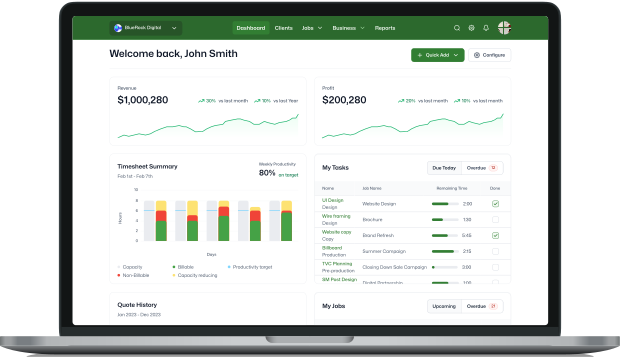
WorkflowMAX is designed to be your ultimate job management ally. Just some of the improvements in the new version include:
A customisable dashboard to highlight your performance: making it easier to see your key business metrics and identify any actions that need to be taken.
A fresh new look for managing your sales pipeline: you’ll never miss winning a new customer again.
Job performance snapshot: that shows projected profit, overall profitability, hours and tasks so you can easily see where each job is at.
Improved user interface: enjoy a modern look and feel, with drag and drop and in-line editing, global search, and bulk actions available across the product.
Advanced reporting: customisable reports give you insights to make more informed decisions.
Read more about what’s new in WorkflowMAX
A product built just for you
Our design and development decisions are based on feedback from more than 3,000 customers and so is our future roadmap. At the heart of WorkflowMAX lies the aspirations of a dedicated team of experts. Our team, brimming with pride and passion, has poured their extensive knowledge and experience into every aspect of this product. We're a group united by a common goal: to bring you a job management solution that you can be proud of, one that you see immense value in, and enjoy using. One that makes a real tangible difference to your business every single day.
Join us on this journey
Whether you're a long-standing customer or completely new to the community, we welcome you to experience the difference WorkflowMAX will make in your professional life.
Thank you for trusting us with your job management needs.
Got questions? Contact us

On 23 March 2023, Xero announced it would retire WorkflowMAX. We’re excited to share that BlueRock has acquired the WorkflowMAX brand and will launch a newly developed solution to market: WorkflowMAX by BlueRock.
We launched WorkflowMAX by BlueRock in early 2024, combining the core features customers know and love with exciting updates and a refreshed, intuitive user experience.
From quoting and scheduling to billing and reporting, WorkflowMAX by BlueRock builds on a strong foundation while introducing enhancements to make job management smarter, faster, and easier.
As a tech-led advisory firm, BlueRock has always looked for ways to improve the lives of SME business owners through technology and innovation. WorkflowMAX has already proven its value across countless industries, and we saw a huge opportunity to evolve it for the future.
As well as this, BlueRock’s Digital team had already been implementing Xero’s WorkflowMAX for more than 8 years, seeing first-hand its value and popularity across industries.
BlueRock’s Founder and Chief Executive Officer, Peter Lalor, said: “We’ve always been passionate about WorkflowMAX and the benefits it brings SME business owners, and believe there is so much potential to build on the great foundations Xero has set with this product. We’re excited to offer a new job management software solution, which we’re aiming to be similar, if not better, in terms of functionality, to meet evolving market and customer demands. As a business, we're focusing more and more on the development of tech and AI products that will support our SME business clients and advisors, and the WorkflowMAX by BlueRock product will be a fantastic addition to our offering.”
As part of the brand acquisition, Xero managed existing WorkflowMAX subscriptions until the product’s retirement on 26 June 2024, BlueRock launched WorkflowMAX by BlueRock as the next-generation solution and Xero and BlueRock entered a revenue share agreement for the new product.
SAME FEATURES YOU KNOW
Customers continue to enjoy the core functions, quoting, job management, scheduling, time tracking, invoicing, and reporting, now with a modernised interface and easier workflows.
EXCITING UPDATES
Since launch, WorkflowMAX by BlueRock has rolled out major product updates in 2024 and 2025, including enhanced reporting, improved navigation, new mobile functionality, and integrations with tools like Airwallex, Google Drive, Dropbox, and SuiteFiles.
IMPROVED CUSTOMER EXPERIENCE
Customer feedback has been at the heart of every update. In 2025, users benefit from fewer clicks, more intuitive workflows, and a stronger mobile experience that keeps teams productive wherever they are.
If you were a Xero WorkflowMAX customer, the retirement of Xero’s product on 26 June 2024 has already taken place, which means the time to transition is now. You won’t be automatically migrated, but BlueRock has created a simple one-click conversion process to make the move as smooth as possible. All you need to do is register through THE WorkflowMAX by BlueRock website and follow the guided steps.
As part of this journey, you still have the opportunity to shape the future of WorkflowMAX by BlueRock. Our community forum is open for feature requests and feedback, giving you a direct voice in how the product evolves to meet your needs.
If you’re an existing WorkflowMAX implementation partner, ecosystem partner, or certified advisor, we know you’ll have questions. We remain fully committed to these important relationships and have dedicated resources available on our website to help you stay connected and informed as we continue to grow the new platform together.
.Our focus is on supporting a seamless transition and ensuring you can keep delivering value to the businesses you work with. And if you’re just beginning to explore job management software for your organisation, now is the perfect time to discover WorkflowMAX by BlueRock and see how it can transform the way you manage your operations.

All the essential features you need will be available. Plus, heaps more to be added in the coming months as we finalise the release details of many feature requests, and even more integrations to make managing jobs that much easier. If there's a feature landing after launch, we recommend you hold off starting your trial until that point so you can test out the new product with confidence. You can take a look at our live release schedule of what is landing when, this is updated in real time.
Enjoy the new customisable dashboard to keep track of all your important job related tasks, business performance and cash flow. Show or hide widgets, rearrange into your preferred layout. The dashboard makes it easier to see your key business metrics and identify any actions that need to be taken.
There’s a beautiful new way to see and manage your sales pipeline with additional filtering and visualisation. You’ll never miss winning a new customer again!

Now you can add custom fields to your quotes and this information will carry through to your jobs. These can now be mandatory. Display a dedicated sales person on your quote and track their won deals and pipeline more easily and surface optional items more simply by using the optional checkbox within the quote information screen.
You can now copy all your job tasks from the previous week's time sheet to this week. We’ve added a drop down field with all staff members so you can easily switch between staff time sheet views - great for managers and approvals.
You’ll love the new job manager screen with the handy job overview dashboard that shows projected profit, overall profitability, hours and tasks so you can easily see where each job is at.
All the tax rates you've set up in Xero will automatically be synced to your WorkflowMAX account. No more limits on the number of tax rates you can have. We’ve added deep linking too, so it’s easier and quicker to view an invoice or PO in the alternate platform.
We’ve extended the search capabilities to return more results so you can find the information you need quickly. No more scrolling through pages and pages. Simply type three characters and you’ll be amazed by what you see.
Now you’ll experience wider availability to drag and drop items in the UI. Reordering and editing tasks/costs/phases and allocating tasks/costs to phases has never been easier.
There’s now more availability to perform bulk actions to speed up your processes e.g. assigning staff to jobs, bulk changes job or quote statuses, bulk delete tasks and costs on a job or quote and more.

5 MIN READ
WORK SMARTER
Most people know efficiency matters. Whether you’re an Auckland-based accountant or a Chicago SEO expert, the less time you waste, the more productive you are. Likewise, the more productive you are, the more opportunities there are to make sales, finish projects and succeed in business.
If that’s the case, why do so many people still waste precious time during the day? Here’s one theory: they don’t know they’re doing it. Even when you want to work efficiently, you could be unintentionally sabotaging your time management.
Here are five things you might be doing that are hampering your productivity in the workplace. Do any of these describe you?
According to at least one organisation professional, the average worker wastes close to two weeks each year looking for misplaced items. Two weeks! That time could be better spent getting work done – at least if everything had a designated place, items were clearly labelled and work followed a predictable process flow.
Take a look around – what does your desk look like now? Pens loosely tossed into drawers, documents and loose paper piled high around you? What about your tech – is your desktop awash with random files and screenshots?
Luckily this is the easiest 'bad habit' to fix when it comes to your personal productivity! A simple system can help sort out the messiest of workstations. All you need to do is remember to put items in one place (and back after using them) and schedule a regular five minute tidy up sessions into your day. Even using a system like WorkflowMAX’s collaboration manager, can help you make sure all job-related files are saved in one place.
A new project always sounds more exciting than the one you’re in the middle of at the moment, with all its complications and bottlenecks.
When a new brief or project comes in, we tend to drop everything to start it, until of course it reaches the same sticky point and we promptly abandon it as well...building a backlog of unfinished projects.
The best way to tackle this is to plan your projects in advance (allowing a bit of wiggle room), set milestones and deadlines, and most importantly get an accountability partner to hold you to them!
Knowing what to prioritise helps you knock out the vital work first, rather than wasting time on smaller projects that can wait.
Whether it's chatty co-workers, Slack messages, phone calls or the lure of TikTok, distractions – either work related or personal – are still distractions.
And they can be a good thing, if they’re managed. For example, allow yourself a few five minute mini breaks throughout the day so you have a chance to reset, and use this time to reply to that Facebook invite or talk to your coworker about her weekend.
There’s no prize for doing everything solo. When you delegate some daily tasks to your team, you spread the workload, reap the benefits of collaboration and help them grow in their own roles. Determine which tasks you can delegate and which you must handle on your own, and simplify your schedule accordingly. With project management software like WorkflowMAX you can assign tasks and effectively plan staff capacity to lighten the delegation burden.
To make meetings useful rather than frustrating, set clear goals. Open with an agenda and finish with action points. When you clarify a meeting’s agenda, you’ll often discover that items can be covered in a short email or Teams message instead.
Everyone is guilty of wasting time without knowing it at one point or another. The key is to check in with yourself regularly and stay vigilant against the sneaky little choices that stifle efficiency. By doing so, you'll make yourself more effective and more productive.

5 MIN READ
Maintaining positive client relationships is a top priority for service businesses and agencies. However, from time to time you’ll encounter challenging client situations that require tactful communications.
So here are four email templates to help you respond professionally.
1. Client has changes after a contract is negotiated
You’ve spent time negotiating a contract, writing out and agreeing on the brief, and you’re just waiting for the client to hit GO. Then they want changes. What do you say?
Dear [Name],
Thanks for sending through the new requirements for [Name of project]. We’re happy to amend the current contract to reflect these changes. Here’s a new outline of the scope:
(LIST REQUIREMENTS)
These changes will need a new contract, which I’ll send to you as soon as I can. The price will also change.
If you think these aren’t the last amendments, please let me know so I can see if we have to adjust the schedule as well.
I’ll be in contact again shortly.
Kind regards
2. When you decide to raise your rates
As your team upskills and your business or agency gains experience and reputation within the industry, you can command a higher rate. But telling a long-term client that your rates are rising can be daunting, so here’s a little template to help:
Dear [Name]
I hope this email finds you well. I’m writing today to let you know that as of [date], we’ll be changing our rates to:
(LIST NEW RATES)
This adjustment reflects our commitment to bringing you top-notch service while helping us keep pace with the rising costs of talent, technology and other essential resources. We understand the importance of budget decisions and want you to know this isn’t a change we’ve undertaken lightly.
We appreciate your continued trust in our company. I’d be more than happy to answer any questions.
Kind regards
3. When you need to decline a project
What happens when you’re already pulling 70 hour weeks and you're having trouble managing the work you already have? Occasionally you’ll need to decline a project, so here’s how you can do it while keeping things friendly and not closing the door on future opportunities.
Dear [Name]
Thanks for contacting us about [name of project]. It looks like a fantastic piece of work.
However, we unfortunately don’t have the capacity to take it on right now. We’d want to give it 100% of course but with our current workload, we wouldn’t meet our high standards.
I anticipate that we’ll have more capacity around [month] if you have any projects you’d like us to look at then.
Kind regards
4. Request a testimonial or case study
Testimonials from current clients who are happy with your work are an excellent way to show others that you’re a credible company. Reading about or seeing the results you’ve helped a client gain, or how easy you were to work with, can help you stand out from the competition.
It’s not always easy to ask someone to praise you but if you’ve done a good job, they should be more than happy to offer a quote or sit down for an interview that can be used for a case study. Quick tip: Ask for the testimonial as soon as you’ve completed the job or when the results roll in. Your client will be more likely to remember the good experience and be on a bit of a high from the success.
Here’s a template to help get the story you want.
Dear [Name]
Thank you for working with us on your [name of project] campaign. We really enjoyed the creative challenges in this particular project!
I’d love to showcase the work and wondered if you could share some of your thoughts about it. We’d use your words to accompany images that we’ll include on our [website/social pages/pitch packs].
It would be great if you could send through a short testimonial paragraph or write a few sentences to answer these questions:
Thanks so much for helping us out. Let me know if you have any questions.
Kind regards

When everything is important, how do you prioritise? Use these five tips for prioritising tasks better:
An uninterrupted fifteen minutes a day can be very helpful. Some time where you can just focus on what needs to be done. Block it in your calendar, tell people not to book over this time, and stick to it religiously - if you're taking it seriously, so will others.
Depending on how precise you want to be, you could organise your to-dos by setting A, B and C priorities. You can find out more in this book: Eat That Frog!: 21 Great Ways to Stop Procrastinating and Get More Done in Less Time. Always start with a high priority ‘A’ task, even if you can only accomplish a small part of it and leave the low-value administrative tasks for later. These are things you could probably accomplish in between meetings, or when your brain is in more of an admin mode.
In WorkflowMAX for example, every job consists of several tasks. You can use the task manager for a complete overview of all the tasks across all jobs that each staff member should currently be working on. At WorkflowMAX, we also use Trello to stay on top of our individual tasks. If you need something simpler, use notes or reminders in your phone or online calendar or try something like TeuxDeux.
Let’s face it, deadlines help us complete things. So set some. Even if your deadline is ‘get X done before lunch’ or ‘have a snack after you complete Y’. Better yet, tell someone. And then hold yourself accountable.
An approach you used last year may not be right this year. Has your workload increased significantly? You may need to add another type of categorisation. Maybe the time of day you set for ‘me time' is now a weekly sales call with the rest of the team. You need that time back so adjust accordingly.
The five tips above are a sure fire way to help you prioritise tasks better and get more done. What methods do you use to prioritise your tasks?

When you’re employing freelancers or other contractors, you need to keep a careful eye on their workload and hours to be sure you’re not blowing your budget.
Get your contractors to fill out the same timesheets as your staff. Keeping an accurate record of their hours with a time tracking software ensures you’re only paying for what’s actually done, and also lets you track the performance of different contractors so you can allocate work to the right people.
With time tracking software like WorkflowMAX that has job scheduling, you can use the calendar, milestones and staff allocation features to make schedule adjustments. You’ll find it’s an easy way to reallocate hours and shift deadlines for high-priority projects.
With so many different people working on different parts of a project (and several projects on the go at once), it can be difficult to know the status of each task as you require it.
Not so if you’re using time-tracking software! Simply log in and you can see the status of every single job. You can narrow down your view to a certain department or job type, and if your software is in the cloud, you can access this data from anywhere in the world.
Do you find projects and milestones regularly run late? If so, it’s a good time to have a look at your project timeframes and schedules. Are you being too ambitious with your schedule? Your time tracking software will tell you how many hours each job task takes. If you see consistent patterns in certain project types or stages, perhaps you need to adjust your schedule to a more realistic timeframe.
5. Track time across different devices
If you have remote workers, team members out on site, or staff working all across the world, you can still maintain consistent time keeping. With a cloud-based time tracking app, your whole team can quickly and accurately enter time, no matter where they are or what they’re doing.
6. Focus on strategic projects
One of the biggest benefits of tracking time is your ability to report on that data. You’ll have access to a goldmine of data on your staff, jobs, suppliers and profits which you can use to help focus your strategic direction and measure the progress of your goals.
7. Compare projects over time
Want to compare features of different projects past and present? Need to see if you’ve improved the speed of a certain type of task? Want to see how the ratio of different project types changes over time? If you’re recording the data, then you can find the answers.
8. Raise your rates
How do you know when it’s time to raise your rates? You could use the data you’ve collected from your time tracking software. That’s right. A look at the time spent on each task, as well as the charge-out rates for your staff, and your overall profit on a job, should quickly give you an indication if you’re pricing accurately. If not, it’s time to crunch the numbers and make some changes!
9. Provide additional value when selling
If you want to sell your business, being able to provide potential buyers with your timesheet records could prove extremely valuable. Records show you’re running a professional operation with a reputation for accuracy, and buyers can see at a glance exactly what kind of output they can expect from the team.
10. Review team performance
When your annual performance reviews approach, it can be great to refer to data. You can pull numbers on individual employees and how they compare to the rest of the team.
This data is also useful for team members to see how their performance stacks up, and it can help you identify strengths to emphasise and weaknesses to work on.
11. Manage the dreaded scope-creep
Scope creep impacts all service businesses in one form or another. Clients think they want one thing, and end up adding a whole bunch of different tasks to the job. Before you know it, you’re tackling a whole different beast to the project that was originally agreed, with a blown-out timeline and hours to match.
When time and budget are being monitored through your time tracking system, you’ll be able to identify and manage scope creep almost before it happens.
12. Identify areas for improvement
When conducting a productivity audit as part of your continuous improvement strategy, you can look for areas and tasks that your team struggles with. This bottleneck might be pointing to a process that needs adjusting.
13. Present a professional face
Clients love to ask questions. What’s the status of my job? Who’s working on this stage? Where in the process are we? Time tracking software lets you answer these questions quickly and accurately.
14. Check if you’re making money
By having visibility over exactly how much time is being spent on different jobs, you can see whether you’re actually turning a profit or not.
Do you need to adjust your pricing? Are you putting too much effort into job types that don’t pay off? The only way you can gain these insights is to track the time and then analyse it
15. Find out if a team member is overextending themselves
A person might put their hand up to take on a variety of projects, but then realise they’ve taken on too much. Or maybe someone’s home life needs more attention at the moment.
An online employee time clock can help with wellbeing and balance because you can easily see who has been assigned to what, and how many tasks each team member is working on. So you should be able to head off overloading problems before they become a serious burden.
16. Accurately report hours for compliance
In some industries, hours worked by your team are required for reporting and compliance reasons. This can be a huge task to compile and send off at the end of each month or quarter.
But not if your team is accurately tracking their time! If you use a cloud-based time tracking software like WorkflowMAX, you’ll be able to quickly run a report to pull out the information you need. Compliance can be done in a matter of minutes.
17. Reward excellence
Many staff – especially those not used to time tracking software – worry that clocking their hours will make them look as though they’re slacking off. In fact, the opposite is usually true. An accurate log of hours worked lets you, as the business owner, see when good work is being done so you can reward it accordingly.
If someone is consistently performing above their targets, it may be time to consider a promotion. Likewise, you can incentivise staff to challenge themselves with friendly time-based competitions or challenges.
Successful time tracking is all about recording data in your business, then using that data to work as productively and profitably as possible. We hope we've given you a few ideas to think about and put into practice.

Team productivity... it’s what everyone wants and needs for small business success. But inspiring team productivity can be difficult. Your employees are from different walks of life – with a huge variation in personalities, working styles and strengths.
How do you successfully motivate and inspire a diverse group? Here are 31 unique ways to increase team productivity, while still empowering them as individuals.
1. Hold a team building day. Team building exercises build a culture of trust and support, which is essential for productivity. These team outing ideas are a great place to start.
2 - Host a hackathon.
A ‘hackathon’ is a day where people from different areas of your company join to collaborate on a project from scratch, usually completing it in 24-72 hours. It’s team building, skill sharing, and incredibly fun.
3. Have a family day. It’s important that your workplace is inclusive for loved ones. Try to have a family day at your business at least once a year. This helps to solidify team bonds, boost motivation, and strengthen employee loyalty to the company.
4. Creative brainstorming sessions. Starting a big project from scratch? Get your team moving with an innovative brainstorming session. These unusual meetings help to stimulate creativity while unifying your team.
5. Start an exercise challenge.
An exercise challenge is great for team bonding. Hold a regular lunch-time walking competition, cycling group or morning squat challenge. It’s been proven that exercise boosts productivity - and you’re less likely to suffer the afternoon slump.
6 . Use agile methodology. Agile is the name of a project management strategy that was invented by software developers in the 2000s, but many different industries can use the agile methodology to their advantage.
7. Hold daily stand-ups. A 5-10 minute team chat in the morning is a great chance to update each other, address any challenges and get the ball moving. Keep the time limit strictly under 10 minutes. This can replace the need for long meetings later in the day.
8. Create awesome meeting agendas. When long meetings are necessary, stick to a clear and concise agenda.
9. Keep your workflow visible. One of the best ways to increase productivity is with a visible workflow board. Everyone can see what team members are working on and the status of projects. Try an online system like Trello or use WorkflowMAX for job, task and staff management.
10. Have a reward system. Your team should have clear targets, along with incentives for reaching them. Fun social events like team dinners, a day trip or sports matches give them something to strive towards.
11. Delegate by interests. Try to assign tasks to team members based not only on their strengths, but also their passions. You’ll see an immediate increase in productivity if they’re interested in the project, or when it aligns with their personal career goals.
12. Start a mentorship program.
Have a sign up form so staff can express their interest in learning particular skills. Then arrange for them to buddy up with a work mentor. When team members upskill, your whole company benefits.
13. Offer internal training. Your staff will be happier and more productive if they’re constantly learning new skills. This is especially true if they get to choose their development path. If they express the desire to study part-time at university, consider offering a flexible working scheme.
Add some spark to your space…
14. Create the perfect workspace, whether that space is at the office or at home. Take some time to reassess your surroundings. Natural light, ergonomic chairs, plants, temperature – they’re all important for employee happiness and efficiency.
15. Encourage clean eating. A healthy team is a productive team! Sign up for a weekly fruit box, or supply a nutritious staff breakfast once a week. Some cafes also offer corporate membership deals – pick one with healthy, diverse food options.
16. Invest in a water cooler. Water has been proven to increase productivity, so do everything you can to make sure it’s consumed. A water cooler or filtration system will encourage staff to stay hydrated in the office at all times.
17. Build fun communal spaces. Stuffy, formal meeting rooms don’t do much to inspire productivity. Create colourful break-out areas with bean bags, couches and interesting decor.
18. Limit distractions. Open plan offices are great in some ways, but they can make it difficult to focus. Create a ‘quiet zone’ for anyone who needs privacy to work on a solo task. If this isn’t possible, consider implementing a ‘no interruptions’ time of day, e.g. 2pm-4pm.
19. Implement time tracking.
Employee time tracking is one of the most powerful methods of measuring productivity. It can show you where business profits are being made and lost, and which projects are problematic.
20. Keep individual time logs. Encourage your team to track their own time as well. This can help each team member identify their personal productivity hurdles. Armed with these insights you can develop better habits together.
21. Try a team pomodoro timer. Your brain can only focus for a certain period of time. Using Teamodoro on a big screen encourages your team to work in synchronised blocks, with short breaks in between. It’s not for everyone – but some work groups swear by it.
22. Have a peer review system. Create a formal channel so your team members can increase their productivity and performance together, through a constructive feedback process.
Understand each other...
23. Celebrate workplace diversity. Hold events to celebrate different nationalities and cultures in the workplace, including diversity training days. This will help your team members to understand, enjoy and respect each other’s differences.
24. Share your DiSC profiles.
A team DiSC assessment is a great way of identifying the individual personalities within your team, and how you work best together.
25. Respect individual habits. Some team members work best at their desk, others increase productivity by being active and moving locations. Some like music while others prefer silence. Do your best to accommodate and respect individual preferences. Productivity is never one-size-fits-all.
26. Eliminate excess tasks. Is your team bogged down with unnecessary meetings, small non-urgent tasks or office maintenance? Try to ‘trim the fat’, so your team can focus on big projects without distractions.
27. Set a powerful example. A team is only as good as its leader. If that’s you, make sure your own personal productivity is at its peak. You can’t expect the team to move mountains if they don’t have a strong role model.
28. Have an open door policy. Nothing hurts productivity more than confusion or a lack of direction. If you’re leading a team, keep an open door so they can approach you with any challenges and reach a quick resolution.
29. Minimise chatter. Is your entire Tuesday morning spent gossiping about the latest Love Island? Workplace friendships are beautiful, but they can be distracting for co-workers. Try to create ‘social spaces’ in the office that are separate from your quiet, working hubs.
30. Embrace the latest tools. Don’t be afraid of the learning curve – those who are scared of technology get left behind. Online productivity tools can have a huge impact on your team’s overall efficiency.
31. Set realistic goals. One of the best ways to increase productivity is by setting realistic goals. Your team should always have specific targets to strive for. They should also understand how these goals help your overall business objectives – helping to foster a sense of unity and purpose.

As Xero's WorkflowMAX approaches its retirement in June 2024, it's important to start planning for a smooth transition to a new job management software that aligns with your business needs. However, researching and evaluating software solutions can be overwhelming. This guide aims to assist you in scoping and evaluating potential job management software solutions, so you to make an informed decision.
Understanding the importance of software scoping and evaluation is key before embarking on the research and evaluation process. It helps identify cost-effective, easy-to-implement solutions that offer a great user experience. It also helps prevent costly mistakes and helps ensure your chosen system remains relevant in the long term.
Scoping a software solution involves assessing, among other things, the features, capabilities, cost, implementation timeline, and user experience to determine the best fit. Start by identifying your organisation's needs and objectives, then create a list of required features. It's a good idea to highlight things which are must haves and things which are nice to have. This narrows down the potential solutions and facilitates the evaluation process.
When scoping a software solution, it's crucial to thoroughly consider the features and capabilities offered by each option to help ensure it aligns with your organisation's needs. When evaluating software, you may want to look for:
Once you have a shortlist of potential software solutions, it's time to evaluate them. Here are some tips to help you in the evaluation process:
When evaluating software solutions, ask the right questions to gather essential information. These questions could include:
Here are some potential pitfalls to avoid:
After evaluating the software solutions, create a comprehensive report that includes an overview of the solutions, your evaluation criteria, and conclusions. The report should provide a clear comparison of the evaluated software solutions.
WorkflowMAX has a global community of very passionate software implementation partners who can help you navigate this transition. If you have more complex business requirements, or simply no time to focus, reach out to a partner for support. Many partners have developed one-off WorkflowMAX transition packages that include needs analysis, discovery, scoping and evaluation to help you choose the right solution for your business. Visit our Partner page to find a partner.
Scoping and evaluating software solutions may seem challenging, but by following these steps, you can navigate the process with confidence.




