





Product
Featured




Maybe you've just finished school and you're ready to brave the real world. Maybe you're tired of working for other companies, or maybe you just have an entrepreneurial streak. Whatever the reason, you're thinking it's time you hung out your shingle and started your own architecture firm.
But beforeyou start handing out business cards, you'll need to get your new firm properly established. In this article, we'll look at everything you need to get your architecture firm off the ground and give it the best possible head start.
Here's our guide for starting your own Architecture Firm:
Before you embark on any business decision – and starting your own firm is a HUGE business decision – you need to ensure you have goals in mind for the future. Your goals set the direction and focus of your business. They allow you to align your business with what you want for your life in years to come.
Goals for your architecture firm should always beSMART, and they might relate to the size of the firm, the revenue, the type of work you want to do, or where you want the firm to be in a certain period of time. Think about 3-5 goals for your business. They might include:
You need three things to start your own architecture firm:
Businesses need money to survive, and businesses in the startup phase need more money. You need money to rent office space, buy equipment, obtain licenses, build your website, hire a photographer, pay contractors, and keep the business and you running while you wait for client work to become steady.
The amount of money needed will vary depending on the resources you have available and the type of architecture firm you're starting. Are you working solo, or are you paying staff? Do you need an office, or can you work from home?
Before you begin to think about where the money will come from, sit down and draw up a preliminary budget. Work out what you need to get the business up and running, and the minimum you need to pay your bills for the first year. Knowing how much money you need is the first step to financing your new architecture firm.
Next, you need to explore avenues to obtain that money. You might:
All these options have positive and negative aspects, and you may use more than one form of finance to get your firm started. For example, you might loan half the money you need from your parents, and then take out a bank loan for the remainder. Whatever you choose, it's important for you to research all your options, and to talk to a chartered accountant or business advisor before taking the plunge.
Many up-and-coming architects choose to bootstrap their first firm. Holding your business up by the bootstraps means that, for a few years at least, you use your own money to fund the business – without any external support from investors, grants or finance.
Bootstrapping is hard work, but is one of the best ways to get ahead, as you won't have any loans to pay back or external shareholders to answer to. You have the knowledge that everything you purchase for your business has come from you alone.
There are many mistakes to be made on the path to success as an architect. But what if you could skip a few of those mistakes? What if you could learn from someone who has started where you are today and built a busy, successful firm?
When starting an architecture firm, you should find a successful architect to mentor you. He or she will be able to offer invaluable advice on what works and what doesn't.
How do you find a mentor?
From the onset, it is important that you chose the right company structure for your architecture firm, and chat to a lawyer and accountants about setting up your. It's much easier to get these things right from the beginning then to fix them later.
Liability is a huge issue in the architecture world. Talk to a commercial lawyer and insurer and ensure you are properly covered for all eventualities. Don't trust to chance when it comes to company structure and licensing.
Your brand is what you will be recognised for. It's like the suit you wear to a job interview – it presents an image to clients and colleagues of what your company is about. One of the first things you need to do when establishing a new architecture firm is to start thinking about your branding.
Unless you have experience as a graphic designer or brand specialist, it's best to hire a firm to take care of this for you. Talk to your friends and colleagues – has anyone used a branding agency before?
Your company branding will encompass:
I could write a whole article just on the importance and structure of contracts. Bob Borson, the writer behind the fantasticLife of an Architectblog, calls your contract "the most important document that you'll never use … hopefully." And he's right – a contract (if properly prepared by a professional) protects both client and architect in event of something going wrong. The contract sets out expectations about the job from the onset and establishes a payment schedule and due dates for services.
Where once a handshake might have sufficed as a contract, now it's vital for the survival of any business to have solid, legally-binding contracts in place before any work commences. The contract between architect and client might consist of a number of documents, including:
TheAmerican Institute of Architectsoffers a range of generic legal documents for the architecture profession. These documents can serve as an excellent jumping-off-point for a cash-strapped agency. In the US, these documents are now considered the industry standard, and other professional institutions across the world have followed their example and created documents of their own. Check with your local professional architectural board to see what is available to assist you.
You'll need someplace to work. A physical space where you can set up your table, computer and drawing tools, as well as some comfy chairs and a coffee machine for client meetings.
The space you choose will depend on the size of your firm (if it's just you, versus if you've hired ten staff), your particular aesthetic tastes, and location and proximity to the amenities you need.
Working from home is an option for many bootstrapping architects just starting out. There are numerous advantages, including lower overhead, comfortable and personal space, and no commute to work. Some architects work from home while raising kids and, while it's not easy, that can be very rewarding.
However, most homes are not set up to accommodate an architect's studio. You need the right space and light for your setup, and you need to be aware that you'll also be meeting clients at your home. Many families won't be comfortable with this and if you can't keep your home tidy, or the décor or design is a bit dated, then it won't make the best impression on your clients.
Some architects solve this issue by working from home and hiring co-working or meeting spaces in a city when they need to see clients. This can be a great option until a firm has built up the cash flow to rent a permanent office space.
If neither of these options work for you, you'll need to find a studio to rent. When choosing a studio, look for the following factors:
Just like a builder has a toolbox and a juggler has his balls, a good architect has a suite of tools and equipment that help him or her do the best work. Here are some of the essential items you'll need to get your office set up:
As an architect, you'll need to keep track of multiple aspects of each job – and this can be very difficult if you have more than one client at a time, or if you work with a range of subcontractors or employees. Managing workflow is one of the key components of a successful architecture firm – if you know exactly how long each job is taking, what stage it's at, who is working on it and what you earned from it, you'll be able to assess on a regular basis what is working and what isn't.
WorkflowMAX offersworkflow management softwarebased in the cloud, designed with the needs of architects and other designers in mind.
All too often, I hear stories from young architects who start their own firms, and then get so bogged down in running the business that they don't get to do what they actually enjoy – designing buildings. This is the risk all business owners face – if you don't enjoy the strategy, networking, administration and other duties of running a business, you need to either outsource those duties to someone else or go back to being an employee.
Achieving balance in vital for a successful firm, and a fulfilling business. Unfortunately, it's something that is different for every person, so it's not something you can learn from watching others. You need to experiment with different ways of doing things until you find a business model and a balance that works for you.
If you want to start building a reputation and gaining clients, then once you've set up shop the first thing you should do is start networking and getting your name out there. One of the ways you can do this is by joining local business networking groups and events, and start meeting with and getting to know other local businesses. A good place is start is your local Chamber of Commerce branch, or formal networking groups such as BNI or Venus.
You can also start looking at online networking. Open a twitter account, set up a LinkedIn profile, and start looking for places online where potential clients might be hanging out. For example, if you specialise in passive design, hang out on forums where people are talking about sustainable design.
As a new firm, you're going to want to get your name out amongst the design community, and one of the best ways to do this is by entering – and winning – design awards. Often, the – many architects don't believe they have a chance, so they don't enter, and you'll be competing against a small pool of candidates. Winning or placing in design competitions will get you a bit of publicity and a body of work you can show clients – even if your projects never get built, they show the world what you can do.
Starting an architecture firm is not something that can be done in a weekend. It takes time, money and determination to pull together all of the required elements into a cohesive whole. Not only are you thinking about the practical side of doing business – ensuring you have all the tools you need to get the work done – but you have to start thinking of high-level strategy: what will your brand be? How are you going to attract clients? How do you want your company to grow? But once you start, you'll find yourself on one of the craziest, but most rewarding, roller coaster ride of your career.
Have you started your own architecture firm? What advice can you give to those architects just starting out?

What’s the best thing about architecture blogs? You barely have to do any reading. Filled with images that transcend words, there is so much visual inspiration to be found on the web without having to do much searching yourself.
There is a strong selection of well-known architecture and design blogs, but if you dig a little deeper you can come across some less publicised blogs too which also curate a depth of architectural ingenuity and design innovation.
From the awe-inspiring to the enviable, get lost in the creative constructions featured on these 25 awesome architectural blogs:
Started by Romanian Micle-Mihai Cristian in 2007, Freshome is now “the go-to destination for anyone who is passionate about design, architecture, luxury, travel, lifestyle and creativity in the home”.
Perfect for architects, designers and DIYers alike, this blog provides resources and tips, as well as inspiration for creating organised and healthy living spaces without the need for a big budget.
Snaps of beautiful living spaces provide inspiration fodder, and it is very hard not to laugh at the witty, dead-pan photo captions.
We all dream of a hidden retreat, our own little refuge away from a busy world. Cabin Porn collates a collection of inspirational quiet places for you to covet.
A curation-of-cool from a young Archiphile living in Hong Kong for anyone else who has a strong affinity for beautiful spaces and places.
Talkitect is a site dedicated to the discussion of contemporary architecture, art and design. It presents articles and videos with commentary around new designs, research and issues in the design world.
A compilation of all things related to outstanding modern residential architecture from a UK-based estate agency. Take some design inspiration, or swoon at the extravagant designs.
Busyboo celebrates the simplicity of modern homes. An interesting page is the Japanese architecture collection, focusing on deceptively diminutive buildings that are forced to employ clever thinking to make the most of compact sites.
An awesome selection of concrete projects, including architecture, where concrete plays an important role in the design and interiors.
Contemporist celebrates cool contemporary culture, focusing on architecture and design from around the world.
Touted as the world’s most visited architecture website, it pretty much features everything you could want to know when it comes to the latest trends, materials, news and software.
Coffee with and Architect is the musings of architect, Jody Brown, who provides an entertaining and insightful commentary of life as an architect which fellow designers will no doubt relate to.
If the name hasn’t already given it away, this is a site dedicated to resources for all budding business owners to help them become financially successful architects.
Your go-to site for anything cool, creative and incredible. Design Milk’s architecture page offers up a curation of clever contemporary building design.
A visual collection of user-submitted ideas featuring modern architecture and design materials and products. Don’t be surprised if you lose track of time while you’re exploring.
Aims to bring together the thoughts, ideas and opinions of architects from all around the world and is “a top online destination for progressive design oriented students, architects, educators and fans”.
Stair Porn showcases nothing but cool stairs from buildings all around the world. Who knew staircases could be such works of art?
A helpful site for designers when it comes to architecture graphics and rendering using Photoshop and Sketchup. It includes Alex’s own portfolio of images as well as a series of tutorials.
An examination of contemporary creativity through architecture, products and interior design. Features a collection of awesome architectural examples as well as some news and opinion pieces worth taking a look at.
Bob Borson, a Texas-based architect, provides weekly posts about the ins and outs of the daily life of a practicing architect, covering a whole range of topics.
World of Architecture pulls together architectural, interior and engineering projects from around the globe. Explore residential properties, celebrity homes, resorts and more.
A dark and eerie look at bleak buildings that are in a state of disrepair. Perhaps not the most inspirational of sites, but the Dutch curator obviously sees beauty in their desolation - have a look and see what you think.
I couldn’t put together a list of top architecture blogs without mentioning Dezeen. Arguably one of the most popular architecture, design and technology websites, it is regularly updated with photos and articles from around the globe.
The Cool Hunter finds all things, well, cool, and puts them in once place to make it easy for you. This includes some pretty awesome architectural discoveries for some inspiration when creativity feels like it’s lacking.
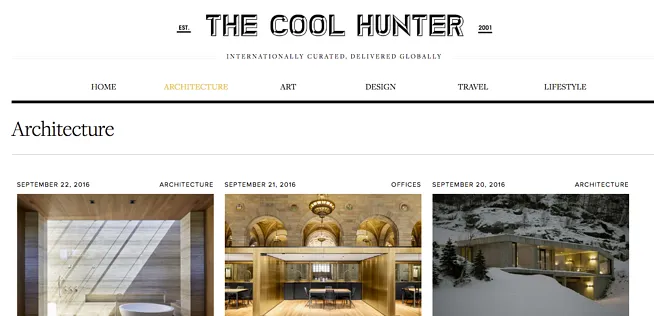
Keeping things simple, Pretty Architecture is an eclectic collection of architectural images covering a range of styles and locations.
What architecture blogs do you keep an eye on? Can you recommend any more that aren’t on this list? Or do you have your own to share?
It’s easy - no credit cards, no contracts. Start today.
As architects, trends play an important role in design work. While clients coming to you usually want a design that is unique, they will no doubt be influenced by the features they see in magazines and in their friend’s homes, as well as their own needs and desires (that change with the times).
2000 years ago, pyramids were all the rage. In the 60s there was a lot of natural material, whereas by the 80s more synthetic “space age” materials were used. When the television became a common household feature, the design of living spaces shifted to make the box the focal point of the room (instead of a fireplace or other feature).
And now, our modern lives impact the design of our homes, and this has created some unique trends in architecture and design. How many of these trends have you spotted in your recentarchitectural projects?
Open-plan spaces are all about connectivity and interaction. To me, this is an exciting trend, as it shows a desire of people to be more connected to their family and friends. The main rooms in the home become communal activity areas, with many different things going on all at once. They can make a home seem much more friendly and welcoming.
People are returning to the idea of entertaining at home, and more families are coming together for activities like board games and movie nights. Busy parents want to be able to keep tabs on the kids while they prepare dinner and do the other chores.
As real estate prices in many cities are rising much faster than wages, more and more young families are finding themselves unable to afford to live and save for a first home. Likewise, retirees are also finding it difficult to get into the housing ladder.
This gives rise to the multi-generational home: where more than one generation live under the same roof for an extended period of time. Also, friends might share a house in order to afford real estate in a desirable area.
Sharing a home with other adults can help you save money for a deposit, manage monthly expenses, and stay in a desirable area when house prices fluctuate. Having two master suites gives both adult families private space while enabling them to share resources under the same roof.
Completely bespoke design is becoming rare in residential architecture. It seems people who are building a new home want something architecturally interesting, but they prefer to rely on a “tried-and-tested” plan they can choose from a book. Often, these plans can be tweaked and altered to suit the client’s unique needs.
Housing developments and off-the-shelf plans simplify the process and often offer a streamlined approval process for local council, meaning the client gets a home quicker and cheaper. As an architect, this means you might find yourself designing these types of homes more and more, while your bespoke designs will be for increasingly high-end clients.
When it comes to creating a beautiful bathroom, it used to be all about the choice of tile. But now, the bath is becoming the focal point of the bathroom space. I think people are designing their bathrooms to be quiet, relaxing spaces, a haven from the hustle-bustle of daily life. And the bath is a huge part of that.
Baths are becoming more sculptural in form, so they look more like art installations than tubs for bathing. My personal favourites are square stone tubs that look hewn from the earth itself like some kind of ancient lustral basin.
Gone are the days of the home office tucked away in a forgotten bedroom. Now, with more people than ever working from home and areas for work and play are blurred together, people are just as likely to sort their emails from their laptop on the couch or from their phone in the bathroom.
With an increasing array of devices and media hubs, a static office doesn’t work any more. Now, people are designing charging stations throughout the home - areas where devices can be stored, charged and used.
We all know the home of the future is self-sufficient - either a self-contained unit able to generate it’s own power, or part of a community that shares resources at a local level. Many people are looking to the future and installing technology to create sustainable environments within their homes. Sustainability has been a growing trend for the last ten years, and it shows no signs of going away.
Don’t be surprised if you’re increasingly required to work on passive design, add in infrastructure for solar arrays, and make adjustments for increasingly sophisticated eco-technology (such as the new Tesla batteries).
Let me say right now that I hate the term ‘man cave’. Why does it have to be a space delineated by gender? Maybe I, as a woman, are just as keen to hang out in a star-trek themed movie room?
However, love the term or not, man caves are more popular than ever. Many clients use these rooms to let their creativity run free, as they are often a space to be enjoyed by family and close friends. As spaces for clients to indulge in their chosen hobbies, man caves often include architectural challenges, such as an extra wide roofspan to accommodate boats or planes, or - as in the case in my own home - a soundproofed music studio.
Whether they be the classic “library” room with a fireplace and hardwood shelves stacked high with books (which is what I’m building in my own home), or a room for yoga / meditation, people are craving a space in their home that isn’t filled with enormous televisions or clutter.
Quiet spaces can often be inserted into tricky corners as a way to “fill out” unoccupied space in a complex plan. They may include complex architectural elements like enormous skylights, internal courtyards and indoor gardens.
“A place for everything, and everything in its place.” Never has this phrase been more true than now, and it has become especially important as the average family burdens themselves with increasing amounts of stuff. From camping equipment to bicycle repairs, from toys to board games, from designer clothing to model train sets, the modern home has a custom-designed inbuilt storage solution for everything.
In particular, the kitchen has become a space for entertaining, so clutter has been moved from the cupboards and benchtops into a separate pantry space - often including prep-stations, sinks, and even a second oven.
Always losing your front door key? No worries,now all you need is your thumbprintto operate your entire security system. How James Bond is that? Worried about germs in your bathroom? You can installself-sterilising door handles. My father - a builder - recently completed a house where thekitchen cupboards were all programmed. So if you want to make pancakes, you hit “31” on the keypad (the preprogrammed number for pancakes), and the drawers containing the pan, bowl, whisk, and pancake ingredients would open.
There’s no limit to the amount of uber-tech that can be installed in a home these days. As an architect, expect to receive increasing requests for new and fascinating technology to be built into home design.
And there you have it - 10 trends that are marking the future of residential architectural design. Of course, as an architect, you don’t have to blindly follow the trends, and you may find that local trends supercede these, but it does help to be aware of them, as trends reflect the desires of the market over time. What trends have you noticed in your own residential design clients?

Don’t you just love invoicing?
As an architect, you’re writing invoices all the time, for huge amounts of money. You’ve probably had enough late-paying clients or miscalculated fees to understand how important it is to stay on top of invoicing and make sure you haven’t missed off a zero, or moved a decimal point in the total.
Does your invoicing system need an overhaul? Could you be doing something better to help steer clients toward paying on time? Anything that gets money in your pocket faster is definitely a good thing, so let’s take a look at 7 tips for streamlining your invoicing process.
Because of the nature of an architect’s business, you will need a relatively sophisticated invoicing system. Invoicing can be a very time-consuming process, especially when you’re including elements like printing, sub-contractors and other sundries. You might also be performing multiple jobs for one client and wanting to include them all on one invoice.
Are you writing or typing out each invoice by hand, and breaking out a calculator to add up the total? Have you ever made a mistake? Or are you using an invoicing software tool but find it doesn’t do everything you’d like it to do, such as include multiple jobs on one invoice or allow you to bill according to the quoted time or the actual time?
The biggest improvement you could possibly make to your invoicing process would be to move to an automated cloud-based invoice system. The cloud isn’t as scary as you think it is!
For the client, an architect’s invoice can be very difficult to decipher, especially if you’re being hired in an on-going capacity to oversee the construction. Adding a quick description of exactly what you did for each item on the invoice can help ease the confusion. It also has the bonus of making it look like you’ve done a LOT of work for your fee (For example, listing research time and liaising with subcontractors.)
Have you ever received an invoice that’s been handwritten by someone who looks as though they learned penmanship from an ancient Egyptian scribe? Or have you ever received an invoice that was so “over-designed” that all the text was crammed into a corner to create more “white space” or worse, that you had to break out a code cracker or hold it up to a mirror to read it?
OK, OK, so your invoice probably isn’t that bad. But the easier your invoice is to read and comprehend, the higher the chances your client will pay on time.
What do I mean by “keep it clean and simple?” I mean make sure your type is bold and easy to read – try to use at least a 12pt font for easy readability. Don’t use all caps – it’s more difficult for people to read and understand.
Here’s a tip: More often than not, the person who receives the invoice isn’t actually the person who pays it. Often, especially in larger companies, an invoice is printed and photocopied several times before it actually makes it to the accounts department. If this is the kind of client you work for, then keep vital information on your invoice away from the margins of the paper – as the page is photocopied text near the margins is often cut off.
With in-progress invoices, you can send an invoice for different stages of a project.
To help both you and the client manage cashflow, it can be useful to bill large jobs as progress payments. This usually means taking a deposit at the beginning of a job, then asking for monthly or bi-monthly payments up until the end of the job of the balance of the invoice is owed. WorkflowMAX enables you to quickly and easily arrange multiple billing operations.
The easier you make it for the client to pay your invoice, the higher the probability that you’ll be paid promptly and correctly. This means including accurate payment information (such as a correct and legible bank account number for direct deposit, a button that automatically links to a payment gateway for credit card (if required) and an accurate address for mailing cheques.
It’s also important for both yours and the client’s protection that you include accurate payment terms and conditions. This includes the date the invoice needs to be paid by, how the invoice should be paid, and what will happen if the invoice is late. Many architects have a late payment penalty which they can invoke. Talk to a lawyer about writing a payment policy and ensure this is written clearly on your invoice.
It should go without saying, but you’d be surprised how often business owners – especially architects – leave off vital information on their invoices. So what do you need to have on an invoice?
The advantage, of course, of using invoicing software, is that all these fields are automatically populated.
No one really likes paying invoices, even if you’re happy with the job rendered. Even though an invoice is a business document, that doesn’t mean you can’t use it to show your client that you’re grateful for their business. A simple “thank you!” on the bottom of their invoice will help you instantly come across as friendly.
You want your invoices to look and feel as clean and professional so possible, but getting that process right can take a bit of experimentation, especially if you’re just starting out in business. This guide should help you avoid some of the more common mistakes architects make while delivering their invoices.
WorkflowMAX offers a complete cloud invoicing solution for architect firms – whether you’ve got one staff member or more than fifty. Our clients love the fact the fact that they can track time against a job and calculate invoices based on this or the quoted time if preferred.
Alastair Wilson of TOAST design in Takapuna says, “Talk about time saving. Instead of jobs mounting up on your desk, you deal with them as you go. On completion of the job we can simply finalise and print out an invoice. The days of long laborious invoicing are gone."
TL;DR: Manual admin slows small architecture firms down. Disconnected systems, repeated data entry, and scattered documents drain time and increase risk. WorkflowMAX anchors your entire process by uniting quoting, invoicing, and financial tracking. Our integration with Xero acts as the final link in the chain, ensuring your project data flows directly into your accounting without you ever having to touch a keyboard. Time dashboards, document management, and customisation reduce admin burden so teams can focus on delivering quality work and growing their business.
Small architecture firms often find themselves caught in a tangled web of disconnected tools, where managing financial and administrative tasks becomes a constant source of inefficiency. This fragmentation is further compounded by the burden of manual data entry, a hurdle that not only drains valuable time but significantly increases the risk of costly errors.
Addressing these operational gaps is crucial for firms looking to stay competitive amidst increasing client demands. By centralising tasks and automating workflows, you can effectively remove the administrative 'noise', allowing your team to shift their focus back to what truly matters: delivering exceptional architectural projects.
WorkflowMAX offers solutions to these challenges. Our comprehensive job management features integrate quoting, invoicing, and billing, providing real-time insights and improving decision-making. The Xero integration further simplifies financial tracking, reducing administrative load.
Embracing technology that connects several processes not only boosts productivity but also strengthens client relationships. With the right tools, small architecture firms can maintain their competitive edge and consistently deliver outstanding projects.
Integrating technology in small architecture firms brings big benefits. Enhanced financial management, fewer errors, and better workflow efficiency are just the start.
Cloud-based tools offer real-time data access and scalability. This means teams can work on projects from anywhere, ensuring updates happen instantly. Automation handles repetitive tasks, saving both time and money.
By adopting these technologies, architecture firms can achieve better project outcomes. Improved efficiency leads to increased profitability and higher client satisfaction.
With WorkflowMAX, firms enjoy different integrations with essential financial tools, like Xero, helping reduce the need for manual data entry. This integration provides accurate financial tracking, helping firms make informed decisions quickly.
Centralised document management ensures all project files are easily accessible. This fosters collaboration among team members and keeps everyone aligned.
Real-time performance dashboards provide valuable insights into key business metrics. Firms can monitor progress and adjust resources as needed, enhancing overall efficiency.
Embracing these tools not only streamlines operations but also supports scalable growth. Architecture firms can focus more on their core activities, delivering exceptional projects while building lasting relationships with clients.
Project and job management software improves operations for architecture firms. It centralizes tasks, making it easier to manage projects, reduce errors, and boost efficiency. Our solution offers customisable features for job management, integrating quoting, invoicing, and reporting, all in one place.
Real-time updates and centralised document access keep your projects moving, ensuring timelines stay on track and quality never slips. By moving your files into a single, organised environment, you replace the hunt for information with easy collaboration.
This connectivity extends to your finances through our direct Xero integration. By syncing invoicing and payroll, WorkflowMAX strips away the friction of manual data entry, providing real-time dashboards that turn complex financial data into actionable insights. Ultimately, you spend less time on paperwork and more time on high-value design. By letting the systems handle the admin, you can focus on building client relationships and scaling your firm with confidence.
Integrating technology into an architecture firm's workflow can transform how tasks are managed, leading to significant efficiency gains. Building a connected application stack is key. Use tools like WorkflowMAX to centralise job management, from quoting to invoicing. This integration reduces manual entry and errors, providing real-time insights for better decision-making.
Creating standard operating procedures (SOPs) is essential. SOPs ensure that everyone follows the same processes, which streamlines operations and minimises misunderstandings. Document these procedures clearly and make them accessible to all team members.
Training staff effectively is crucial. Equip your team with the knowledge to use new tools efficiently. Regular training sessions and support can help staff adapt quickly, ensuring the technology is used to its full potential.
Gradual implementation of technology helps in minimising disruptions. Start with one area, like invoicing, and expand as the team becomes comfortable. This approach enables adjustments and feedback, ensuring the technology aligns with the firm's objectives.
Regular monitoring is also vital. Keep track of how the tools are performing and make necessary tweaks. This ongoing assessment ensures that the technology continues to enhance efficiency and supports the firm's growth objectives.
Reducing manual admin transforms a practice from 'getting by' to truly thriving. By centralising workflows and automating the repetitive 'busy work', firms can track budgets with total precision while freeing up the team to focus on high-level design. This shift doesn’t just cut operational costs; it builds a scalable foundation that allows you to exceed client expectations and grow your firm without ever compromising on quality. This is exactly what WorkflowMAX provides.
TL;DR: Clear roles and responsibilities are crucial for the success of architecture projects. From principal architects to project managers and sustainability consultants, every role plays a key part in delivering high-quality outcomes. WorkflowMAX helps firms streamline job management, allocate resources effectively, and enhance collaboration through real-time dashboards and integrated tools. As the industry evolves with digital technologies and sustainability demands, having well-defined responsibilities supported by efficient systems is vital for long-term success.
Managing roles in architecture firms is crucial. Clearly defined roles lead to efficient project management, adherence to regulations, and client satisfaction. With technology and globalisation changing how teams collaborate, clear communication and structured workflows are more critical than ever.
Modern tools, like WorkflowMAX, simplify defining and managing roles, aligning them with organisational goals and industry standards. By using these tools, firms can manage complex projects more effectively, ensuring that everyone is aware of their responsibilities.
Integrating the right technology provides the structural integrity needed to keep complex projects on track while optimising creative output. By embracing structured processes, your team can focus on their strengths to deliver high-quality outcomes for every client.
Principal Architects set the vision for architecture firms. They manage client relationships and make major design decisions. Their leadership ensures projects align with the firm's goals:
WorkflowMAX streamlines these roles by providing tools for quoting, invoicing, and job management. It helps architecture firms manage complex projects with ease, aligning roles and responsibilities for success.
Technology is transforming architecture management by enhancing precision, efficiency, and communication. Tools like Building Information Modelling (BIM) enable architects to create detailed models, enhancing design accuracy and client presentations. These models help visualise projects in three dimensions, ensuring every aspect aligns with the client's vision and structural requirements.
Collaboration platforms are key for real-time communication. They allow team members to share updates instantly, regardless of location, fostering a seamless workflow. This connectivity ensures everyone is on the same page, reducing miscommunication and enhancing productivity.
Project management software streamlines task delegation and scheduling. By automating administrative processes, these tools ensure that resources are allocated effectively and timelines are adhered to. WorkflowMAX offers features for job management, including quotes, scheduling, and time tracking, centralising tasks to improve workflow efficiency. Architecture firms can streamline financial workflows by solving disconnected quoting, invoicing, and billing across RIBA 0–7.
Sustainability analysis tools contribute to environmentally friendly designs. They help evaluate the environmental impact of building materials and practices, promoting sustainable architecture. This integration of digital methodologies not only optimises project outcomes but also aligns with modern ecological standards.
begin with a proactive approach to identification and mitigation. By developing detailed project plans from the outset, firms can pinpoint potential hurdles early, allowing for strategic measures rather than reactive fixes. This stability is guaranteed through clear, open dialogue; consistent communication ensures that every stakeholder remains aligned and responsive to the evolving challenges of a project.
Maintaining high standards is equally critical to reducing long-term liability. By implementing rigorous quality control and review processes, firms can uphold industry standards and ensure strict compliance with all relevant regulations, effectively eliminating costly errors before they occur.
WorkflowMAX further empowers this process by centralising job management and scheduling within a single, high-visibility platform. Our real-time performance dashboards provide the insights needed to monitor stability and track project health with precision.
When paired with essential insurance coverage and a commitment to staying updated on emerging industry trends, these tools provide a robust layer of financial and operational protection. Ultimately, by mastering these elements, architecture firms can ensure long-term client satisfaction while maintaining total control throughout the project lifecycle.
Emerging trends are reshaping how architecture firms manage roles and responsibilities. Certifications are becoming increasingly important, reflecting a demand for verified skills and knowledge. As the industry evolves, professionals must stay current with new standards and competencies required for licensure.
Advanced technologies, such as AI and IoT, are transforming architectural practices. AI offers powerful tools for design automation, while IoT enhances innovative building management. Embracing these technologies requires firms to adapt, ensuring their teams are proficient in using these digital tools.
Cultural and sustainability awareness is crucial. Firms are integrating eco-friendly practices and culturally sensitive designs, responding to global demands for sustainable architecture. This trend requires architects to be knowledgeable about materials, energy-efficient solutions, and the cultural contexts in which they operate.
TL;DR: Understanding work in progress (WIP) reporting is crucial for architecture firms to maintain project profitability. Accurate time tracking and job management are key, and WorkflowMAX provides the tools needed for effective WIP monitoring and reporting.
For architecture firms, Work In Progress (WIP) reporting is an essential tool for maintaining financial health. It helps track ongoing project costs, ensuring that resources are properly allocated and that projects stay within budget. This becomes especially important in an industry where projects can span months or even years, and where costs can escalate quickly if not carefully managed.
Without proper WIP reporting, architecture firms risk losing track of billable time, leading to revenue leakage, reduced profitability, and an inability to accurately assess the financial status of ongoing projects. For firms looking to grow or scale, WIP reporting is a non-negotiable aspect of sound financial management.
WIP reporting in architecture tracks the value of work that has been completed but not yet billed to the client. It provides a snapshot of the revenue 'in progress', helping firms understand how much value they're generating versus how much has been invoiced.
In architecture, WIP can include things like:
This reporting is critical for accurate financial forecasting, cash flow management, and ensuring the firm isn't under-billing for completed work.
Accurate time tracking is the foundation of effective WIP reporting. If your team isn't logging hours correctly, it becomes impossible to know the true value of work in progress. WorkflowMAX's time tracking tools make it easy for architects and project managers to log hours in real-time, ensuring that every minute of billable work is captured.
With WorkflowMAX, time entries are directly linked to specific jobs and tasks, making it easy to see how much time has been spent on each project and how that translates to WIP value. This level of detail is essential for generating accurate WIP reports and for making informed financial decisions.
WorkflowMAX offers robust reporting features that make it easy to generate WIP reports. These reports can be customised to show the information most relevant to your firm, whether that's a breakdown by project, client, or time period.
The platform's integration with Xero further enhances WIP reporting by allowing firms to sync financial data between their project management and accounting systems. This means that WIP data can be easily incorporated into broader financial reports, giving firm leaders a complete picture of their financial status.
To make the most of WIP reporting, architecture firms should follow several best practices. First, firms should regularly review their WIP reports, ideally on a monthly basis, to ensure that billing is keeping pace with work completed. This helps prevent situations where large amounts of unbilled work accumulate, which can strain cash flow.
Second, firms should use WIP data to inform their project planning and resource allocation. If certain projects are generating more WIP than expected, it may be a sign that additional resources are needed or that the project scope needs to be re-evaluated.
Finally, firms should integrate WIP reporting into their overall financial management strategy. WorkflowMAX's tools make it easy to do this, providing the data and insights needed to keep projects on track and profitable.
For architecture firms looking to improve their financial management, WorkflowMAX offers everything needed to implement effective WIP reporting. From time tracking to job management and reporting, our platform provides the tools to stay on top of work in progress and ensure that every project is as profitable as possible.
TL;DR: Effective client management is essential for architecture firms. WorkflowMAX helps firms streamline communications, track project details, and deliver exceptional client experiences through better job management, time tracking, and reporting. By centralising client information and automating routine tasks, firms can improve satisfaction and build stronger relationships.
In architecture, client relationships are everything. The ability to manage client expectations, communicate effectively, and deliver projects that meet or exceed client needs is at the core of a successful firm. Yet, managing multiple clients across various projects can be a complex and time-consuming task.
Architecture firms often struggle with keeping track of client communications, project details, and deadlines, leading to miscommunications and missed opportunities. Without the right tools, these challenges can hinder a firm's ability to grow and maintain strong client relationships.
One of the most significant challenges in client management is keeping all relevant information in one place. WorkflowMAX addresses this by providing a centralised platform where firms can store and access client information, project details, and communications. This makes it easy for team members to stay informed and ensures that everyone is working from the same data.
WorkflowMAX's job management features allow firms to link client information directly to specific projects, providing a clear picture of each client's needs and expectations. This level of organisation is essential for delivering personalised service and building lasting client relationships.
Effective communication is key to successful client management. WorkflowMAX enables firms to keep clients informed at every stage of a project, from initial quoting to final delivery. The platform's quoting and estimating tools make it easy to provide accurate and timely quotes, while the reporting features allow firms to share progress updates with clients.
By using WorkflowMAX to manage client communications, architecture firms can ensure that clients are always up-to-date on the status of their projects, reducing the likelihood of miscommunications and ensuring that client expectations are met.
Delivering exceptional client experiences requires more than just completing projects on time and within budget. It requires a deep understanding of client needs and the ability to anticipate and address issues before they become problems. WorkflowMAX's reporting and time tracking features provide the data needed to do this, allowing firms to monitor project progress and client satisfaction in real-time.
For architecture firms looking to improve client management, WorkflowMAX offers a comprehensive solution that addresses the unique challenges of the industry. By centralising client information, improving communication, and providing the tools needed to deliver exceptional experiences, WorkflowMAX helps firms build stronger, more profitable client relationships.
TL;DR: Architecture firms face unique resource management challenges. WorkflowMAX provides the tools needed to optimise staff allocation, monitor project progress, and ensure that resources are used efficiently. By leveraging job management, time tracking, and reporting features, firms can improve productivity and profitability.
Effective resource management is critical for architecture firms. With multiple projects running simultaneously, each at different stages of completion, managing staff time and project resources can be a complex balancing act. Without the right tools, firms risk overloading their teams, missing deadlines, and compromising the quality of their work.
Resource management in architecture involves more than just assigning tasks to team members. It requires a deep understanding of each team member's skills, availability, and workload, as well as the ability to anticipate and address resource conflicts before they impact project delivery.
One of the key challenges in resource management is ensuring that the right people are working on the right projects at the right time. WorkflowMAX's job management features make it easy to assign tasks to team members based on their skills and availability, ensuring that resources are used efficiently.
WorkflowMAX also provides tools for monitoring staff workload in real-time, allowing managers to identify potential resource conflicts and make adjustments before they impact project delivery. This level of visibility is essential for maintaining productivity and ensuring that projects are completed on time and within budget.
Effective resource management requires a clear understanding of project progress. WorkflowMAX's reporting features provide real-time insights into the status of each project, allowing managers to see how resources are being used and where adjustments may be needed.
By linking resource data to project progress, WorkflowMAX helps architecture firms make informed decisions about resource allocation, ensuring that projects stay on track and that resources are used as efficiently as possible.
WorkflowMAX's time tracking features are essential for ensuring that resources are used efficiently. By logging hours accurately, firms can see exactly how much time is being spent on each project and identify areas where resources may be over- or under-utilised.
For architecture firms looking to improve resource management, WorkflowMAX offers a comprehensive solution that addresses the unique challenges of the industry. By optimising staff allocation, monitoring project progress, and ensuring efficient resource use, WorkflowMAX helps firms improve productivity and profitability.
TL;DR: Accurate project costing is essential for architecture firms to remain profitable. WorkflowMAX provides the tools to track costs in real-time, manage budgets, and ensure that projects are delivered on time and within budget. By leveraging job management, time tracking, and reporting features, firms can improve financial management and project outcomes.
For architecture firms, accurate project costing is the foundation of financial success. Without a clear understanding of project costs, firms risk under-pricing their services, running over budget, and ultimately compromising their profitability. Yet, managing project costs in an industry where every project is unique can be a significant challenge.
Architecture projects often involve complex cost structures, including staff time, materials, subcontractors, and overhead. Keeping track of all these costs in real-time requires robust tools and processes, and that's where WorkflowMAX comes in.
WorkflowMAX's time tracking features allow firms to monitor labour costs in real-time, ensuring that every hour of billable work is captured and accounted for. By linking time entries to specific jobs and tasks, WorkflowMAX provides a clear picture of how costs are accumulating across each project.
In addition to time tracking, WorkflowMAX's job management features allow firms to track all project-related costs, including materials and subcontractors, in a single platform. This centralised approach to cost tracking ensures that nothing falls through the cracks and that project costs are always up-to-date.
Effective budget management is essential for keeping projects on track. WorkflowMAX's reporting features provide real-time insights into project budgets, allowing managers to see at a glance whether a project is on track or if adjustments need to be made. This level of visibility is crucial for preventing budget overruns and ensuring that projects are delivered within the agreed-upon financial parameters.
WorkflowMAX also integrates with Xero, allowing firms to sync project costs with their accounting system. This integration ensures that financial data is always accurate and up-to-date, making it easier to manage budgets and produce accurate financial reports.
For architecture firms, delivering projects on time and within budget is the ultimate goal. WorkflowMAX's comprehensive project management tools make it possible to achieve this goal by providing the data and insights needed to make informed decisions at every stage of a project.
For firms looking to improve project costing and financial management, WorkflowMAX offers a complete solution that addresses the unique challenges of the architecture industry. By tracking costs in real-time, managing budgets effectively, and integrating with leading accounting software, WorkflowMAX helps firms deliver projects on time and within budget, every time.
TL;DR: Streamlining invoicing and billing is crucial for architecture firms. WorkflowMAX automates invoicing processes, integrates with accounting software like Xero, and provides tools for accurate billing, helping firms improve cash flow and reduce administrative burdens.
For architecture firms, invoicing and billing can be a time-consuming and complex process. With multiple projects running simultaneously, each with its own billing schedule and requirements, managing invoices manually can lead to errors, delays, and missed payments. These issues not only impact cash flow but also take time away from the firm's core architectural work.
WorkflowMAX offers a solution by automating many of the invoicing and billing processes, reducing the administrative burden on firms and ensuring that invoices are sent out promptly and accurately.
WorkflowMAX's invoicing features allow firms to automate much of the invoicing process, from generating invoices based on completed work to sending them out to clients. This automation reduces the risk of errors and ensures that invoices are always accurate and timely.
By linking invoices directly to job data, WorkflowMAX ensures that billing always reflects the actual work completed, reducing the likelihood of disputes and making it easier to resolve any that do arise. This level of accuracy is essential for maintaining client trust and ensuring that the firm is always paid for the work it does.
WorkflowMAX integrates seamlessly with Xero, one of the leading accounting platforms for small and medium-sized businesses. This integration allows firms to sync their invoicing data with their accounting system, ensuring that financial records are always accurate and up-to-date.
The integration with Xero also makes it easier to manage cash flow, as firms can see at a glance which invoices have been paid and which are outstanding. This level of visibility is crucial for maintaining healthy cash flow and ensuring that the firm can meet its financial obligations.
Accurate billing is essential for maintaining healthy cash flow. WorkflowMAX's time tracking and job management features ensure that all billable time and costs are captured and included in invoices, reducing the risk of under-billing and ensuring that the firm is always compensated for the work it does.
For architecture firms looking to streamline their invoicing and billing processes, WorkflowMAX offers a comprehensive solution that addresses the unique challenges of the industry. By automating invoicing, integrating with leading accounting software, and ensuring accurate billing, WorkflowMAX helps firms improve cash flow and reduce the administrative burden associated with billing.
TL;DR: Scope creep in architectural projects occurs when unplanned tasks expand the original scope due to uncontrolled changes, vague briefs, or client-driven revisions. This leads to delays, higher costs, and client dissatisfaction. WorkflowMAX helps prevent scope creep by supporting clear scope definitions, structured change control, and centralised communication. With real-time tracking and transparent documentation, teams can keep projects focused, aligned, and financially viable.
Scope creep in architectural projects happens when unexpected work expands beyond the original plan because changes aren't adequately controlled. You begin with clear objectives, then extra tasks appear, stretching your resources. This results in delays, increased costs, and extended timelines.
These disruptions strain client relationships and may trigger legal disputes. Catching scope creep early prevents small changes from becoming significant problems. You need vigilance and solid strategies to keep projects on track.
How can you handle scope creep? Define project scope clearly from the start. Communicate openly with clients. Create a formal change control process to document and evaluate every adjustment. Monitor progress regularly to ensure deadlines and budgets are protected.
Understanding the causes of scope creep helps you prevent it. With the right approach, you can transform potential chaos into manageable work and ensure the success of architectural projects.
Scope creep in architectural projects often springs from a few main culprits. Unclear job briefs lead to confusion about project goals. Without precise definitions, stakeholders may interpret tasks differently, leading to unexpected additions to the workload.
Communication gaps between stakeholders further complicate matters. When architects, clients, and contractors aren't aligned, misunderstandings can occur. This misalignment often results in changes that weren't part of the original plan.
Client-driven changes are another common factor. Clients may request alterations as they observe the project's progress, sometimes without considering the impact on timelines and budgets. This can stretch resources and disrupt schedules.
External factors introduce an additional layer of unpredictability. Regulatory adjustments or unforeseen site conditions may require prompt adaptations. These unexpected elements challenge architects to modify plans while keeping everything on track.
Architects face specific hurdles in managing scope creep. Coordinating complex projects with multiple stakeholders requires meticulous attention to detail. Balancing client expectations with project constraints demands careful negotiation and planning.
WorkflowMAX can assist with these challenges. By centralising communication and offering robust project management tools, architects can better define job briefs, streamline communication, and manage changes effectively. This helps maintain control over project scope and ensures smoother project delivery.
Managing changes in architectural projects requires careful attention to maintain alignment with goals. It's crucial to limit unreasonable requests that can derail progress. Regular reviews help assess how changes impact the project, ensuring everything stays on track.




