




Product
Featured



TL;DR: File chaos slows down design firms. Confusing names, scattered storage, and no version control lead to mistakes, rework, and missed deadlines. Centralised systems, structured naming, and clear protocols improve collaboration, protect client data, and streamline operations. WorkflowMAX supports this with document management and version consistency, so your team can stay focused and efficient.
File management in design firms is messy. Names like 'Version 19_FINAL_v2' create confusion and waste time. Files spread across different storage locations make finding current versions hard.
These problems hurt productivity. Teams make mistakes, struggle to work together, and miss deadlines. Without version control, people often work on outdated files or overwrite others' changes, resulting in delays and additional work.
Security risks exist, too. Poor access controls can leak client data to unauthorised individuals. Organising and securing files builds trust and keeps projects moving.
Better file management boosts workflow and productivity. With structured systems, design firms can work faster, collaborate more effectively, and maintain data security. Resolving these issues creates a more efficient and secure workplace.
File management issues in design firms often stem from a lack of standardised naming conventions. Without clear guidelines, files become confusing, making it hard for teams to find current versions. This leads to errors and wasted time as people hunt for the right document.
Effective file management is critical for design firms and creative agencies. Implementing clear naming conventions is essential. Define protocols that include the project name, date, and version number. This reduces confusion and ensures everyone can find the correct file quickly.
Centralised storage solutions streamline access:
1. Use a single repository for all project documents. This approach prevents duplication, keeps files organised, and ensures team members can access the most current versions. It enhances collaboration and consistency across projects.
Utilising tools like WorkflowMAX can further enhance file management. Its centralised document management feature allows easy access to all project files, while customisable templates ensure consistency. These solutions support smooth workflow, reduce errors, and protect client data, fostering trust and efficiency in design operations.
Version control is essential in design workflows, as it provides structure and reliability. It automatically tracks edits, ensuring each change is recorded systematically. This prevents confusion over which file version is current, allowing teams to work efficiently without overwriting vital work.
Restoring previous versions in case of errors is a key benefit. Design teams can revert to earlier versions if mistakes occur, saving time and reducing frustration. This capability maintains project integrity and prevents costly rework.
An organised file structure is vital for collaboration. Version control systems ensure files are stored logically, enabling easy access for all team members. This enhances communication and workflow, as everyone can find what they need without delay.
Training staff on version control practices is crucial. Regular sessions reinforce the importance of adhering to protocols, enhancing overall productivity. As teams become proficient in using these systems, design firms experience smoother operations and increased client satisfaction.
Implementing robust version control systems is a strategic move that simplifies workflows, boosts collaboration, and secures project success.
Effective file management is essential for design firms to maintain productivity, security, and client satisfaction. Implementing structured systems and continuous training ensures long-term success.
Standardised naming conventions reduce confusion, making it easier for teams to find the proper documents quickly. Centralised storage solutions offer consistency, preventing duplication and loss. Version control is crucial; assigning specific responsibilities helps track updates accurately and maintain file integrity.
TL;DR: Workload forecasting is a major challenge for architects and engineers due to unpredictable scopes, poor data, and outdated tools. Manual methods like spreadsheets lack real-time visibility and adaptability. WorkflowMAX solves this with customisable features, live performance dashboards, and integrated job management, enabling smarter planning and more reliable project delivery.
Architects and engineers constantly navigate the complex terrain of workload forecasting. Unpredictable project scopes and shifting client demands create significant hurdles. Accurately estimating time, effort, and resources becomes a daunting task.
Both short-term and long-term planning need attention. Focusing solely on today's work while ignoring future capacity can create resource gaps. This affects project delivery and business performance.
The solution is real-time workload visibility. Architects and engineers require tools that display current data to make quick, informed decisions. Better forecasting processes improve resource allocation and reduce team stress, ensuring smooth operations and financial stability.
Our WorkflowMAX solution streamlines these processes. We offer job management, customisable features, and real-time performance dashboards. These tools help firms forecast with greater accuracy.
Conventional workload forecasting methods often rely on spreadsheets and manual tracking. These approaches are limited in their ability to provide real-time insights. Spreadsheets may offer a static view, but they cannot adapt quickly to changes in project scope or client demands.
Manual tracking introduces errors and inefficiencies. It consumes valuable time and resources without delivering the precision needed for complex projects. This lack of immediacy hinders decision-making, resulting in the misallocation of resources and delayed project timelines.
Traditional methods fail to integrate seamlessly with other management tools. This disconnect means architects and engineers struggle to see the full picture of their operations. The absence of integration results in fragmented data, making it challenging to make informed decisions across various project areas.
Without real-time visibility, managing unpredictable events becomes challenging. Architects and engineers require tools that can dynamically adjust to shifting workloads and provide up-to-date information. Relying solely on static methods limits flexibility and adaptability.
Enhancing workload forecasting for architects and engineers requires the implementation of practical strategies. WorkflowMAX is essential. It offers real-time performance dashboards, customisable features, and seamless integrations, providing immediate visibility into workloads and resources.
Effective communication across teams is crucial. Clear collaboration and sharing of information prevent the misallocation of resources. WorkflowMAX's centralised document management facilitates efficient teamwork, ensuring vital project data is accessible to all.
By adopting these strategies, architects and engineers can improve forecasting, optimise resource allocation, and maintain project timelines effectively. Prioritising real-time insights and consistent communication leads to better workload management and overall project success.
By implementing these strategies, architects and engineers can improve forecasting accuracy, enhance resource management, and achieve successful project outcomes.
Don’t hesitate to test all our features in our free trial opportunity!
TL;DR: Architecture project success depends on tracking the right metrics. Key ones include utilisation rate, cost variance, overhead multiplier, schedule adherence, and net revenue per employee. These metrics show how efficiently resources are used, how close you are to budgets and timelines, and how profitable your firm is. WorkflowMAX helps architecture leads track these indicators with real-time dashboards, customisable reports, and seamless financial integrations. With accurate data and insights, firms can improve decision-making, enhance client satisfaction, and grow sustainably.
Project metrics are essential in architecture project management. They measure progress and success. Architecture leads must focus on key metrics to align project outcomes with organisational goals.
Metrics such as utilisation rate (productivity), overhead multiplier, and net revenue per employee indicate efficiency, profitability, and effective resource allocation. Tracking these metrics regularly helps firms identify areas for improvement and make more informed decisions. When architecture leads understand these metrics, they improve performance and meet project goals.
Our tool makes tracking these metrics simple. Our reporting tools and real-time dashboards give you clear insights into your business performance. This helps you make decisions based on actual data.
Our Xero integration, along with the QuickBooks one, ensures your financial data remains accurate and current, supporting improved project management. These features enable architecture firms to stay competitive and achieve their objectives.
You also need to understand what your users want. Engaging with clients throughout the design process ensures projects are functional and meet requirements. This makes clients happier and projects more successful. Good metrics help you balance user needs with business performance, leading to better projects overall.
Understanding these metrics helps architecture leads align project success with organisational goals. We support tracking with customisable features, giving leaders the data they need for informed decisions.
Accurate data collection and real-time reporting improve effective project management and job profitability as well. Our tools help you capture the right metrics consistently.
Real-Time Performance Dashboard: This shows you key job-related tasks and business metrics. It helps you track progress instantly, so you can adjust quickly and plan better.
Customisable Reporting Tools: Detailed reports show you productivity, workflow, and profitability. These tools allow architecture leads to make better decisions based on real data.
Tracking regularly helps improve project management. Monitoring metrics like utilisation rate and cost variance ensures projects remain on schedule and within budget. Our job management system centralises all job-related tasks, reducing administrative burden.
Time Tracking: Captures every minute of work, ensuring all billable time is recorded. Accurate time tracking maximises revenue and improves resource allocation.
We help you see what matters with clear, actionable insights. Accurate data collection and real-time reporting improve your performance and help meet your company's goals.
Good metrics help improve architectural projects. Checking and adjusting based on metrics enhances efficiency and supports your firm's growth. Utilisation rates and project schedule adherence let architecture leads monitor team productivity, driving job profitability.
TL;DR: Cross-functional teams offer agility and innovation but often face confusion due to differing priorities and communication styles. Clear goals, defined roles (via frameworks like SMART and RACI), and strong leadership are key to success. Building trust through open dialogue, recognition, and psychological safety fosters cohesion. WorkflowMAX supports this collaboration by streamlining admin tasks and centralising job management, allowing teams to focus on shared outcomes.
Cross-functional teams bring together diverse expertise, aiming for enhanced agility and innovation. However, they often face challenges due to differing project terminologies and priorities. Communication breakdowns, unclear roles, and misaligned expectations can hinder progress.
Effective collaboration across such teams requires addressing these barriers. Clear communication is crucial; it ensures everyone understands the project's purpose and goals. Inclusive planning fosters ownership by involving representatives from all areas, aligning them towards shared objectives.
Regular updates maintain transparency and keep team members informed about progress and changes. Visual aids like charts can help illustrate project vision and milestones, providing clarity.
Despite the challenges, successful cross-functional collaboration can lead to significant benefits, including increased agility and creativity. By focusing on clear roles and consistent communication, teams can navigate complexities and work efficiently towards common goals.
Setting clear objectives is essential for managing cross-functional teams effectively. Use frameworks like SMART goals, which provide clarity and focus through specific, Measurable, Achievable, Relevant, and Time-bound objectives. This clarity aligns team efforts towards common outcomes.
Define roles explicitly to prevent overlap and confusion. Use the RACI matrix to outline responsibilities: who is Responsible, Accountable, Consulted, and Informed. This framework ensures everyone knows their specific contributions, reducing role conflicts.
By focusing on clear objectives, defined roles, and effective communication, teams can efficiently manage cross-functional dynamics. These strategies ensure alignment and drive successful collaboration across diverse expertise.
Trust is essential in cross-functional teams. It fosters collaboration and drives innovation. Open communication is crucial. Encourage team members to share ideas and concerns freely. This creates an environment where everyone feels heard and valued.
Peer recognition builds rapport. Acknowledge contributions and celebrate achievements. Recognition boosts morale and reinforces mutual respect. It aligns team priorities and strengthens collaboration.
Psychological safety supports innovation. Create a space where team members can take risks without fear of criticism. Encourage leaders to model vulnerability by admitting mistakes and seeking feedback. This openness fosters trust and encourages innovative problem-solving.
Establish norms for respect. Set clear expectations for active listening and mutual respect. These practices foster a cohesive team culture, centred on shared goals.
WorkflowMAX enhances collaboration with tools like centralised document management and comprehensive job management. These features streamline workflows and reduce administrative tasks, allowing teams to focus on building trust and delivering results.
By prioritising trust, open communication, and mutual respect, cross-functional teams can work effectively towards shared objectives. This foundation of trust leads to successful collaboration and drives business growth.
Effective leadership in cross-functional teams requires adaptability and emotional intelligence. These qualities empower leaders to navigate diverse perspectives and foster cohesive collaboration. Adaptability enables leaders to adjust their strategies swiftly in response to changing circumstances, ensuring teams remain focused on their objectives. Emotional intelligence aids in understanding team dynamics, helping leaders to empathise with members and manage emotions constructively.
Evaluating collaboration success involves measuring key outcomes such as reduced misunderstandings and enhanced decision-making speed. Successful collaboration is evident when teams communicate effectively, roles are clear, and decisions are made efficiently. Metrics such as task completion rates and stakeholder satisfaction can provide valuable insights into team effectiveness.If you're a team leader, why don't you check out our Academy?
TL;DR: AI is no longer just a buzzword in architecture. Generative AI accelerates design prototyping and enhances creativity, while traditional AI models improve project planning, resource allocation, and client communication. Together, they streamline workflows and drive better outcomes. WorkflowMAX supports this shift by providing the reporting and job management tools architects need to turn AI insights into real-world results.
Artificial Intelligence is transforming architectural workflows. Generative AI and traditional AI machine learning models are reshaping design processes and operational efficiency. Generative AI creates new content, enabling architects to develop innovative design prototypes. Traditional AI focuses on data analysis, enhancing predictive tasks and decision-making.
The integration of AI brings substantial benefits to the architecture field. It improves client deliverables by allowing more precise and creative design solutions. AI fosters innovation, enabling architects to explore new possibilities and streamline operations.
AI technologies are not just buzzwords. They are practical tools that elevate architectural practices. By embracing AI, firms can enhance workflows and deliver superior outcomes to clients.
Generative AI transforms architectural design by automating the creation of prototypes and visualisations. It generates design options using data models, saving time and unlocking creative solutions.
Architects can leverage this technology to analyse patterns and produce designs that feel human-made. With generative AI, they quickly develop and modify designs based on client requirements, making the design process more efficient.
The technology offers architects a wide range of design possibilities. They can explore new concepts without being limited by the constraints of manual drafting. Design teams respond quickly to project needs and client feedback.
Quick visualisation generation helps during client presentations, making designs easier to understand. Architects can show multiple options, which improves client satisfaction and decision-making.
Traditional AI models enhance architectural workflows by analysing data and optimising resource allocation. These models improve decision-making processes, ensuring projects are carried out efficiently. They focus on data interpretation, providing insights that guide architects in project management, cost estimation, and client interaction.
In project management, traditional AI models help streamline operations by predicting project outcomes and identifying potential issues. They analyse historical data to forecast timelines and resource needs, enabling better planning and execution. This predictive capability enables firms to allocate resources effectively, thereby reducing waste and enhancing efficiency.
Client interaction also benefits from AI-driven insights. AI models analyse client data, enhancing communication strategies and improving satisfaction. By understanding client preferences and behaviours, firms can tailor their offerings to meet specific needs, fostering stronger relationships and business growth.
WorkflowMAX supports these AI-driven strategies with features like powerful reporting tools to transform the AI work into reliable data. The platform offers detailed reports on productivity and performance, aiding data-driven decision-making. It centralises job-related tasks, improving workflow efficiency and reducing administrative burdens, aligning perfectly with AI-enhanced operations.
AI changes how architects work and interact with clients. It helps solve scaling issues and manages complex projects effectively. As AI continues to improve, its influence on architecture will grow.
It will continue to transform our work. New technology will continue to improve design and operations. In the future, AI will help architects innovate and maintain a competitive advantage.
Why doesn’t your architectural firm get a free trial of WorkflowMAX?
TL;DR: WorkflowMAX is a rebuilt, cloud-based project and job management tool tailored for architecture firms and creative agencies. It offers scalable team-based pricing, powerful features like quoting, invoicing, time tracking, and real-time reporting, plus seamless integration with Xero, QuickBooks and other key business tools.
Disorganised job management can stifle creativity in creative agencies. Cluttered workspaces lead to missed deadlines and errors. Unclear processes block efficient task completion, leaving teams frustrated and unmotivated.
We offer solutions that streamline agency operations. Our job management tools centralise tasks, enhancing workflow efficiency. Our client management features simplify communication, boosting satisfaction and business growth.
Customisable features allow agencies to adapt our software to their specific workflows. Our reporting tools provide insights into productivity and profitability, enabling informed decisions.
Disorganised spaces and workflows clutter your mind, leading to inefficiency and reduced creative output. Visual chaos increases stress and cognitive overload, reducing productivity. When tasks are scattered and unstructured, focusing becomes difficult, stifling innovation.
Understanding personality styles enhances creative work environments. Recognising individual strengths and challenges enables the development of tailored workflows that improve productivity and satisfaction. Each team member brings unique capabilities, and aligning tasks with these traits promotes effective collaboration.
By understanding and accommodating distinct personality traits, agencies create environments where creativity flourishes. Structured workflows support diverse needs, empowering teams to maximise their potential. Embracing these practices fosters a more cohesive and innovative work environment, driving success and satisfaction. All whilst driving job profitability
Why don’t you and your creative agency book a demo with us?
TL;DR: The first 30 days of an architecture project are critical for identifying and mitigating risks. Using tools like a risk breakdown structure (RBS), early prototyping, and continuous monitoring helps teams plan proactively. WorkflowMAX enhances this process with real-time dashboards, centralised document management, and client communication features—keeping projects efficient, on budget, and aligned with client goals.
Early risk evaluation is vital in architecture projects. Detailed assessments help categorise and prioritise challenges so you can address them effectively.
A risk breakdown structure (RBS) organises risks into clear categories, making them easier to manage and ensuring you catch all potential issues.
These approaches help teams face uncertainties with confidence, keeping the project on track.
Our client management tools make it easier to build relationships and simplify your work. Real-time performance dashboards provide a clear overview of business metrics, so you can adjust quickly and plan better.
Using these approaches will make your projects more efficient and effective. Teams can focus on what truly matters, helping projects run smoothly and succeed. Focus on these basics to build projects that succeed over time.
Effective task management starts with breaking tasks into manageable units. This approach improves clarity and focus, helping teams tackle each component with precision.
Use probability-based time estimates and task buffers. This ensures realistic scheduling and accommodates unexpected delays. By planning for variability, teams stay on track without stress.
Centralised document management is key. Keeping all project documents in one place makes them easily accessible. WorkflowMAX offers this feature, enhancing collaboration and ensuring no important information is overlooked.
Real-time communication tools foster team collaboration. They keep everyone informed and aligned. Establish clear communication protocols and encourage open dialogue. Regular updates ensure that all members have the latest information.
Managing tasks effectively leads to smoother project execution. With the right tools and strategies, teams work efficiently, adapting to changes and staying aligned with project goals. Boost your project’s success by focusing on task management and collaboration.
Tackling risks in the first 30 days creates lasting benefits. Early risk management enhances projects, conserves resources, and fosters client satisfaction. When you address challenges at the start, your projects run smoothly and deliver better results.
The financial benefits are clear. Identifying risks early prevents costly delays and rework, ultimately improving your bottom line. Our Xero integration makes tracking finances simple, ensuring your data remains accurate and your operations run smoothly.
Your daily operations improve, too. Early risk management sparks innovation, allowing teams to explore creative solutions without fear of unexpected problems. Our customisable features and reporting tools help you plan with agility and make informed decisions.
TL;DR: Estimation drift—when project costs deviate from initial estimates—threatens profit margins in the architecture industry. Causes include scope creep, poor resource allocation, and communication gaps. WorkflowMAX helps prevent drift with real-time dashboards, job management tools, centralised documentation, and intelligent reporting. These tools empower architects to monitor budgets, enhance planning, and maintain client satisfaction.
Estimation drift can sneak up on architecture projects, affecting margins and causing headaches. When costs are underestimated or project requirements change, financial strain arises. This impacts the budget and can erode client trust.
Architects need to understand estimation drift to protect their margins. Reliable data and planning are essential tools. They help manage unexpected changes and keep projects financially on track.
You can manage estimation drift with good planning and the right tools. Good data and smart management keep your projects profitable and your clients happy.
Estimation drift occurs when architecture projects deviate from their initial cost estimates. This occurs when projects hit unexpected complexities or requirements change. As costs climb, margins shrink, making budget management harder.
Cost overruns happen when actual expenses exceed budgets. They're common in architecture and construction. The causes? Inaccurate initial estimates, scope changes, and surprises. A project might face new regulatory requirements or sudden material price increases that push costs beyond original plans.
We provide solutions to tackle these challenges. Our customisable features, real-time performance dashboards, and job management tools help businesses track costs and adapt to changes. These tools help firms control budgets and protect margins, keeping projects profitable and clients happy.
Getting control of estimation drift and cost overruns saves money and reduces stress. With reliable data and effective planning, architects can handle these issues confidently, protecting their finances and client relationships.
Estimation drift in architecture projects can disrupt budgets and timelines. Recognising its signs and causes is key to maintaining project margins.
WorkflowMAX offers tools to tackle these challenges. Real-time performance dashboards provide visibility into project metrics, allowing quick adjustments. Centralised document management ensures easy access to essential information, supporting effective collaboration.
Recognising and addressing these factors early helps architects manage projects efficiently, keeping budgets intact and timelines on schedule.
Vigilance is key. Regularly monitor project progress using real-time dashboards. This helps you stay informed about metrics and make swift adjustments, avoiding costly delays and budget overruns.
Adaptability ensures you’re ready for unexpected changes. Use customizable features to tailor workflows to your project’s specific needs. This flexibility enables you to adjust plans without compromising your financial goals.
Efficient resource management is crucial. Allocate materials and staff wisely to control costs. WorkflowMAX’s job management tools simplify scheduling and time tracking, ensuring resources are used effectively.
Centralised document management facilitates collaboration. Keep all project documents in one location for easy access, which enhances team communication and decision-making.
Looking for a demo with us?
TL;DR Managing multiple MTD (Making Tax Digital) clients can be a logistical and compliance nightmare for accountants and tax agents, especially when workflows are manual or fragmented. The key to thriving under MTD lies in process automation, centralised client visibility, and real-time tracking. WorkflowMAX helps accountants and agents handle volume without losing clarity, offering integrated tools for time tracking, job costing, and seamless connections with Xero and other platforms.
Making Tax Digital (MTD) has reshaped how accountants and agents operate in the UK. What began as a call for digital VAT submissions has now evolved into a broader mandate that includes Income Tax and Corporation Tax, forcing practices to modernise.
For firms juggling dozens or even hundreds of small business clients, the problem isn’t just about compliance. It’s about efficiency, risk, and profitability. The shift to digital reporting means agents must track deadlines, client statuses, and submissions across multiple systems, while maintaining accuracy and avoiding penalties.
The right workflow is no longer a luxury. It’s essential.
Many accountants still rely on spreadsheets, emails, or disparate apps to manage MTD obligations. With each client on a different timeline and tech stack, the result is duplicated effort, missed deadlines, and stress.
Under MTD, each client has unique filing frequencies and requirements: creating a never-ending cycle of quarterly VAT returns, monthly reviews, and now income tax digital submissions. Practices need a way to track who is due when and what is done.
Start by mapping each client’s MTD journey. Use consistent naming conventions, template-based jobs, and client groupings to categorise work. This makes it easier to filter by submission deadlines, software used, or engagement type.
Best Practice:Use WorkflowMAX to create job templates for:
Each template can include standardised tasks, key dates, and estimated time allocations, freeing your team from starting from scratch each time.
As your MTD workload scales, so does the risk of lost time and unbilled work. By automating time tracking across these recurring jobs, you can:
Use time tracking and job costing features to understand how much effort each client or return requires. This helps with capacity planning and informs pricing strategies, critical for maintaining profitability across fixed-fee services.
A central dashboard where agents can view all active jobs, deadlines, and statuses is key. Rather than checking 30 inboxes or 50 spreadsheets, firms need a single source of truth.The job manager board allows you to view all active jobs, filter by client, due date, or task status. You can immediately spot bottlenecks or missed deadlines before they become problems.
MTD compliance it’s about submissions and auditability. When HMRC comes calling, you need to show:
Use document storage to keep client notes, submission confirmations, and supporting docs all within the job file, ensuring compliance and saving hours during audits.
Integration reduces the risk of data loss or duplication. For accountants already using Xero, the Xero-WorkflowMAX integration provides seamless data flow between job records, billing, and client accounts.
Key Benefits:
This kind of integration is critical for firms managing multiple MTD clients with differing software stacks.
As the Making Tax Digital regime expands, so do the demands on accountants and tax agents. Manual systems and spreadsheet-based workflows simply won’t scale. To manage dozens, or hundreds of clients with confidence, firms must embrace structured, digital-first workflows that reduce admin, improve visibility, and ensure profitability.
WorkflowMAX delivers the tools to do exactly that: from templated jobs and central dashboards to time tracking and Xero integration. It’s not just about meeting deadlines, it’s about building a practice that’s efficient, compliant, and ready for the future.
Ready to manage MTD with clarity and confidence?Explore how WorkflowMAX can streamline your agent workflows and improve client outcomes.
Book your demo today.
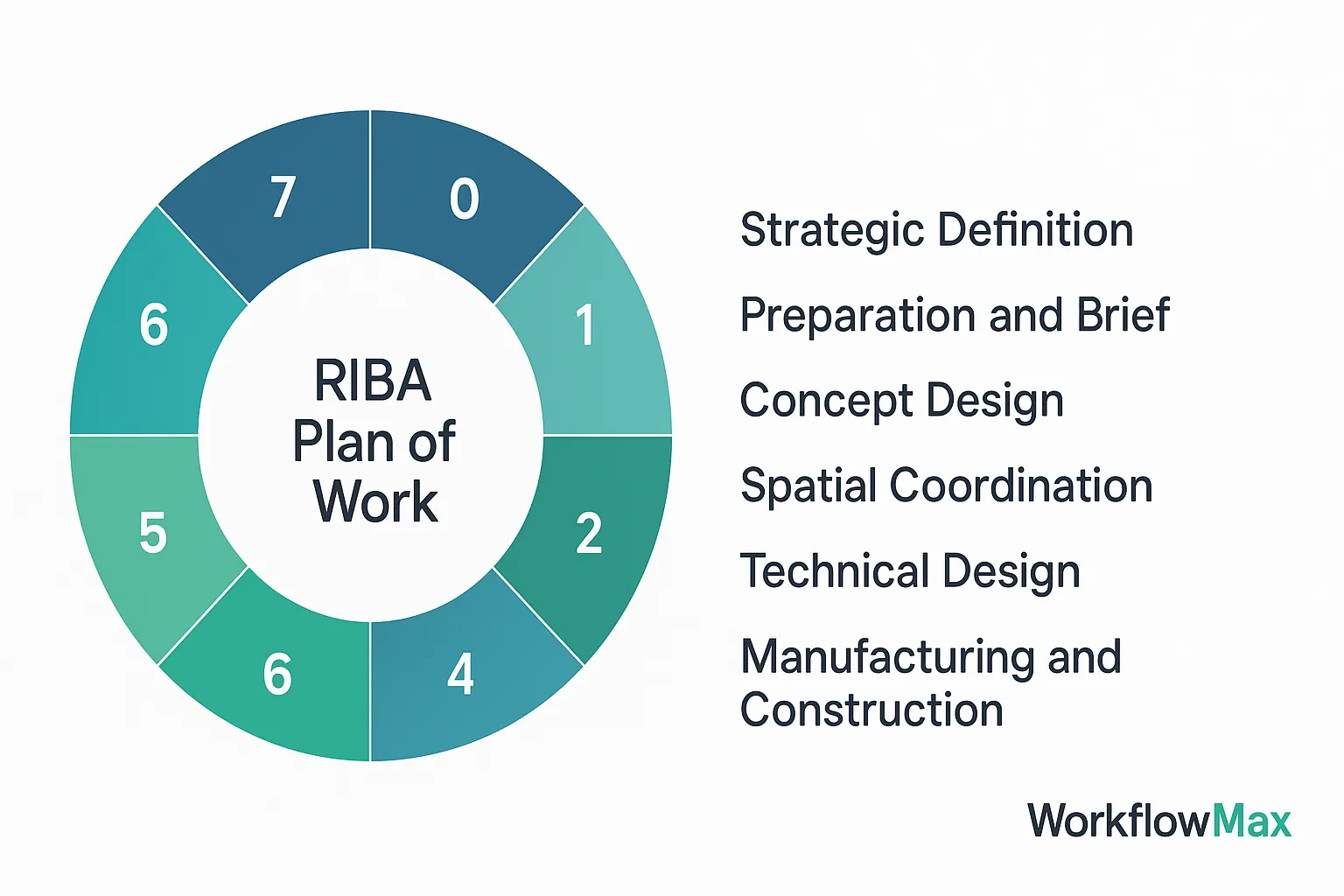
TL;DR: Aligning job costing with the RIBA Plan of Work improves financial clarity, budget control, and project efficiency. WorkflowMAX helps British architects and firms track expenses, manage resources, and gain real-time insights at every stage, from strategic definition to building use. With features like Xero integration and live reporting, your projects stay on budget and on track.
Aligning job costing with project stages can be tricky. Managing complex workflows is a big challenge. Projects often have multiple moving parts, and keeping track of all the costs can feel overwhelming. Ensuring data accuracy is crucial. Mistakes in data entry or updates can lead to financial discrepancies, which can affect project outcomes.
Adapting to project changes is another hurdle. Projects evolve, and costs can shift unexpectedly. Being able to adjust job costing in real-time is essential to maintain financial clarity and control.
Overcoming these challenges is important. It ensures that projects stay on budget and meet financial goals. This clarity supports better decision-making and improves communication with stakeholders.
Technology transforms how job costing aligns with project stages. Centralised documentation keeps all project details in one place, ensuring easy access and reducing errors. With WorkflowMAX, all documents are stored centrally, making collaboration seamless.
Real-time data tracking provides immediate insights into project costs and progress. This feature helps adjust budgets and resources efficiently, ensuring projects stay on track. Our real-time performance dashboard gives a clear view of key metrics, allowing for quick adjustments and strategic planning.
Automated reporting simplifies the task of monitoring project finances. It eliminates manual data entry, reducing the risk of discrepancies. With WorkflowMAX's powerful reporting tools, you gain insights into productivity and profitability, supporting informed decision-making.
These tools address common challenges like managing complex workflows and adapting to project changes. By integrating technology, you enhance accuracy, improve communication, and maintain financial control.
Aligning job costing with the RIBA Plan of Work stages improves financial management. Here's a step-by-step guide:
Identify project goals and feasibility. Allocate preliminary budgets and resources, establishing initial project finances.
Develop the project brief. Outline detailed cost estimates for each aspect, ensuring alignment with the initial budget. Our customisable features help refine these estimates.
Create initial design concepts. Allocate resources for design activities while using historical data to refine cost estimates. Our reporting tools track financial progress accurately during this stage.
Refine designs for spatial arrangements. Track costs related to technical adjustments. Our centralised document management ensures all design changes are documented and financially accounted for.
Finalise specifications and technical drawings. Allocate resources and budget for detailed design tasks. Our real-time dashboard monitors financial progress and helps adjust resources when needed.
Oversee construction, ensuring compliance with design and budget. Our job management tools help manage costs and scheduling efficiently.
Transition the project to the client. Conduct final inspections and account for all costs. Our Xero integration ensures financial accuracy during this stage.
Support the project in its operational phase. Track additional costs and ensure budget alignment. Our time tracking and reporting features ensure ongoing financial control.
Aligning job costing with the RIBA stages keeps projects on budget and uses resources effectively. Our tools support each RIBA stage, making financial management easier and more accurate.
WorkflowMAX supports these benefits with features like powerful reporting tools and seamless Xero integration. These tools provide real-time insights into project costs, enhancing accuracy and efficiency.
Aligning job costing with project stages improves financial clarity. It ensures resources are used effectively and projects stay within budget. Integrating job costing with the RIBA Plan of Work improves transparency and control across your projects.
Structured frameworks guide projects from start to finish, providing clear financial guidance. When aligned, you can budget more precisely, allocate resources better, and track costs accurately. This helps manage complex projects while meeting financial goals.
We make this alignment effortless with WorkflowMAX. Our tools provide real-time insights and seamless integration with Xero, improving your financial accuracy. Features like centralised document management and customisable reporting give you quick access to everything you need.
TL;DR: Fragmented data in construction leads to delays, miscommunication, and costly rework. WorkflowMAX solves this by centralising job data—quotes, scheduling, time tracking, and invoicing—into one platform. With real-time insights and seamless Xero and QuickBooks integrations, firms can improve collaboration, decision-making, and efficiency while staying on time and on budget.
Miscommunication and rework plague construction projects. Scattered data sources lead to mistakes, delays, and additional costs. When information is stored in different locations, keeping everyone informed becomes a challenge.
Centralised job data transforms projects. It creates one accessible hub for all project information. Everyone sees the same up-to-date data. This reduces errors and miscommunication, enabling teams to work smoothly and efficiently.
Fragmented data in construction leads to inefficiencies. When information is scattered across different systems, data silos form. These silos create inconsistencies, making it difficult to access accurate information. Teams often work with outdated or conflicting data, which can cause confusion.
Miscommunication arises from these data silos. Imagine trying to coordinate a project where the plans are outdated or unclear. Labour may be misallocated, leading to delays and increased costs. Material waste occurs when incorrect specifications are used, further impacting budgets.
Project timelines suffer due to these inefficiencies. When teams can't access real-time information, decisions are based on guesswork rather than facts. This causes errors and rework, extending project durations and straining resources.
WorkflowMAX provides tools that centralise job management, including quotes, scheduling, and time tracking. These features streamline workflows and reduce administrative burdens. With real-time insights, businesses maintain control over timelines and budgets, enabling them to manage project complexity effectively.
These systems support better decision-making. With a single source of truth, decision-makers rely on up-to-date data, reducing errors. Predictive analytics becomes possible, allowing teams to foresee potential issues and mitigate risks before they escalate.
Workflow efficiency sees a boost. Centralised data eliminates the need to chase scattered information, streamlining processes. Teams can focus on what matters, knowing they have reliable data at their fingertips.
Risk mitigation is another advantage. Consistent data helps identify project vulnerabilities early. This proactive approach prevents costly rework and keeps projects on track.
WorkflowMAX integrates these principles into its platform. Customizable features adapt to unique workflow requirements, while comprehensive job management centralises tasks like scheduling and invoicing. Seamless Xero integration ensures financial data stays accurate and efficient.
Real-time performance dashboards provide instant insights into business metrics. This empowers quick adjustments and strategic planning, enhancing overall project success.
Centralised data solutions enhance construction project management by offering real-time sharing and collaboration. Tools like WorkflowMAX streamline job management, offering features such as customizable invoicing and powerful reporting. These solutions simplify decision-making, ensuring that everyone has access to up-to-date information.
Adopting centralised systems requires clear strategies. Establishing everyday data environments and standardised frameworks helps unify information across teams. This reduces miscommunication and enhances coordination, resulting in more efficient workflows.
Book a demo with us!
TL;DR: Context switching drains focus and productivity in engineering and design work. Strategies like time blocking, task batching, and minimising notifications help reduce mental fatigue. WorkflowMAX supports these efforts by centralising job data, streamlining workflows, and enabling deep work through real-time dashboards and document management, empowering teams to stay focused and efficient.
Context switching in engineering and design involves shifting mental gears between different tasks. This process loads your brain with new information while unloading the old, and it takes time to get back into a state of flow.
Understanding this can help identify strategies to mitigate these impacts. By recognising the challenges posed by context switching, professionals can aim to streamline their workflows and improve efficiency.
With tools like WorkflowMAX, engineering and design teams can manage their projects more effectively, reducing cognitive load and helping them focus on what truly matters. Solutions that centralise job management, streamline scheduling, and provide real-time insights are crucial in tackling the demands of diverse responsibilities..
Managing context switching in engineering and design means adopting strategies that promote focused work and minimise interruptions. Time blocking is a great approach. Set specific periods for deep work, reducing distractions and allowing you to concentrate on one task at a time.
Implementing these strategies enhances productivity, optimises workflow, and mitigates context switching costs.
Context switching is a reality in engineering and design roles. Specific strategies help you manage it effectively. Self-awareness is key. Recognising patterns in your workflow helps adjust tasks and reduce unnecessary shifts.
Take regular breaks to recharge and stay focused. It's okay to have unproductive moments—they're part of being creative. Setting realistic expectations allows space for creativity to flourish without pressure.
Our WorkflowMAX tool helps centralise tasks, reducing your cognitive load. Features like real-time dashboards and centralised document management keep work organised and accessible, providing clarity and minimising disruptions.
Team strategies matter. Focus agreements and asynchronous communication create a structured environment that supports deep work. This builds collaboration without constant interruptions.
Book a demo with us!




