Manage quote changes without reissuing everything
Quote Variations lets you create and approve scope changes after a quote has been accepted, while keeping a clear record of what changed and how it impacts the job budget.
Why use Quote Variations?
Scope changes are common in construction, consulting, and other project-based work. But rebuilding an entire quote creates confusion and makes it harder to keep everyone aligned.

Handle changes after acceptance
Add variations once the original quote is accepted, without duplicating the full quote.
Make changes obvious
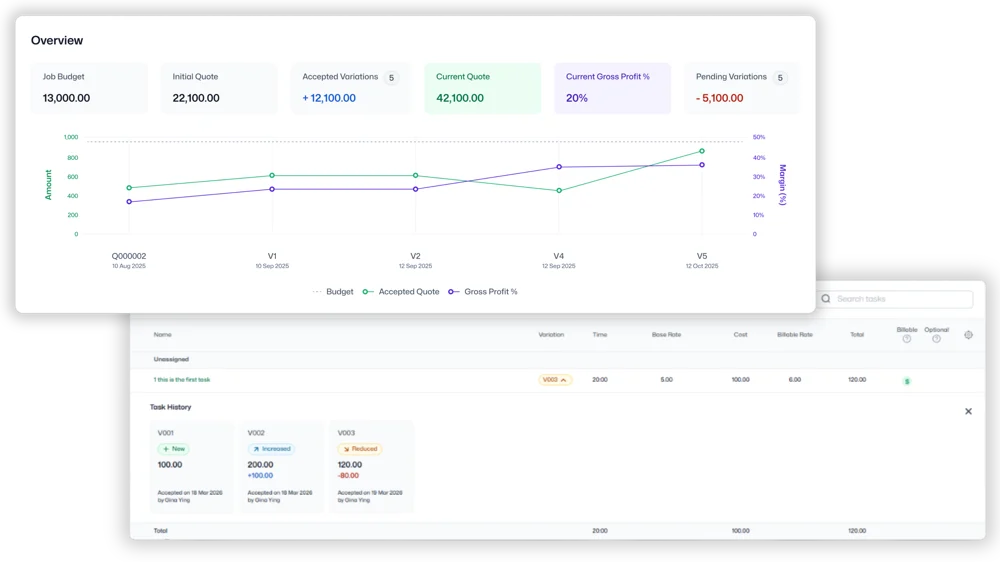
Clear visual indicators show whether items are increased, decreased, or new.
See the impact instantly
An impact summary highlights the net change and the updated job budget before you send anything.
Keep original vs current crystal clear
Separate views help you compare the current quote scope (including approved variations) with the original accepted quote.
How Quote Variations works
Create a variation
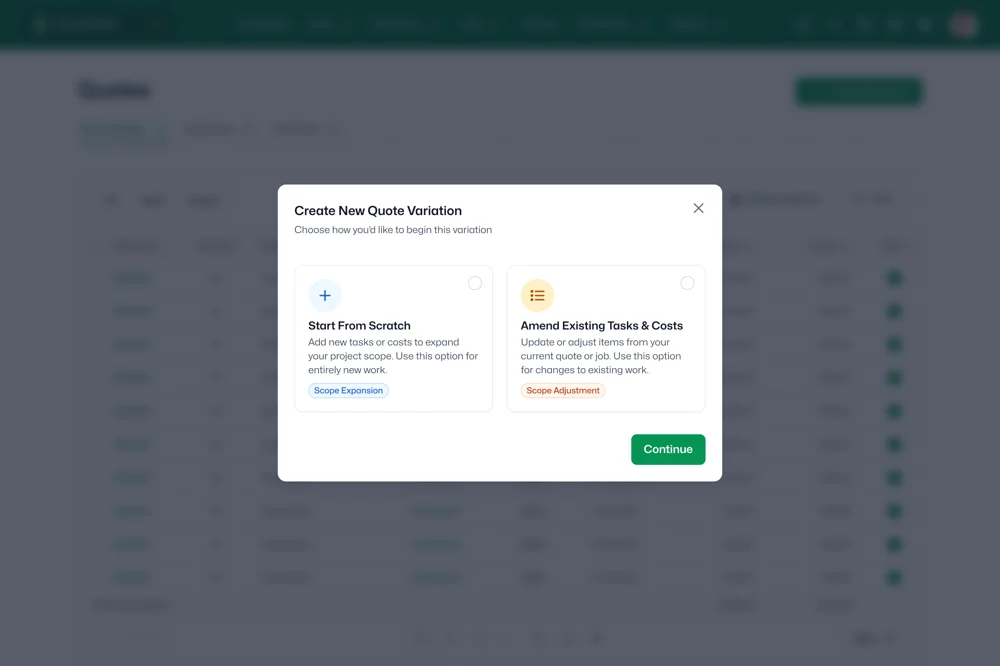
Create a variation from scratch or amend existing quote items.
Update items and pricing
Add new items, adjust quantities and pricing, or amend existing line items.
Review the impact
Check the impact summary to understand the net change and updated budget.
Share and confirm
Send the variation for approval so everyone is aligned on the updated scope.
Built for teams where scope changes are normal
Construction teams managing change requests
- Capture site-driven scope changes and keep pricing and approvals clear.
- Make it obvious what was added, removed, or adjusted before work continues.
Consulting teams updating deliverables mid-project
- Document changes to deliverables, timelines, or effort as the project evolves.
- Keep a clean record of what changed so handovers and invoicing stay straightforward.
Project-based businesses that need a clear audit trail of quote changes
- Maintain a clear history of the original accepted quote versus the current scope.
- Reduce disputes by showing the net impact of each variation on the overall job budget.
Ready to simplify quote changes?
Quote Variations is available in beta for WorkflowMAX Advanced subscription. Contact Support to enable access. Not on Advanced? Start a free trial to test it out.
Frequently asked questions
Can I create a variation by editing existing quote items?
Yes. Variations can be created from scratch or by amending existing quote items.
Will it be obvious what changed?
Yes. Quote Variations includes visual indicators for increased, decreased, and new items.
Can I still see the original accepted quote?
Yes. You can view the original quote separately from the current quote scope.
What happens to the original accepted quote once I create a variation?
The original accepted quote stays unchanged. Variations create a clear record of what changed, so you can compare original vs current scope.
Can I add more than one variation to the same quote?
Yes. You can create multiple variations over time, so each scope change is tracked separately.
Does a variation update the job budget automatically?
Quote Variations updates budget visibility at the job level so you can see the impact of changes on the overall budget as you go.
Unsure where to start?
From free online tutorials, to live demos from a specialised partner - get the help you need
SELF-PACED
One sentence here to explain who this plan is best for
1
Unlimited access
Unlimited access to the course so you can always go back and revisit things
2
Unlimited access
Unlimited access to the course so you can always go back and revisit things
3
Training
Role-specific staff training modules
GUIDED
One sentence here to explain who this plan is best for
1
Unlimited access
Unlimited access to the course so you can always go back and revisit things
2
Unlimited access
Unlimited access to the course so you can always go back and revisit things
3
Training
Role-specific staff training modules
4
Training
Role-specific staff training modules
PREMIUM
One sentence here to explain who this plan is best for
1
Unlimited access
Unlimited access to the course so you can always go back and revisit things
2
Unlimited access
Unlimited access to the course so you can always go back and revisit things
3
Training
Role-specific staff training modules
4
Training
Role-specific staff training modules