AI-POWERED BILL EXTRACTION

Automate data entry for supplier bills

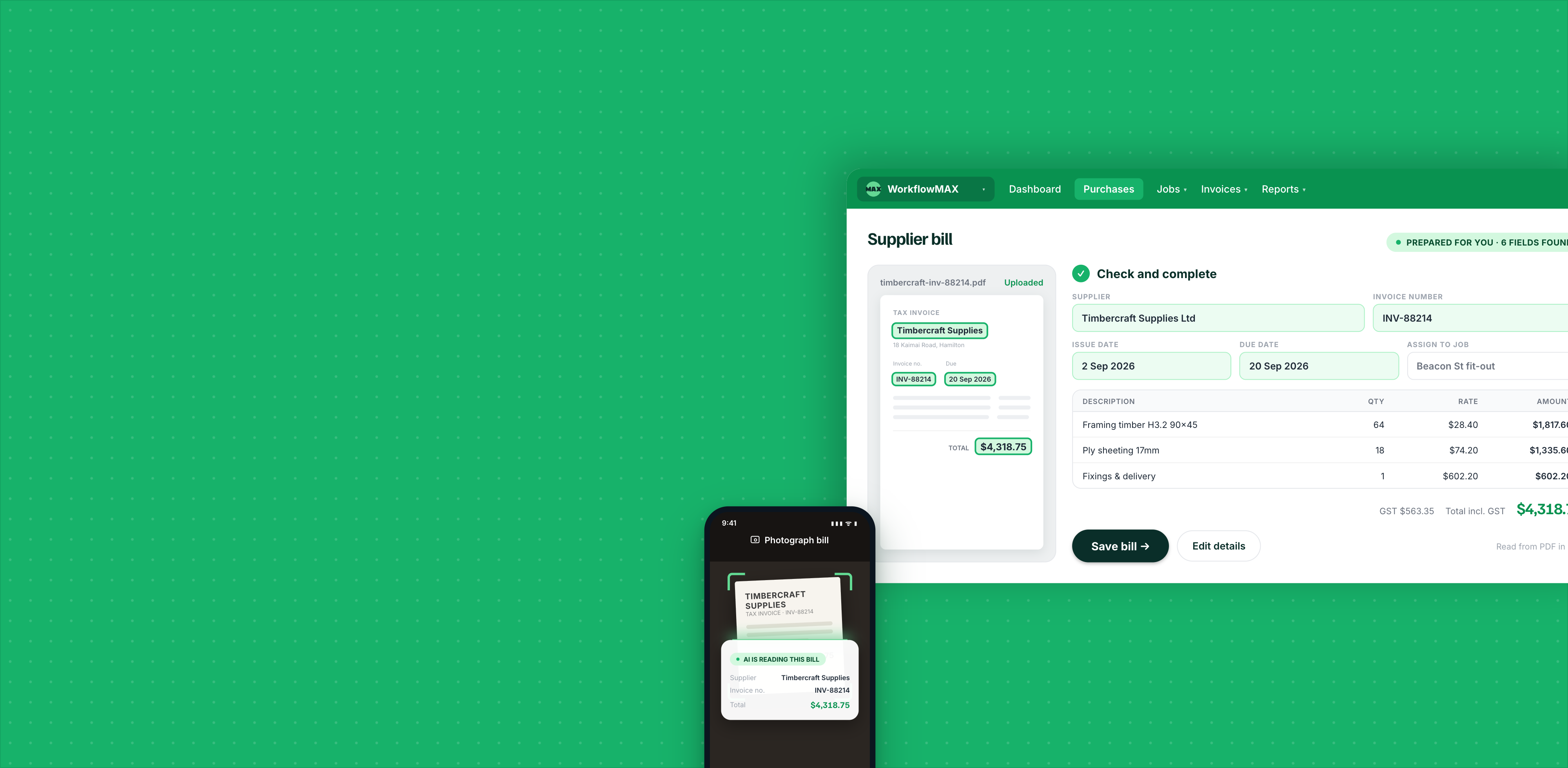
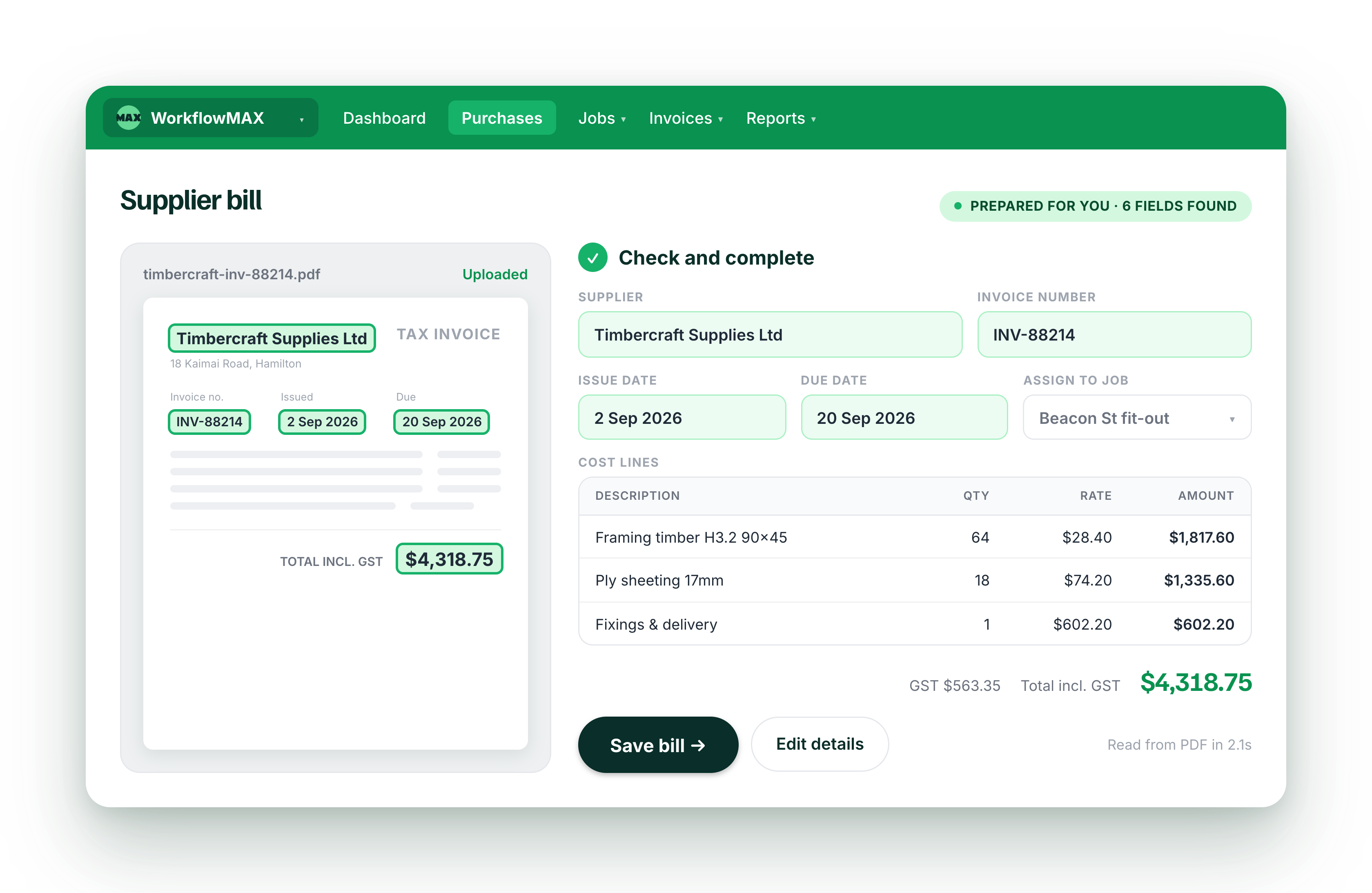
Upload a supplier bill and WorkflowMAX extracts the details for your team to review and save against the right job. Reduce manual admin and keep project costs visible in one job management platform.

Turn supplier documents into job costs in three steps

1

Upload your bill

Upload a supplier bill from your device, drag and drop the file into WorkflowMAX, or select a document from your Collaboration Manager bills inbox.

2

Review the extracted details

‍WorkflowMAX extracts details such as the supplier, dates, invoice number, descriptions, quantities, tax and costs. Check the information and edit anything that needs attention.

3

Save it against the right job

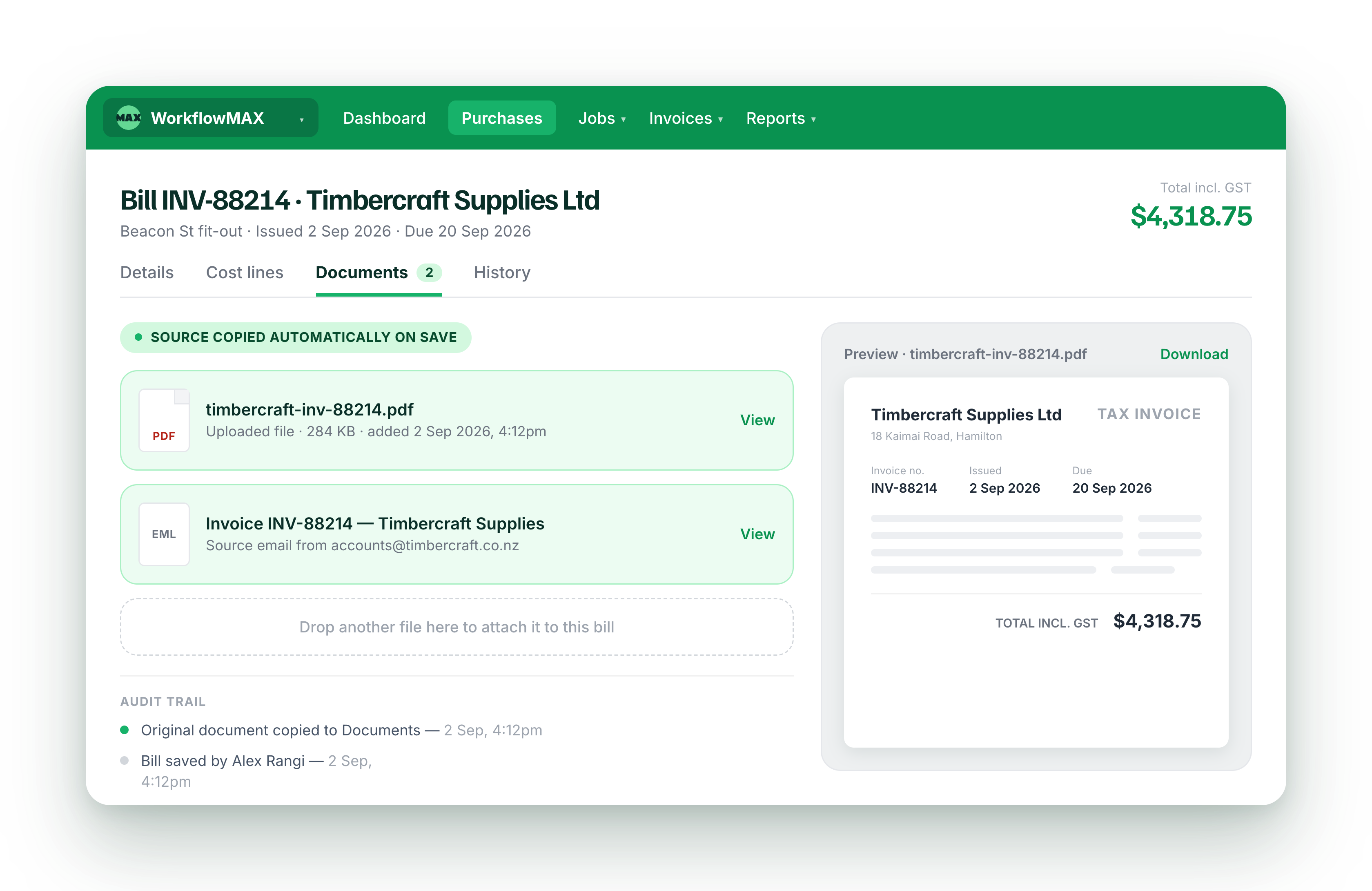
‍Choose the relevant job and supplier, then submit the bill as normal. The source document is stored with the bill so your team has a clear record of the cost.

Lead manager
listing-divider

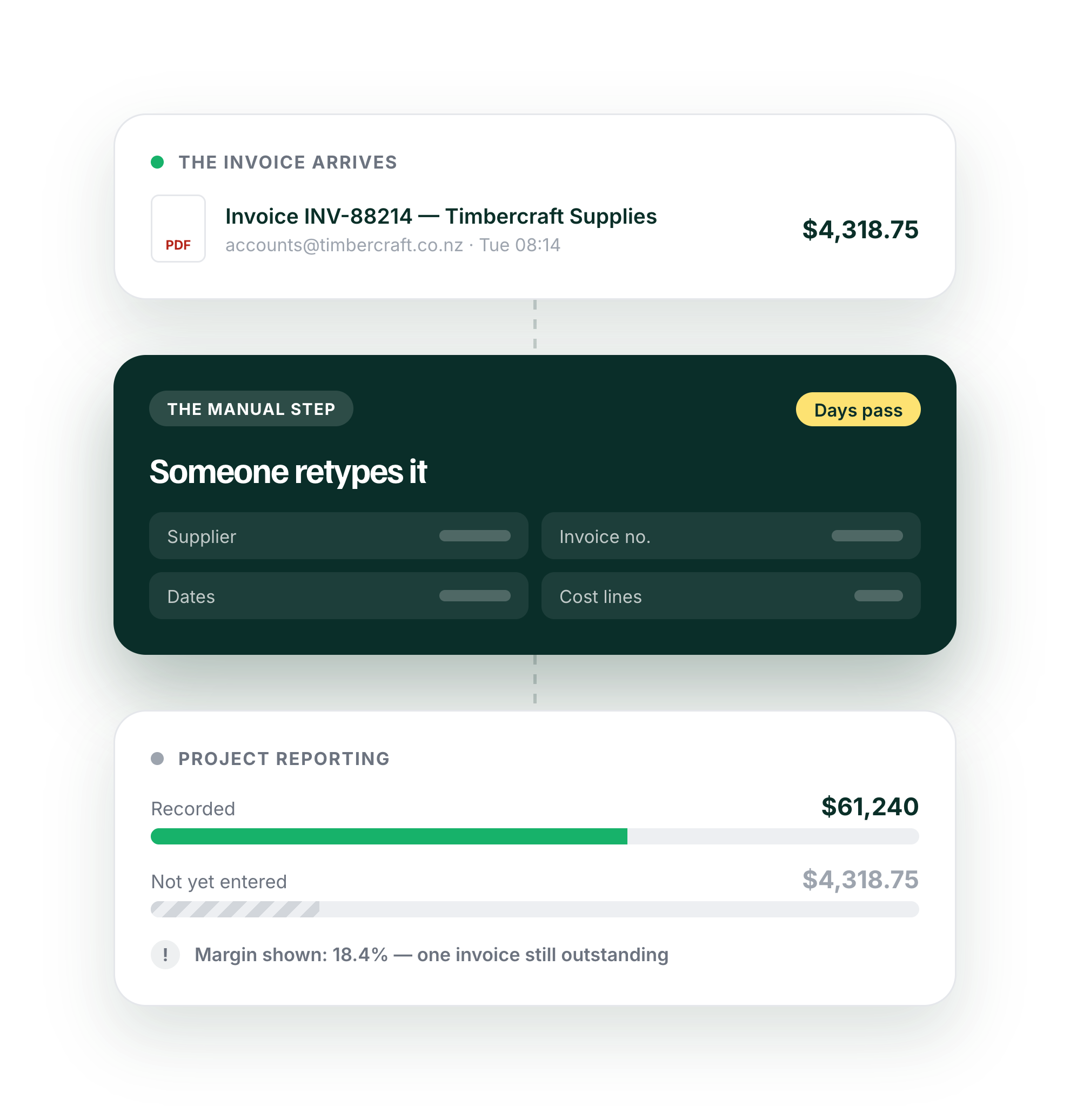
Spend less time entering supplier bills

features-icon

Let WorkflowMAX identify key information such as the supplier, dates, invoice number and costs.

features-icon

Replace repetitive typing with a prepared bill that your team can review and complete.

features-icon

For example: upload a consultant invoice and move directly to checking the details instead of copying them into WorkflowMAX field by field.

Lead manager
listing-divider

Capture bills where they arrive

features-icon

Upload a bill from your device, or drag and drop it directly into the Create Bill form.

features-icon

Select bills from your Collaboration Manager email inbox without downloading and uploading the attachment again.

features-icon

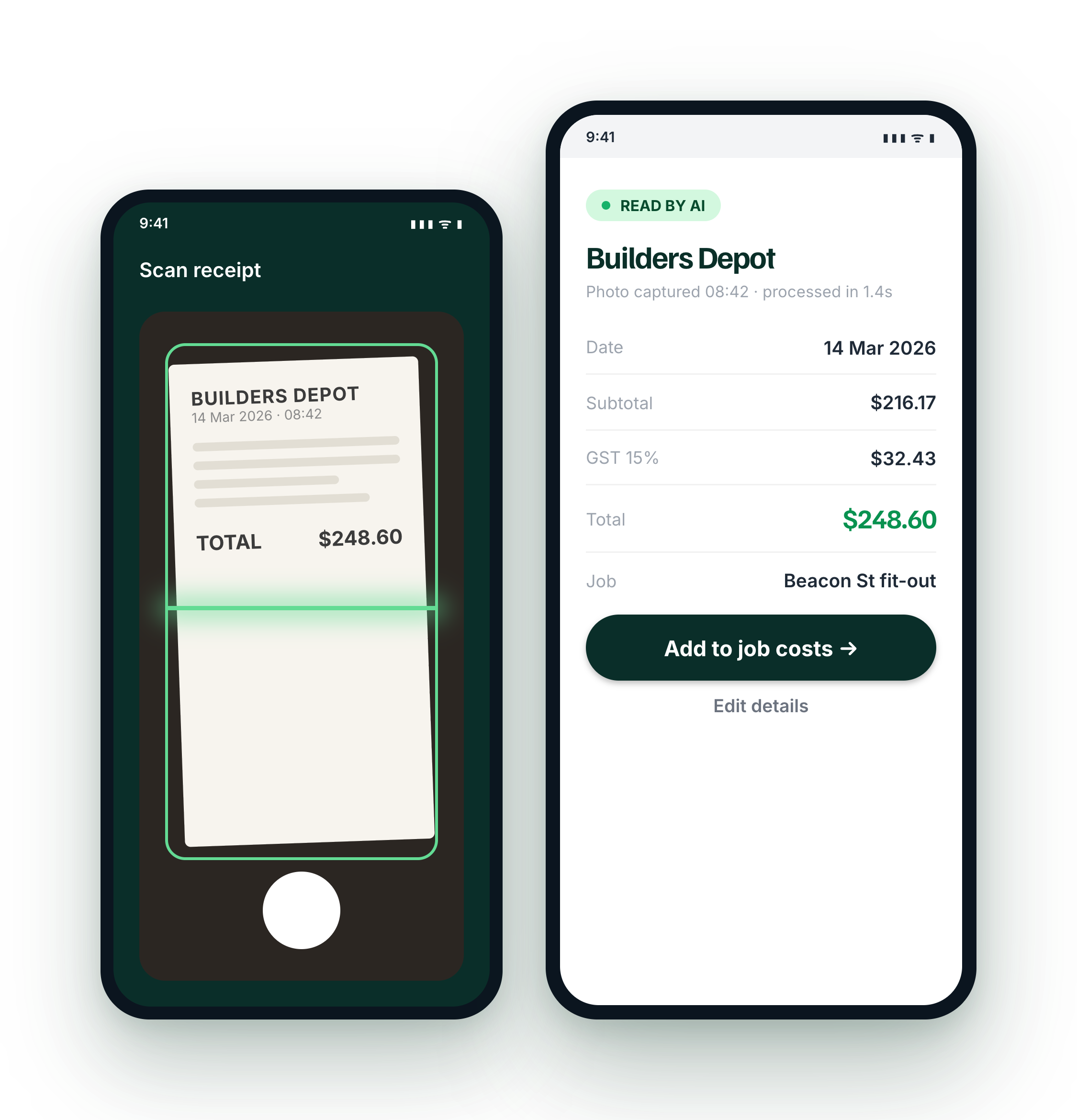
You can also photograph receipts in the WorkflowMAX mobile app, where AI extracts the details for you to review and save as a job cost.

Learn more about mobile receipt scanner ->
Lead manager
listing-divider

Choose the level of detail you need

features-icon

Select Consolidated mode to record the bill total as one cost line.

features-icon

Choose Line Items mode to extract separate descriptions, quantities, unit costs and tax values.

features-icon

For example: record a simple software bill as one total, or capture each item from a detailed materials invoice separately.

Lead manager
listing-divider

Connect supplier costs to the right work

features-icon

Create a standalone bill or add a detailed bill from an existing purchase order.

features-icon

Use Line Items mode when you need WorkflowMAX to match the bill to an active purchase order.

features-icon

For example: a construction firm can link a subcontractor invoice to its purchase order, making the cost easier to trace against the project.

Lead manager
listing-divider

Stay in control of every cost

features-icon

Review and edit every extracted field before the bill is submitted.

features-icon

Select the correct supplier or purchase order when WorkflowMAX cannot find a confident match.

features-icon

For example: check the supplier, dates, tax and job allocation against the original invoice before the cost affects project reporting.

Lead manager
listing-divider

Built for firms that manage project-based work

features-icon

Architects, engineers and designers

Capture consultant and supplier costs sooner, so project budgets reflect the work being delivered.

features-icon

Creative agencies and business consultants

Reduce finance admin while keeping contractor, software and project expenses connected to client work.

features-icon

Building and construction firms

Turn detailed materials and subcontractor invoices into clear job costs without entering every line manually.

Lead manager

Less bill entry, clearer project costs

AI Bill Extraction helps your team process bills sooner, reducing repetitive admin and giving project managers a clearer view of costs across active jobs.

Try AI Bill Extraction free for 14 days

WorkflowMAX is essential for our business. It's intuitive, easy to use, and makes us much more efficient in charging projects correctly.

Andrew S.

Episode Two

We moved back and the team actually loves using it—billing is faster and we can see margins live.

Darlene Robertson

Principal, Surveying & Engineering Firm

It’s the same soul with better bones—job costing, timesheets, and invoicing finally work as one.

Floyd Miles

Implementation Partner

WorkflowMAX has made a huge difference to how we run our projects. A great system backed by great support. Highly recommended.

Rob P.

MAF Associates

Any questions?

Still have questions?

Any questions?

What is AI Bill Extraction?

AI Bill Extraction is a WorkflowMAX feature that reads a supplier bill and prepares key information in the Create Bill form. It can identify supplier details, dates, reference numbers and costs. Your team reviews the information, makes any necessary changes and manually confirms the bill before it is saved.

Does AI Bill Extraction use AI Credits?

Yes. Each time AI Bill Extraction processes a supplier document, it uses AI Credits from your organisation’s available balance. Credits apply to the AI-powered extraction action. Manual bill entry and the core WorkflowMAX job management platform continue to work normally. Plan inclusions and available credits may vary.

Can WorkflowMAX extract a bill from an email?

Organisations with full Collaboration Manager access and the bills inbox enabled can start extraction from an email. Choose a supported attachment, or select the email itself when the bill details appear in the message. The extracted information is then prepared in the same Create Bill form for review.

Which bill file types can I upload?

WorkflowMAX accepts PDF, JPG, JPEG, PNG and HEIC files for manual uploads. Files can be up to 5 MB, with file names of up to 200 characters. Clear and readable documents produce the best results, but users should always check the extracted information against the original supplier bill.

How does AI Bill Extraction help with job management?

AI Bill Extraction reduces the time spent copying information from supplier invoices into your job management software. Processing bills sooner helps project managers see a more current picture of project costs, budgets and profitability, while finance staff retain control over the information saved against each job.

addt-bg-left

Additional features

addt-bg-right
{"@context":"https://schema.org","@graph":[{"@type":"SoftwareApplication","name":"WorkflowMAX – Advanced WIP","url":"https://www.workflowmax.com/job-management-software/advanced-wip-control-job-level-profitability-workflowmax","applicationCategory":"BusinessApplication","operatingSystem":"Web, iOS, Android","brand":{"@id":"https://www.workflowmax.com/#organization"},"isPartOf":{"@id":"https://www.workflowmax.com/#software"},"description":"Advanced WIP control for job-level profitability tracking, revenue recognition and margin protection.","featureList":"Advanced WIP"},{"@type":"BreadcrumbList","itemListElement":[{"@type":"ListItem","position":1,"name":"Home","item":"https://www.workflowmax.com/"},{"@type":"ListItem","position":2,"name":"Features","item":"https://www.workflowmax.com/job-management-software/all-features"},{"@type":"ListItem","position":3,"name":"Advanced WIP","item":"https://www.workflowmax.com/job-management-software/advanced-wip-control-job-level-profitability-workflowmax"}]}]}