Advanced WIP: Real-time visibility and control at the job level

Advanced WIP

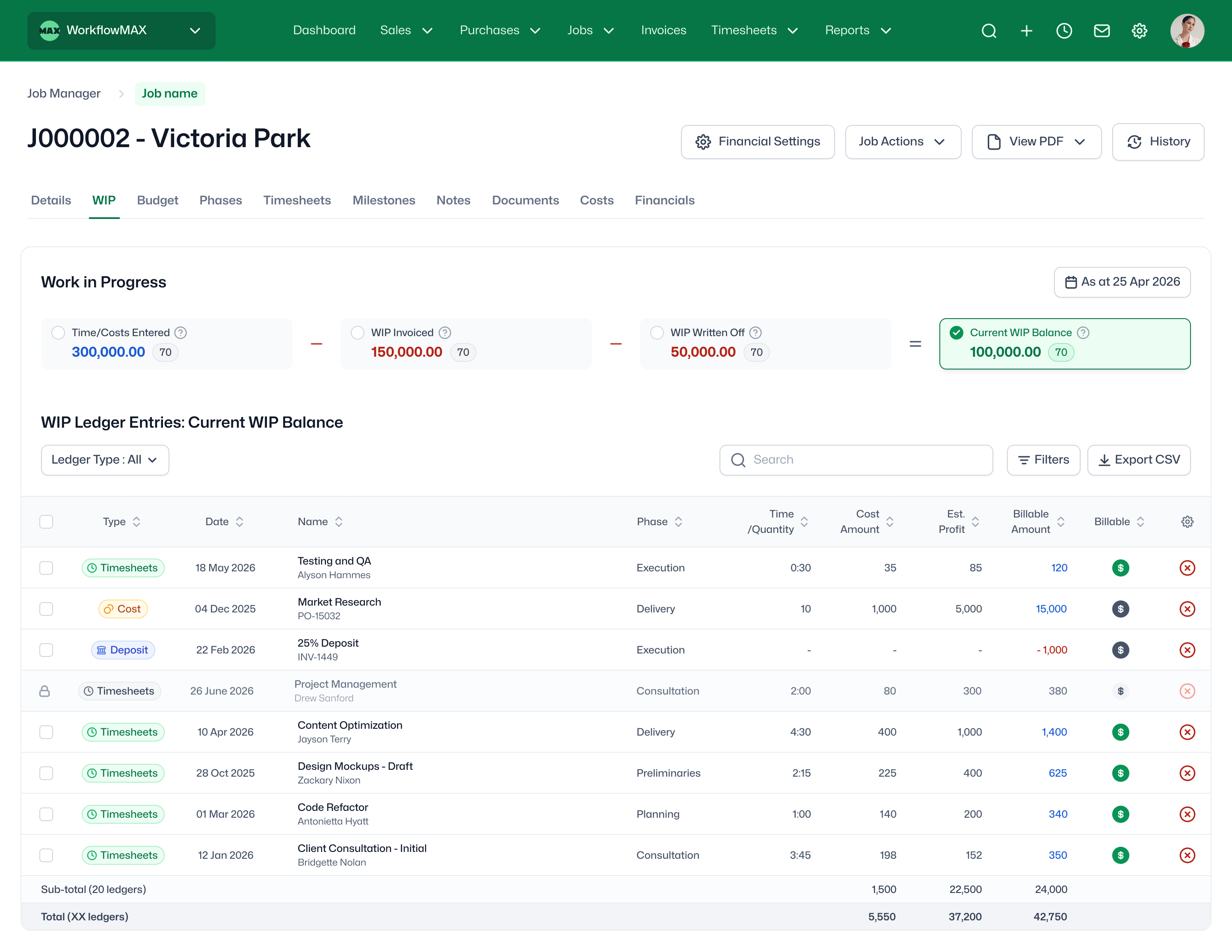
Advanced WIP gives finance teams and project leads real-time visibility into every job. A dedicated WIP tab sits inside each job, providing a live, interactive ledger of every timesheet, cost and interim entry - what's been invoiced, what's been written off, and what's still sitting in your WIP balance. All in one place, with the tools to take action on it any day of the month.

A dedicated WIP tab, right inside the job

Instead of running a WIP report, your team can open any job and see a live WIP overview instantly. The tab shows headline figures - time and costs entered, WIP already invoiced, WIP written off, and the current WIP balance - all dated so you know exactly what position you're looking at. Below the summary, a full ledger lists every entry that makes up the balance: whether it's a timesheet, cost, or interim; when it was entered; which phase it belongs to; and whether it's billable or non-billable.
What you’ll see on the new WIP tab:

features-icon

Time/Costs Entered

features-icon

WIP Invoiced

features-icon

WIP Written Off

features-icon

Current WIP balance (dated)

features-icon

A full entry-by-entry ledger with billable/non-billable status

Lead manager
listing-divider

View your WIP as of any date

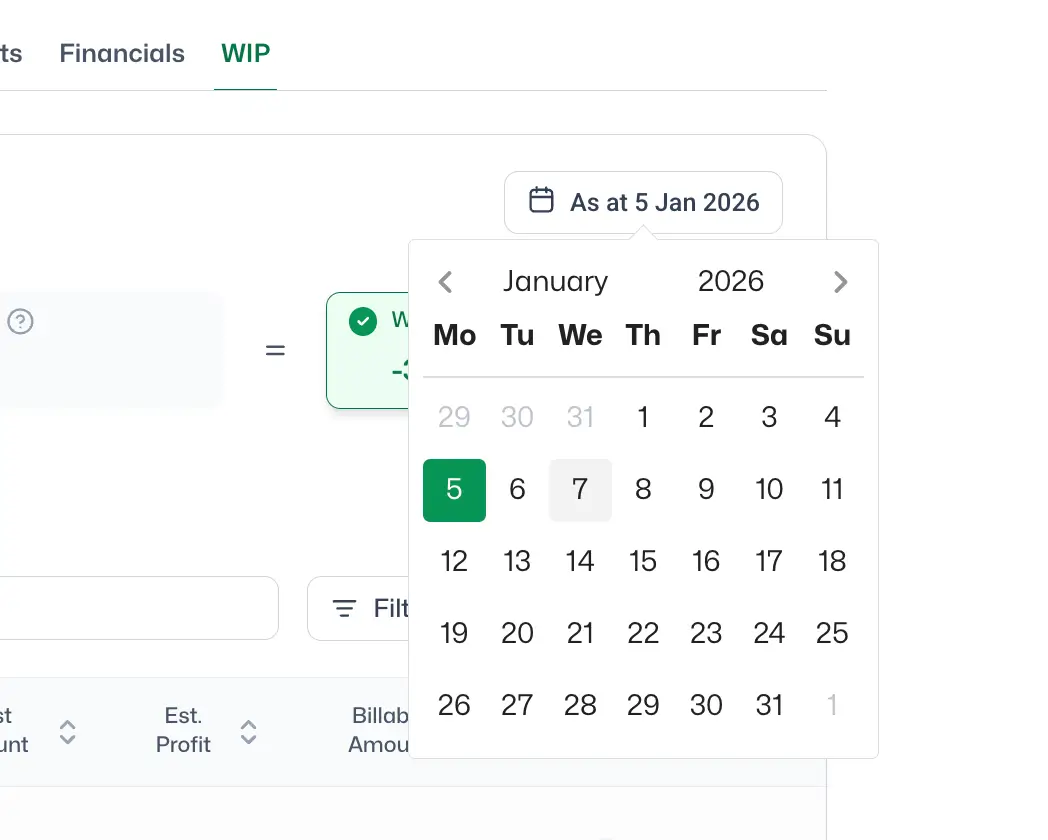
Need to know what WIP looked like at the end of last month? Use the date selector to move your ledger back to any point in time. The figures and entry list update automatically, so you can answer "how did this build up?" queries and reconcile WIP at reporting cut-off - without manual recalculations. Export what you see to Excel in one click.

Lead manager
listing-divider

Take action on WIP entries - individually or in bulk

Select one entry or many, then choose what to do with them. You can invoice selected items directly from the WIP tab (choose progress or final invoice, set the date, and the draft invoice is created for you), mark entries as billable or non-billable, write them off with a date of your choice, or undo a write-off entry by entry if you need to. No more jumping between screens or building manual workarounds.

features-icon

Invoice (progress or final)

features-icon

Set as Billable / Non-Billable

features-icon

Write off (with date)

features-icon

Undo write-off

Lead manager
listing-divider

Control who sees and acts on WIP data

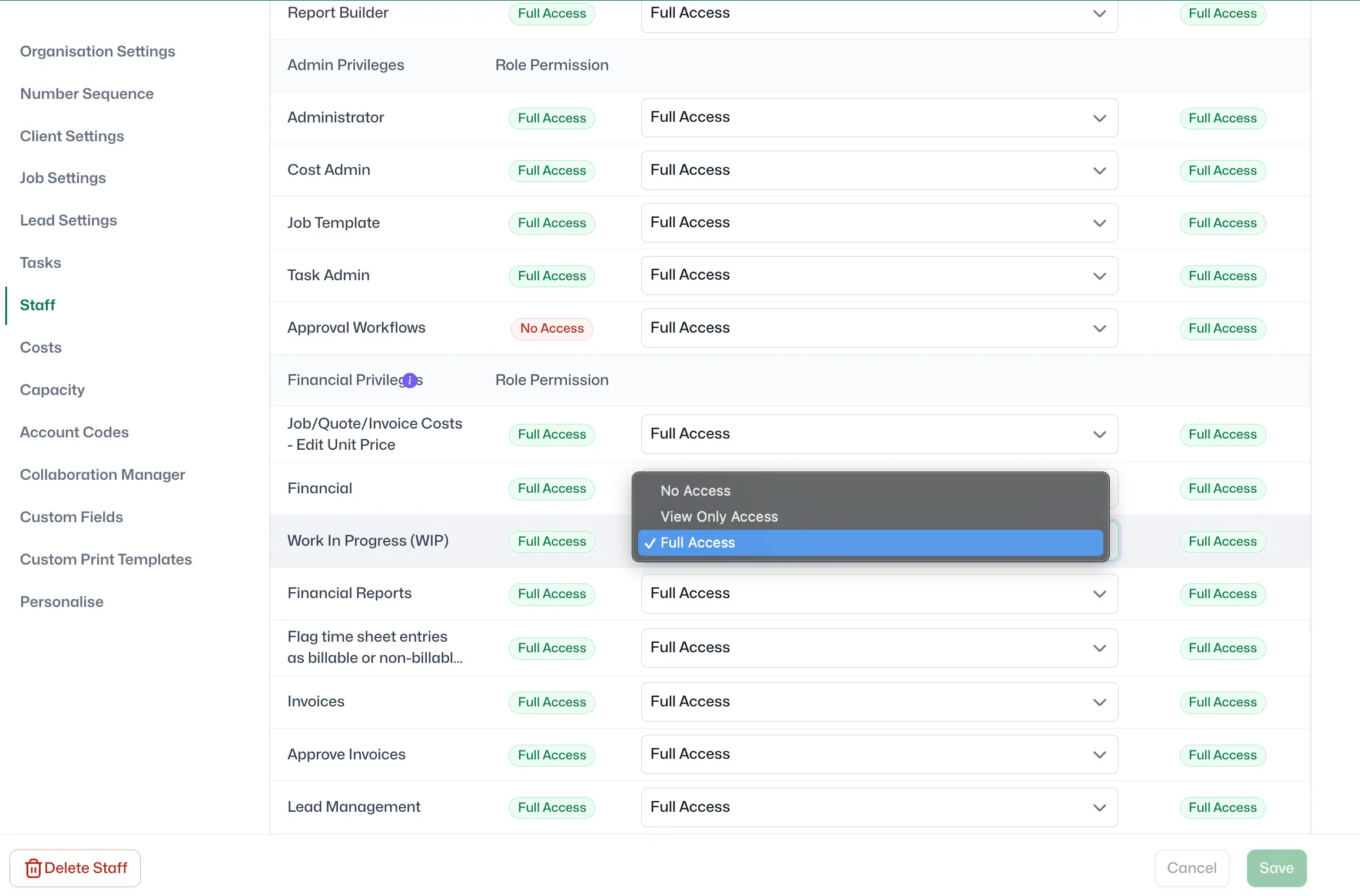
Set WIP access on a per-staff-member basis - Full Access (view and take actions), View Only (see the tab but make no changes), or No Access (hidden entirely). Permissions apply to both the WIP tab within jobs and the WIP option in reporting, so finance teams, project managers and junior staff each get the right level of visibility for their role

Lead manager
listing-divider

Say goodbye to stressful project management

Managing projects doesn’t have to be stressful. Our scheduling feature simplifies the process, providing you with a clear and easy-to-follow Gantt chart that displays the entire project journey at a glance.

features-icon

Small to medium-sized businesses and consultants

features-icon

Project managers looking to streamline their workflow

features-icon

Teams aiming to improve project management efficiency

Lead manager

WorkflowMAX is essential for our business. It's intuitive, easy to use, and makes us much more efficient in charging projects correctly.

Andrew S.

Episode Two

We moved back and the team actually loves using it—billing is faster and we can see margins live.

Darlene Robertson

Principal, Surveying & Engineering Firm

It’s the same soul with better bones—job costing, timesheets, and invoicing finally work as one.

Floyd Miles

Implementation Partner

WorkflowMAX has made a huge difference to how we run our projects. A great system backed by great support. Highly recommended.

Rob P.

MAF Associates

Close month-end faster with Advanced WIP

Already using WIP reports in WorkflowMAX? Advanced WIP replaces the end-of-month summary with a live, job-level ledger you can act on every day - not just at month-end. Advanced WIP is included on WorkflowMAX Advanced.

Any questions?

Which plans include Advanced WIP?

Advanced WIP is included on Advanced plans. Standard/Premium customers can trial it free for 14 days.

What does Advanced WIP show on a job?

Advanced WIP shows a breakdown of Time/Costs Entered, WIP Invoiced, WIP Written Off, and the resulting Current WIP Balance, plus a ledger of the entries that make up that balance.

Where do I find it?

Open any job and select the new WIP tab.

What is Work In Progress (WIP) in project-based businesses?

WIP (work in progress) is the value of time and costs that have been incurred on a job but not yet invoiced (or otherwise resolved), helping you understand profitability and revenue-in-progress.

Can I view WIP “as at” a past date?

Yes. Use the As at date selector to reconstruct WIP at a historical point in time, including the table view and CSV export.

Can I export WIP details?

Yes. You can export the point-in-time WIP view (including the underlying ledger) to CSV.

What bulk actions are available on WIP ledger entries?

You can apply bulk actions to ledger entries, including Invoice, Set as Billable / Non‑Billable, and Write off.

Does Advanced WIP replace WIP reports?

Advanced WIP adds an interactive job-level view and ledger. Reports may still be useful for cross-job analysis, but Advanced WIP reduces the need to rely on static reports for day-to-day WIP understanding and action.

addt-bg-left

Additional features

addt-bg-right