Free Winning Architecture Proposal Template

Turn your leads into high-value projects. This strategic framework balances architectural vision with technical precision, helping you prove value and win more tenders.

Validate Client Needs & Define the Journey

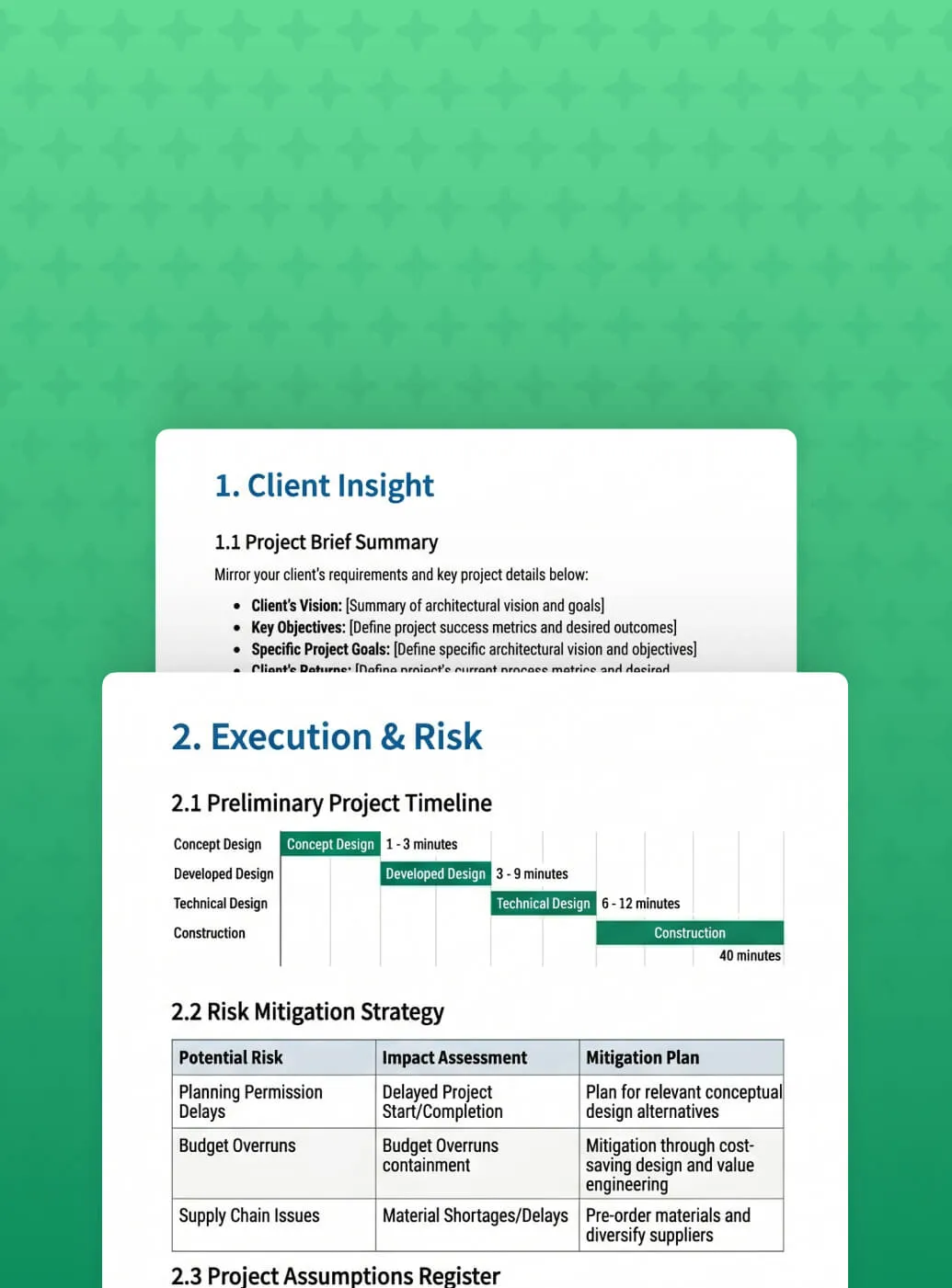
Stop sending generic pitches. This template provides a structured framework to prove your value from the first interaction:

Mirror the clientโ€™s brief back to them to prove active listening and custom-built intent.

Build professional confidence by addressing site or supply chain issues before they arise.

Provide total financial transparency by phase to justify your investment and win high-stakes tenders.

Protect your firmโ€™s margins with a defined workflow for when project requirements inevitably shift.

Define success metrics and project assumptions upfront to eliminate scope creep and ensure your proposal is professionally guarded.
Master the Art of the Pitch

All the latest insights from WorkflowMAX

Winning Architecture Proposal Template

May 5, 2026
โ€ข
5 min read

Heading 1

Heading 2

Heading 3

Heading 4

Heading 5
Heading 6

Lorem ipsum dolor sit amet, consectetur adipiscing elit, sed do eiusmod tempor incididunt ut labore et dolore magna aliqua. Ut enim ad minim veniam, quis nostrud exercitation ullamco laboris nisi ut aliquip ex ea commodo consequat. Duis aute irure dolor in reprehenderit in voluptate velit esse cillum dolore eu fugiat nulla pariatur.

Block quote

Ordered list

  1. Item 1
  2. Item 2
  3. Item 3

Unordered list

  • Item A
  • Item B
  • Item C

Text link

Bold text

Emphasis

Superscript

Subscript

Winning Architecture Proposal Template

May 5, 2026
โ€ข
5 min read

Heading 1

Heading 2

Heading 3

Heading 4

Heading 5
Heading 6

Lorem ipsum dolor sit amet, consectetur adipiscing elit, sed do eiusmod tempor incididunt ut labore et dolore magna aliqua. Ut enim ad minim veniam, quis nostrud exercitation ullamco laboris nisi ut aliquip ex ea commodo consequat. Duis aute irure dolor in reprehenderit in voluptate velit esse cillum dolore eu fugiat nulla pariatur.

Block quote

Ordered list

  1. Item 1
  2. Item 2
  3. Item 3

Unordered list

  • Item A
  • Item B
  • Item C

Text link

Bold text

Emphasis

Superscript

Subscript

Winning Architecture Proposal Template

May 5, 2026
โ€ข
5 min read

Heading 1

Heading 2

Heading 3

Heading 4

Heading 5
Heading 6

Lorem ipsum dolor sit amet, consectetur adipiscing elit, sed do eiusmod tempor incididunt ut labore et dolore magna aliqua. Ut enim ad minim veniam, quis nostrud exercitation ullamco laboris nisi ut aliquip ex ea commodo consequat. Duis aute irure dolor in reprehenderit in voluptate velit esse cillum dolore eu fugiat nulla pariatur.

Block quote

Ordered list

  1. Item 1
  2. Item 2
  3. Item 3

Unordered list

  • Item A
  • Item B
  • Item C

Text link

Bold text

Emphasis

Superscript

Subscript

Done with the Downloads? Switch to Active Growth.

Our free tools give you the blueprint, but WorkflowMAX provides the engine to automate it. Experience the full power of this proposal template integrated into a live lead-to-job workflow.

Frequently asked questions

No items found.

Education and training

How do I enable Scheduled Reporting?

Scheduled Reporting is available for Advanced plan subscribers. Contact our support team to enable the feature, or start your free 14-day trial to test it out.

Can I edit or pause a scheduled report?

Yes. You can edit schedules, add or remove recipients, or disable any scheduled report at any time from the centralised management view.

How long are the download links valid?

For security purposes, download links expire after three days. Recipients should download their reports within this timeframe.

What file format are the reports delivered in?

Reports are currently delivered as CSV files, which can be opened in Excel, Google Sheets, or any spreadsheet application.

Can I send reports to clients or external contacts?

Currently, scheduled reports can only be sent to internal team members and staff within your WorkflowMAX account. External recipient support is planned for a future update.

Which reports can I schedule?

You can schedule any WorkflowMAX report with your preferred filters applied, including job reports, timesheet reports, and profitability reports.

Does Advanced WIP replace WIP reports?

Advanced WIP adds an interactive job-level view and ledger. Reports may still be useful for cross-job analysis, but Advanced WIP reduces the need to rely on static reports for day-to-day WIP understanding and action.

What bulk actions are available on WIP ledger entries?

You can apply bulk actions to ledger entries, including Invoice, Set as Billable / Nonโ€‘Billable, and Write off.

Can I export WIP details?

Yes. You can export the point-in-time WIP view (including the underlying ledger) to CSV.

Can I view WIP โ€œas atโ€ a past date?

Yes. Use the As at date selector to reconstruct WIP at a historical point in time, including the table view and CSV export.

What does Advanced WIP show on a job?

Advanced WIP shows a breakdown of Time/Costs Entered, WIP Invoiced, WIP Written Off, and the resulting Current WIP Balance, plus a ledger of the entries that make up that balance.

What is Work In Progress (WIP) in project-based businesses?

WIP (work in progress) is the value of time and costs that have been incurred on a job but not yet invoiced (or otherwise resolved), helping you understand profitability and revenue-in-progress.

Where do I find it?

Open any job and select the new WIP tab.

Which plans include Advanced WIP?

Advanced WIP is included on Advanced plans. Standard/Premium customers can trial it free for 14 days.

Does Advanced include dedicated account management and onboarding support?

Advanced includes access to a dedicated account manager, guided onboarding, and quarterly business reviews for annual subscribers with 25 or more users. If your team is below that threshold or on a monthly subscription, you'll still have access to priority support.

What countries and currencies are supported?

WorkflowMAX is available worldwide. Pricing is available in AUD, NZD, CAD, GBP, and USD.

Can I change plans after signing up?

Yes. You can upgrade or downgrade your plan at any time from your billing settings. Upgrades take effect immediately. If you're on Standard or Premium and want to move to Advanced, book a discovery call and we'll handle the transition.

Is Lead Manager included in my plan?

Lead Manager is included in Advanced at no extra cost. On Standard and Premium, it's available as an optional add-on for a flat monthly fee regardless of team size.

How does Advanced pricing work?

Advanced is priced at a flat per-user rate โ€“ unlike Standard and Premium, there are no user bands. Because Advanced includes a higher level of account support, we size it through a short discovery call rather than a self-serve checkout. Book a call with our team and we'll confirm pricing for your organisation.

What happens when my team grows and I need to add more users?

Your subscription doesn't update automatically. To add users, you'll first need to update your subscription to the appropriate user band or user count, then add the new users to your account. Admins can manage this from within the billing settings.

Are there any setup fees or contracts?

No setup fees and no lock-in contracts. You can cancel at any time.

Is there a free trial?

Yes. All plans include a 14-day free trial with no credit card required. You get full access to the features on your chosen plan so you can test with real data before committing.

Which plan is right for my team?

Standard suits freelancers and small teams who need a solid end-to-end workflow without complexity. Premium suits growing teams who need multi-currency, deeper reporting, and workflow automation via Zapier. Advanced suits larger or more complex operations that need capacity planning, AI features, and a higher level of account support. If you're unsure, start a free trial โ€“ you can always upgrade.

What's the difference between Standard, Premium, and Advanced?

Standard covers the core platform โ€“ quoting, job management, time tracking, invoicing, Xero integration, reporting, and document management. Premium adds productivity reporting, multi-currency support for POs and bills, Zapier integration, Kanban job board view, and the ability to import invoices from Xero. Advanced includes everything in Premium plus Lead Manager, Capacity Planning, Integrated Calendar, Quote Variations, Scheduled Reports, advanced percentage-based invoicing, a sandbox environment, extended API access, and priority support.

How does WorkflowMAX pricing work?

WorkflowMAX is priced per user per month. Standard and Premium are priced in user bands โ€“ 1โ€“3, 3โ€“5, 5โ€“10, 10โ€“20, 20โ€“50, 50โ€“100, and 100+ users โ€“ so the per-user rate decreases as your team grows. Advanced is a flat per-user rate regardless of team size. Pricing varies by currency depending on your region.

Can I change my subscription at any time?

You sure can! You can switch between Standard and Premium by going to your subscriptions tab in your account. We pride ourselves on our easy monthly plans โ€“ no setup fees and no hidden costs. No obligation, no contracts. You can also downgrade or cancel at any time.

Can I trial WorkflowMAX Premium?

All WorkflowMAX trials include Premium and Lead manager features for you to try out.

WorkflowMAX Premium sounds great, but does it cost extra?

Yes, WorkflowMAX Premium is an optional upgrade from your standard subscription plan. See our pricing here.

Which web browsers does WorkflowMAX support?

WorkflowMAX supports modern versions of all major web browsers, including Google Chrome, Microsoft Edge, Mozilla Firefox and Safari. For the best experience - particularly with reporting and complex workflows - we recommend keeping your browser up to date.

Does WorkflowMAX work offline?

No. WorkflowMAX is a cloud-based platform and requires an active internet connection on both web and mobile. This ensures all team members are always working with the latest data and that changes sync across the business in real time.

Can I track time and update jobs on mobile?

Yes. The WorkflowMAX mobile app supports daily and weekly time entry, accessing client and job information, viewing your schedule, and adding notes or uploading documents to jobs. The mobile app focuses on the field-team workflow - for full reporting, invoicing and configuration features, use the WorkflowMAX web application from a desktop browser.

Is there an Android app for WorkflowMAX?

Yes. The WorkflowMAX Android app is available on the Google Play Store and supports time tracking, job and client lookup, viewing schedules, and document capture. The app is built for staff working in the field and complements the full WorkflowMAX web application. For details and download links, see the WorkflowMAX mobile page.

Is there an iOS app for WorkflowMAX?

Yes. The WorkflowMAX iOS app is available on the App Store and supports time tracking, job and client lookup, viewing schedules, and document capture. The app is designed for use in the field and works alongside the full WorkflowMAX web application. For details and download links, see the WorkflowMAX mobile page.

Is there a WorkflowMAX mobile app?

Yes. The WorkflowMAX mobile app is available for iOS and Android, designed for staff working away from the office. The mobile app focuses on the core tasks people need on the road - time entry, accessing job and client information, viewing schedules, and capturing notes or documents. For full feature access, including reporting, configuration and administrative tasks, use the WorkflowMAX web application.

Can I work with a partner or consultant?

Yes. WorkflowMAX has a network of certified implementation partners and advisors across multiple regions. Partners help with implementation, data migration, custom configuration, team training and ongoing optimisation. Working with a partner is recommended for larger teams, complex workflows, or businesses without in-house technical resources.

Is there a WorkflowMAX academy or training course?

Yes. The WorkflowMAX Academy offers self-paced online training courses covering platform fundamentals, advanced features and role-specific workflows. Some courses are publicly accessible; others are available to active customers.

Is there a help centre or knowledge base?

Yes. The WorkflowMAX help centre contains hundreds of detailed setup guides, how-to articles, troubleshooting tips and video walkthroughs covering every area of the platform. The help centre is publicly accessible and is the fastest way to find answers to specific configuration questions.

Where are WorkflowMAX support teams located?

WorkflowMAX support teams are based across the United Kingdom, USA, Australia, New Zealand and Asia. This distribution provides 24/7 coverage across major business timezones and means customers typically reach a local support team during their working hours.

Is WorkflowMAX support available 24/7?

Yes. WorkflowMAX provides 24/7 support via in-product live chat and email, with team members based across the United Kingdom, USA, Australia, New Zealand and Asia to provide round-the-clock coverage.

What support does WorkflowMAX include?

All WorkflowMAX customers have access to 24/7 in-product live chat support, email support at support@workflowmax.com, and the WorkflowMAX help centre. Advanced plan customers also receive priority support. Customers on the Advanced plan with 25 or more users on annual billing additionally receive a dedicated account manager and quarterly business reviews. There are no separate support fees on any plan.

Does WorkflowMAX support single sign-on (SSO)?

Single sign-on (SSO) is not currently available on WorkflowMAX. Authentication is via email and password, with optional or enforced multi-factor authentication for additional security. SSO support is on the WorkflowMAX product roadmap - customers who require SSO for security or procurement reasons can submit a request via the feature requests forum.

Does WorkflowMAX support multi-factor authentication?

Yes. Multi-factor authentication (MFA) is supported on every WorkflowMAX account. MFA is mandatory for accounts integrated with Xero, in line with Xero's security requirements. Account administrators can also enforce mandatory MFA across all users on their organisation - we recommend this as a security best practice for all customers.

Is WorkflowMAX compliant with the New Zealand Privacy Act?

Yes. WorkflowMAX operates in line with the New Zealand Privacy Act 2020. The platform supports the obligations around data handling, breach notification and data subject rights that apply to organisations operating in or with New Zealand. See the WorkflowMAX privacy policy for full details.

Is WorkflowMAX compliant with the Australian Privacy Principles?

Yes. WorkflowMAX operates in line with the Australian Privacy Principles (APPs) under the Privacy Act 1988 (Cth). Customer data is hosted in AWS Sydney, and the WorkflowMAX privacy policy details how personal information is collected, used, stored and disclosed. See the WorkflowMAX privacy policy for full details.

Is WorkflowMAX GDPR compliant?

Yes. WorkflowMAX is compliant with the European Union General Data Protection Regulation (GDPR). The platform supports data subject rights including access, correction, deletion and portability. A data processing addendum is available for customers who need a contractual record of GDPR-compliant data handling. See the WorkflowMAX data processing addendum and security page for full details.

Where is my WorkflowMAX data stored?

WorkflowMAX customer data is hosted on Amazon Web Services (AWS) in the Sydney, Australia region. AWS provides enterprise-grade physical and network security, including 24/7 facility monitoring, access controls and continuous infrastructure monitoring. For details on WorkflowMAX's data handling, security practices and the data processing addendum, see the security page and data processing addendum.

Does WorkflowMAX integrate with HubSpot or Salesforce?

WorkflowMAX has a direct integration with HubSpot for syncing contacts, deals and customer data - see the HubSpot integration page for details. There is no native Salesforce integration; Salesforce can be connected via Zapier (Premium and Advanced plans) or via custom integration through the WorkflowMAX public API.

Does WorkflowMAX integrate with Zapier?

Yes. The Zapier integration is available on the Premium and Advanced plans, and connects WorkflowMAX to thousands of applications including Slack, Gmail, Microsoft Teams, Mailchimp, Trello and many more. Use Zapier to automate notifications, sync data between systems, and trigger WorkflowMAX actions from external events. See the Zapier integration page for examples and setup.

Can I build a custom integration with WorkflowMAX?

Yes. The WorkflowMAX REST API is available on every plan and supports custom integrations with internal systems, BI tools and third-party applications. Full documentation, authentication guides and endpoint references are available at api-docs.workflowmax.com. For custom integration development support, contact a certified implementation partner.

Does WorkflowMAX have a public API?

Yes. WorkflowMAX provides a public REST API available on every plan - Standard, Premium and Advanced. The Advanced plan includes extended API endpoints for more sophisticated integrations and higher usage. Full API documentation is available at api-docs.workflowmax.com. The API supports custom integrations with internal systems, third-party applications and bespoke automations.

What integrations does WorkflowMAX support?

WorkflowMAX integrates with leading accounting, productivity and document management platforms - including Xero, QuickBooks Online, HubSpot, Zapier, SuiteFiles, Dropbox, Google Drive, Airwallex and EzzyBills. Premium and Advanced plans also include Zapier, which connects WorkflowMAX to thousands of additional applications. See the full integrations directory for the current list.

Does WorkflowMAX integrate with MYOB?

WorkflowMAX does not currently offer a direct integration with MYOB. WorkflowMAX integrates natively with Xero and QuickBooks Online for accounting, and with Zapier (Premium and Advanced plans) for thousands of additional applications. If MYOB is a critical part of your stack, contact support@workflowmax.com to discuss your specific requirements.

Does WorkflowMAX integrate with QuickBooks?

Yes. WorkflowMAX integrates with QuickBooks Online, syncing clients, invoices, payments and supplier data between the two systems. The integration reduces manual data entry and keeps your accounting and job management aligned. See the QuickBooks integration page for setup instructions and supported features.

Does WorkflowMAX integrate with Xero?

Yes. WorkflowMAX has a deep, two-way integration with Xero - syncing clients, invoices, payments, suppliers and chart of accounts automatically. The integration eliminates double-entry between job management and accounting and is included on every plan, including Standard. Many WorkflowMAX customers choose the platform specifically because of its native Xero integration. See the Xero integration page for details.

How long does data import take?

A straightforward import of clients, suppliers and active jobs typically takes a few hours and can be completed during your free trial. More complex migrations - for example, multi-year historical time data, complex custom fields, or accounting reconciliation - generally take 1 to 4 weeks depending on data volume and quality. The WorkflowMAX help centre outlines what to prepare in advance to speed up the process.

Which tools can I migrate from?

WorkflowMAX accepts data imports from any system that can export to CSV or Excel - including spreadsheets, generic project management tools, and other job or practice management platforms. For data that needs more sophisticated mapping (for example, historical time entries linked to specific jobs and staff), a certified implementation partner can help structure and load the import.

Can I import data from another tool into WorkflowMAX?

Yes. WorkflowMAX provides import tools for clients, suppliers, jobs, staff, time entries and other core data. Most imports use CSV or Excel files prepared from your existing system. Detailed import templates and step-by-step instructions are available in the WorkflowMAX help centre. For complex or large-scale data migrations, a certified implementation partner can manage the process for you.

Can I bring my existing data into WorkflowMAX during the trial?

Yes. WorkflowMAX includes import tools that let you bring in clients, suppliers, jobs, staff and time data from spreadsheets and other systems. Most teams import their core data during the trial so they can properly evaluate the platform with their own information. For larger or more complex imports, a certified implementation partner can handle the migration on your behalf.

Do you offer onboarding or implementation help?

Yes. The Advanced plan with 25 or more users on annual billing includes guided onboarding from the WorkflowMAX team at no additional cost. All customers have access to the WorkflowMAX Academy, a help centre with detailed setup guides, and 24/7 in-product support. For complex configurations, custom integrations or larger team rollouts, you can engage a certified implementation partner.

How quickly can I get up and running with WorkflowMAX?

Most small teams are operational within a few hours - sign up for a free trial, configure your business details, connect Xero or QuickBooks, set up users, and you're ready to quote and track work. Larger or more complex setups typically take 1 to 4 weeks, especially when migrating data or configuring custom workflows. The WorkflowMAX help centre and in-product onboarding tour guide you through setup.

What happens at the end of my trial?

At the end of your 14-day trial, you can convert to a paid subscription on Standard, Premium or Advanced - your data, settings and configuration are preserved. If you choose not to subscribe, your account is suspended and you can reactivate it later by completing the subscription. To convert, log into your account and complete the subscription form, or contact support@workflowmax.com for help.

Can I extend my trial if I need more time?

Yes. If you need more than 14 days to properly evaluate WorkflowMAX - for example, to import data, configure settings or get team feedback - contact support@workflowmax.com to request an extension. The team is happy to extend the trial for businesses that are actively evaluating the platform.

Do I need a credit card to start the trial?

No. WorkflowMAX does not require a credit card to start your 14-day free trial. You only need to provide your name, business email and a few details about your business to sign up. Payment details are only required if you decide to convert to a paid subscription at the end of your trial.

How long is the WorkflowMAX free trial?

The WorkflowMAX free trial runs for 14 days from signup. During the trial you have access to the full platform, including quoting, time tracking, job management, invoicing, Xero integration and reporting. If you need more time to evaluate, you can request a trial extension by contacting support@workflowmax.com.

Is there a free trial of WorkflowMAX?

Yes. WorkflowMAX offers a 14-day free trial of the full platform, with no credit card required to start. The trial includes access to all core features so you can properly evaluate the product against your business needs. Start your free trial directly from the WorkflowMAX website - setup takes a couple of minutes.

Do contractors and external collaborators need their own licence?

Yes. Anyone who signs into WorkflowMAX - whether an internal employee, an external contractor, a freelancer or a collaborating client - requires their own licence. Licences are simple to add or remove from the account settings, and you can mix internal staff and external collaborators on the same plan. Pricing scales with the total number of users on your account.

Are there setup or onboarding fees?

No. WorkflowMAX has no setup fees, no upfront costs and no implementation charges to start using the product. Customers on the Advanced plan with 25 or more users on annual billing receive guided onboarding from the WorkflowMAX team at no additional cost. For complex configurations or migrations from other systems, you can also engage a certified implementation partner for tailored setup support.

Do you offer not-for-profit pricing?

Yes. WorkflowMAX offers a discount for registered not-for-profit organisations. Eligibility and discount rates are reviewed case by case. To apply, contact support@workflowmax.com with details of your organisation and registration status, and the team will assess your application.

Are there discounts for annual billing?

Yes. WorkflowMAX offers a 10% discount on the Advanced plan when billed annually. The Standard and Premium plans are billed monthly. Advanced annual customers with 25 or more users also receive guided onboarding, a dedicated account manager and quarterly business reviews at no additional cost. To set up annual billing, book a discovery call with the WorkflowMAX team.

What currencies can I pay in?

WorkflowMAX bills in five currencies: Australian dollars (AUD), New Zealand dollars (NZD), British pounds (GBP), US dollars (USD) and Canadian dollars (CAD). The currency you're billed in is determined at signup based on your region. The platform itself supports multi-currency purchase orders and supplier bills on the Premium and Advanced plans for businesses that buy from suppliers across borders. Multi-currency client invoicing is not currently supported.

Do you charge per user or per organisation?

WorkflowMAX pricing is based on team size, not per organisation, per project or per invoice. Standard and Premium plans are priced for groups of users at defined team-size brackets. The Advanced plan is priced per user. Anyone who signs into WorkflowMAX - whether an employee, contractor or external collaborator - requires their own licence. There are no charges based on the number of clients, jobs or invoices you create.

Is there a maximum number of users?

No. WorkflowMAX has no hard upper limit on users - the platform supports firms from sole traders to multi-office teams with hundreds of staff. Pricing scales with team size, and there are no caps on the number of clients, jobs, projects or invoices. For very large teams or specific procurement requirements, book a discovery call to discuss tailored pricing and onboarding.

Is there a minimum number of users?

Standard and Premium have no hard minimums - Standard is suitable from a single user upwards, and Premium is designed for teams in the 3 to 20 user range. The Advanced plan has a minimum of 10 users, reflecting the additional features and onboarding included. There are no hard upper limits on any plan - WorkflowMAX scales to support firms with hundreds of users.

What's the difference between Standard, Premium and Advanced?

Standard covers the core quote-to-invoice workflow and is best for freelancers and small teams. Premium adds collaboration, reporting and integration features - multi-currency purchase orders and bills, productivity reporting, Zapier and a kanban job board - suiting growing teams. Advanced is the full platform, with the biggest differentiators being capacity planning, quote variations and approval workflows. It also adds lead manager, integrated calendar capture, scheduled custom reports, sandbox environments, extended API endpoints and priority support. See the pricing page for the full feature comparison.

What plans does WorkflowMAX offer?

WorkflowMAX offers three plans. Standard suits freelancers and small teams who need core quoting, time tracking, jobs, invoicing and Xero integration. Premium adds productivity reporting, multi-currency purchase orders and bills, Zapier integration, kanban job board view and client groups - ideal for growing teams. Advanced adds capacity planning, quote variations, approval workflows, lead manager, integrated calendar capture, advanced invoicing, scheduled custom reports, sandbox environments, extended API endpoints and priority support. See the full plan comparison.

How much does WorkflowMAX cost?

WorkflowMAX offers three plans - Standard, Premium and Advanced. Standard and Premium pricing scales with team size, while the Advanced plan is priced per user. Pricing is available in AUD, NZD, GBP, USD and CAD, with no setup fees, upfront costs or long-term contracts. For current pricing in your region and a tailored team-size estimate, visit the pricing page.

Is WorkflowMAX related to "WorkflowMax by Xero"?

Yes. WorkflowMAX was originally part of Xero's product portfolio under the name "WorkflowMax by Xero". In 2024, the product was acquired and rebuilt by BlueRock, and now operates as an independent platform. The new WorkflowMAX retains the core capabilities long-term customers know, with a modern technology foundation, an updated user experience, an expanded feature set, and an active product roadmap. Existing legacy customers have already been migrated.

What regions does WorkflowMAX serve?

WorkflowMAX serves customers around the world. Pricing is available in five currencies - AUD, NZD, GBP, USD and CAD - so the price you see depends on your region. Customer data is hosted on Amazon Web Services in the Sydney, Australia region. Team members are based across the UK, USA, Australia, New Zealand and Asia, providing 24/7 support coverage across major business timezones.

Can WorkflowMAX handle larger teams of 50 or more users?

Yes. Larger teams typically use the Advanced plan, which includes capacity planning, approval workflows, quote variations, priority support, sandbox environments and extended API endpoints. Customers on the Advanced plan with 25 or more users on annual billing also receive a dedicated account manager, guided onboarding and quarterly business reviews. WorkflowMAX supports professional services firms with hundreds of staff across multiple offices, with permissions, custom workflows and reporting suited to bigger operations.

Is WorkflowMAX suitable for sole traders and small businesses?

Yes. The Standard plan is designed for freelancers and small teams and works well from a single user upwards. Sole traders use WorkflowMAX to quote new work, track time, manage jobs and invoice through Xero or QuickBooks - without juggling three separate tools. As you grow, you can move to Premium or Advanced without changing platforms or losing data. See current pricing at workflowmax.com/pricing.

How is WorkflowMAX different from generic project management tools?

Generic project management tools like Asana, Monday or Trello are built for task tracking. WorkflowMAX is built for the full quote-to-cash workflow that professional services businesses actually run on quoting, time tracking against billable rates, job costing, WIP management, invoicing and accounting integration. If your business bills clients for time or deliverables, WorkflowMAX connects the work your team does to the revenue it generates. Generic tools require you to bolt on time tracking, invoicing and reporting separately.

What industries use WorkflowMAX?

WorkflowMAX is used across professional services industries where billable time and project profitability matter. The most common industries are architecture, engineering and surveying, creative and digital agencies, business and management consulting, IT services, and building and construction. The platform is flexible enough to suit any service business that quotes work, tracks time against jobs, and invoices clients - including specialist consultancies, project-based contractors, and design firms.

Who is WorkflowMAX designed for?

WorkflowMAX is designed for service-based businesses that bill by the hour or by deliverable - typically teams of 1 to 200 people who need to track time, manage jobs, raise quotes and invoice clients accurately. It suits firms that have outgrown spreadsheets but don't want the complexity or cost of enterprise PSA platforms. Common users include architects, engineers, creative agencies, business consultants and building and construction firms.

What is WorkflowMAX?

WorkflowMAX is job and project management software built for professional services businesses. It brings quoting, time tracking, job management, invoicing and reporting into a single platform, with deep two-way integration to Xero and QuickBooks. WorkflowMAX supports thousands of architects, engineers, agencies, consultants and construction firms around the world.

How am I profiled on your website?

If you become a certified implementation partner you will be included in our partner directory on this website linked here. You will also get a free listing on Coachbar's global directory.

Do I need to be certified?

We are building a new certification process which we will launch in 2025 to help you stay up to date to support your client base with the new product. Look out for communications from us about this.

What benefits and support do I get?

There are many benefits to joining our community from premium support to marketing. Read over the information on the website and book a call with our Head of Growth and Partnerships if you are interested in joining us.

Do I have to sign a contract?

If you'd like to join our partnership program, you will need to sign an agreement.

Can a small consultancy or architecture practice justify the cost of job management software?

For most professional services firms, the cost of not having job management software is far higher than the subscription. Unbilled time, inaccurate job costing, late invoices, and manual admin are the biggest sources of revenue leakage in small practices. Even a team of five recovering just one additional billable hour per person per week will typically recoup the cost of WorkflowMAX many times over. The platform is designed to scale from small practices through to firms with hundreds of staff, so you're not paying for complexity you don't need yet.

How does WorkflowMAX pricing compare to other professional services platforms?

WorkflowMAX is positioned as enterprise-grade capability at accessible pricing. Many competing platforms either charge significantly more per user or require expensive add-ons to match WorkflowMAX's out-of-the-box feature set โ€“ particularly around Xero integration, job costing, and invoicing. Because WorkflowMAX covers the full quote-to-invoice lifecycle in a single platform, you're also less likely to need additional tools bolted on, which reduces your total software spend.

Are there any long-term contracts or cancellation fees?

No. You can pay month-to-month with no lock-in contracts and no cancellation fees โ€“ upgrade, downgrade, or cancel at any time. If you'd prefer to commit for a longer period, WorkflowMAX offers a 5% discount on quarterly billing and 10% on annual billing. Either way, you're never locked into a multi-year agreement. Professional services platforms should earn your business on results, not contractual obligation.

Is there a free trial, and what's included?

Yes. WorkflowMAX offers a 14-day free trial with no credit card required. You get access to the full platform so you can test the features that matter to your business โ€“ time tracking, job costing, invoicing, Xero integration, and more โ€“ with real data. This isn't a limited sandbox; it's the actual product, so you can make an informed decision based on how it fits your workflows rather than relying on a demo alone.

What's the difference between Essentials, Pro, and Advanced?

Essentials covers the core job management workflow โ€“ quoting, time tracking, job costing, invoicing, and Xero integration. Pro adds features for growing teams, including multi-currency support, Kanban job boards, productivity reporting, and Zapier integration. Advanced is designed for firms that need full operational control โ€“ it includes lead management, integrated calendar time capture, scheduled reports, advanced invoicing, a sandbox environment, and priority support with a dedicated account manager. Most professional services firms with 10+ staff find Pro or Advanced gives them the depth they need.

How does WorkflowMAX pricing work?

WorkflowMAX uses simple per-user, per-month pricing with no setup fees and no upfront costs. You choose a plan โ€“ Essentials, Pro, or Advanced โ€“ based on the features your business needs, and pay only for the users on your account. Commit quarterly to save 5%, or annually to save 10%. As your team grows, you add users; if it contracts, you scale back. Costs stay predictable and directly proportional to your team size, unlike platforms that charge flat fees regardless of how many people actually use the software.

Is my data secure?

Absolutely. Every customer gets their very own isolated data warehouse. Database credentials are salt-encrypted...multi-factor authentication can be activated for your account...we take security very seriously. You can read more about our security best practices here.

Where does my data go?

Your WorkflowMax by BlueRock data is stored in its own dedicated data warehouse, hosted in our Microsoft Azure Sydney Data Center. If you'd like it stored somewhere else (even your own servers), just enquire about our BYOD (bring-your-own-database) option.

Can I update WorkflowMAX using SyncHub?

No. SyncHub is a read-only tool and cannot reflect changes back to your cloud application.

Can I use SyncHub with my existing reporting tools and BI dashboards?

Yes! That's exactly what SyncHub was designed for. Just use the standard Database Connector from your reporting tool to connect to SyncHub and start bringing in your data.

What reports does SyncHub offer?

SyncHub steps in where out-of-the-box reporting solutions fall over. We don't presume to know the questions you have of your data, and thus we don't provide any reports. What we do give you is raw data - as pure as possible - so you can build the reports that you need for your business. Of course, if you need help, you're sure to find a helpful professional in our Services Store.

How do I create advanced reports for WorkflowMAX?

With SyncHub, you can create any report you like. This is because (unlike other reporting tools) we give you access to your raw WorkflowMax by BlueRock data. If you don't already have a reporting tool, you can use our Insights platform or grab one of our recommended 3rd-party tools then use its standard Database Connector to connect to SyncHub and begin pulling down your data.