Streamline your timesheet approval process
Add visibility and accountability to time tracking. Timesheet Approvals lets managers review entries, flag issues, and build better habits ‚ without slowing your team down.
Take Control of Time Tracking Accuracy
WorkflowMAX Timesheet Approvals gives you complete oversight of staff time entries before they're billed to clients. Set up custom approval workflows, assign approvers to specific team members, and ensure every hour is accurate and properly documented.
Key Features
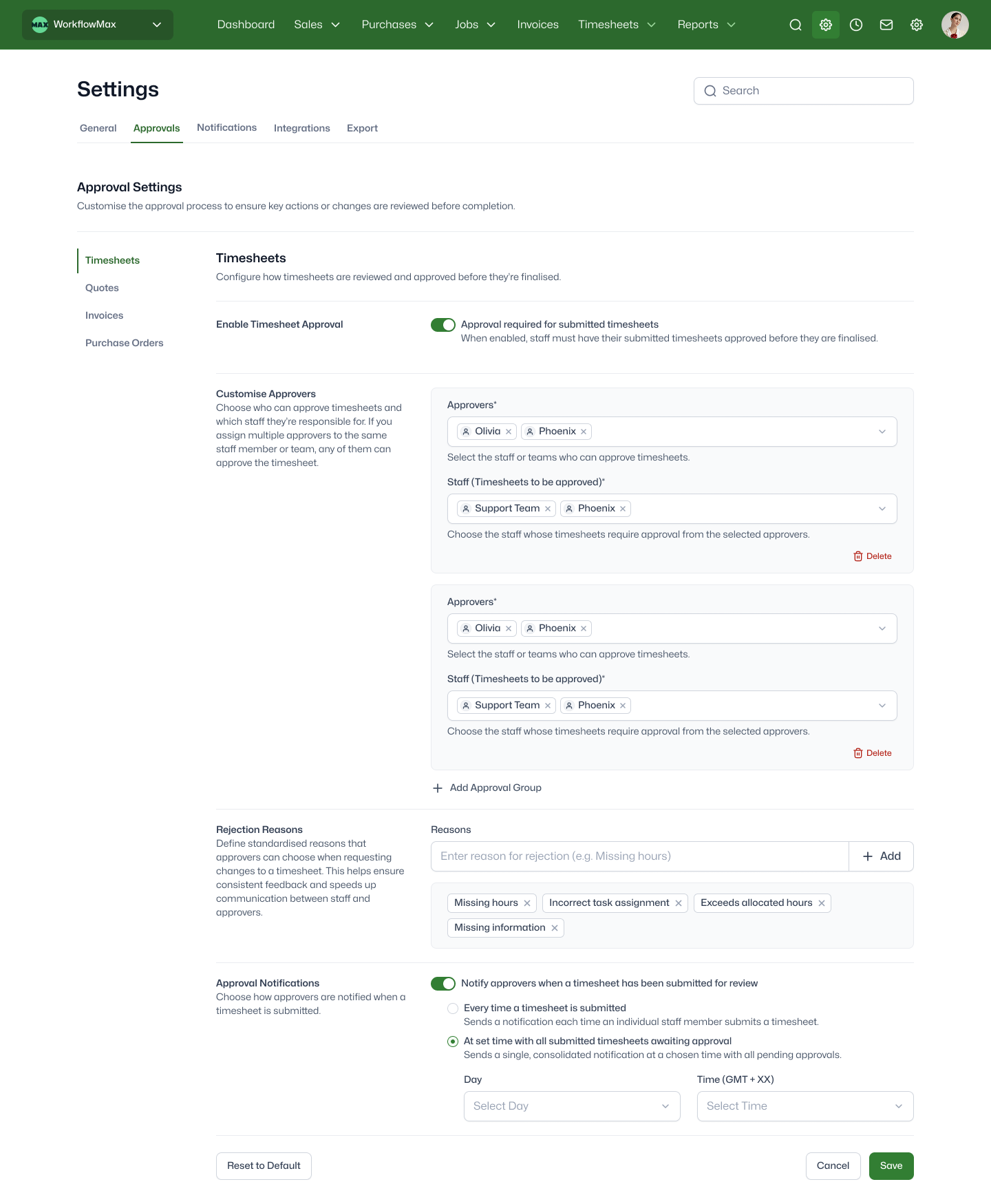
Custom approval groups
Assign the right approvers to each staff member with flexible approval groups that match your team structure.
Smart notifications
Automatic alerts when timesheets need review ‚ and when staff need to take action. No manual follow-up required.
Predefined rejection reasons
Speed up reviews with predefined rejection reasons. One click tells staff exactly what needs fixing ‚ no lengthy explanations required.
Complete approval history
A clear record of every timesheet's journey, from submission through review to approval. Know who signed off and when.
Capacity tracking alerts
Get automatic alerts when tracked hours fall below set thresholds to catch missing time entries early.
How it works
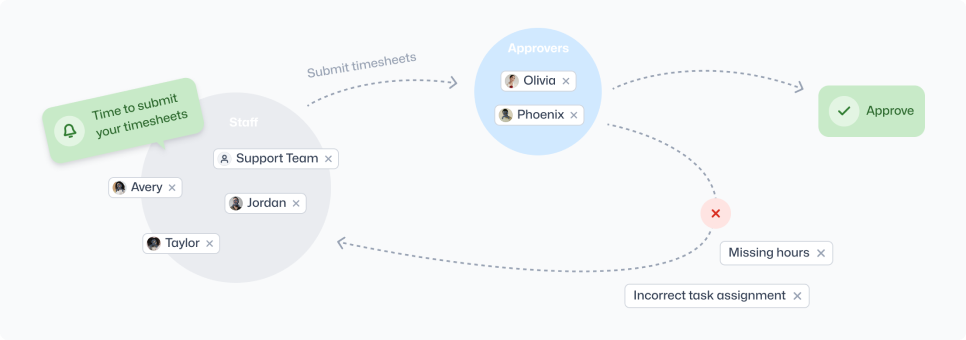
Staff submit timesheets
Team members complete and submit their timesheets, which automatically change to "waiting for approval" status.

Approvers Review
Approvers are notified that timesheets are awaiting approval, and can see all pending timesheets in one view. No hunting through emails or chasing individuals.
Approve or request changes
One click to approve. One click to request changes with a reason. Staff are notified instantly.
Resubmit if needed
When changes are requested, staff can edit and resubmit their timesheets for final approval.
Ready to see what your team's really logging?
Timesheet Approvals is available on Advanced plans.
Start a free trial to add visibility and accountability to your time tracking.
Frequently asked questions
Which subscription plans include Timesheet Approvals?
Timesheet Approvals is an Advanced plan feature. Not on Advanced yet? Start a free trial to test it out.
Can I assign different approvers to different staff members?
Yes. Create as many approval groups as you need ‚ by team, department, seniority, or any structure that fits. Each staff member routes to their designated approver.
What happens when a timesheet is rejected?
When an approver requests changes, the timesheet status changes to "change requested" and the staff member receives an email notification. They can then edit their timesheet and resubmit it for approval.
Can approvers write custom rejection messages?
Yes. While you can set up predefined rejection reasons for faster reviews, approvers can also provide custom feedback specific to each situation.
Will my team receive notifications about timesheet approvals?
Yes. Choose instant alerts per submission or a daily digest of pending reviews. Staff always get notified on approval or change requests.
What permissions are needed to manage approvals?
Admins and users with the "approval workflow" permission can configure approval groups and settings. Approvers only need access to the timesheets they're assigned to review.
Do timesheets need approval before invoicing
No. Timesheet Approvals is a visibility and accountability layer ‚ it doesn't block invoicing. You decide how strictly to enforce the workflow.
What happens to existing timesheets when I enable approvals?
Existing timesheets remain unchanged. Approvals only apply to timesheets submitted after you enable the feature.
What are common ways teams use Timesheet Approvals?
Weekly manager review of billable staff, project lead spot-checks before invoicing, contractor timesheet verification, and new starter oversight during onboarding.
Unsure where to start?
From free online tutorials, to live demos from a specialised partner - get the help you need
SELF-PACED
One sentence here to explain who this plan is best for
1
Unlimited access
Unlimited access to the course so you can always go back and revisit things
2
Unlimited access
Unlimited access to the course so you can always go back and revisit things
3
Training
Role-specific staff training modules
GUIDED
One sentence here to explain who this plan is best for
1
Unlimited access
Unlimited access to the course so you can always go back and revisit things
2
Unlimited access
Unlimited access to the course so you can always go back and revisit things
3
Training
Role-specific staff training modules
4
Training
Role-specific staff training modules
PREMIUM
One sentence here to explain who this plan is best for
1
Unlimited access
Unlimited access to the course so you can always go back and revisit things
2
Unlimited access
Unlimited access to the course so you can always go back and revisit things
3
Training
Role-specific staff training modules
4
Training
Role-specific staff training modules