Multi-currency

Why multi-currency?

Managing projects with international suppliers shouldn't mean manual currency calculations and spreadsheet juggling. Multi-currency support brings native foreign exchange handling directly into WorkflowMAX, so you can work with suppliers in their currency while keeping your books in yours.

Streamline international purchasing

Create purchase orders in your supplier's currency

Automatic conversions

Exchange rates applied automatically with the option to override

Accurate job costing

See costs in your base currency instantly

Seamless Xero sync

Foreign currency data flows directly to your accounting

How it works

Set your base currency

Define your organisation's base currency in settings. If you're integrated with Xero, WorkflowMAX automatically inherits your Xero account currency.

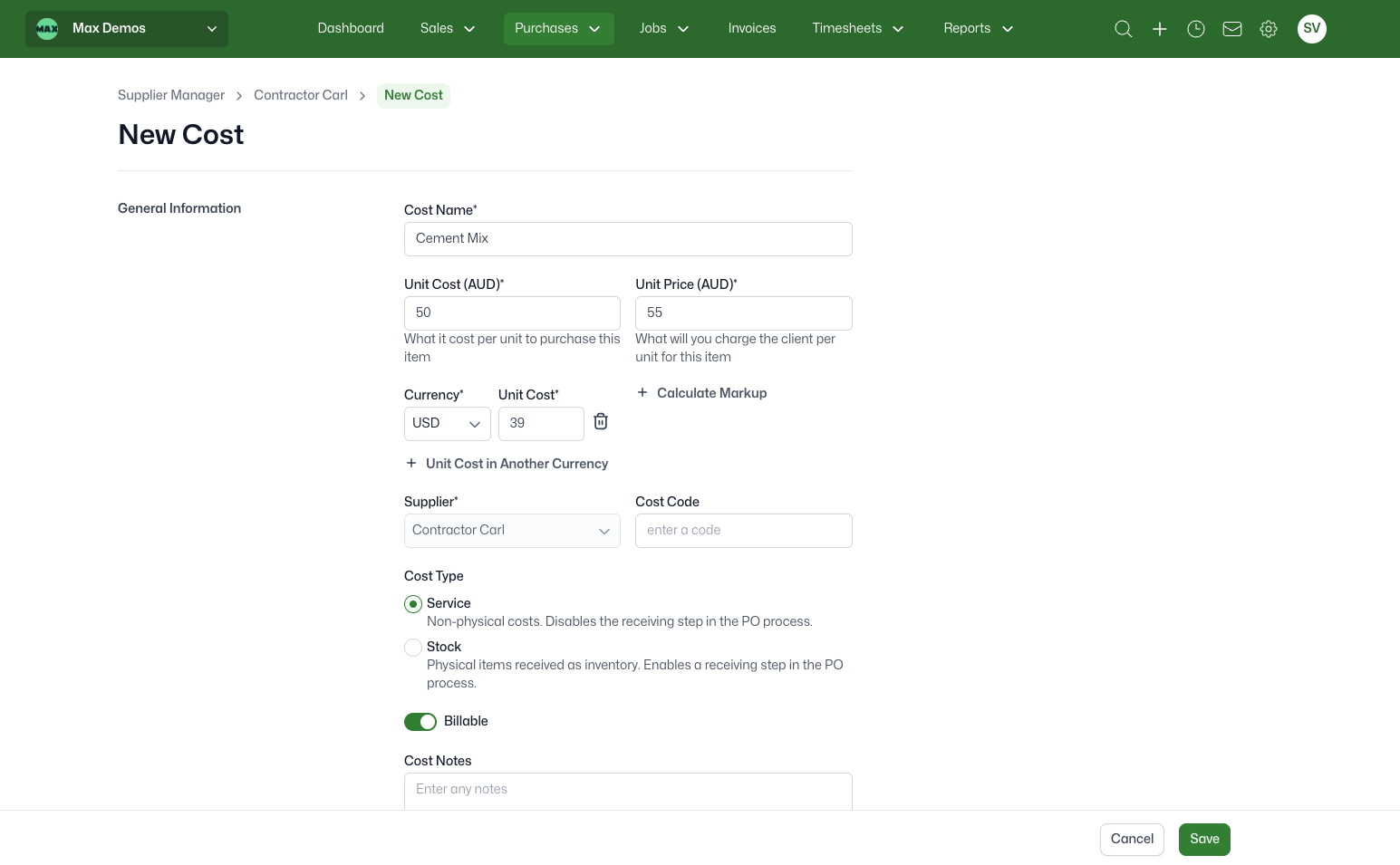
Add foreign currency costs

Set up inventory items with costs in multiple currencies. Enter USD, EUR, GBP or any currency your suppliers use.

Configure supplier currencies

Assign a default currency to each supplier in their financial information. When you create a purchase order, their currency is automatically applied.

Create purchase orders in any currency

When you select a supplier with a foreign currency, their currency is automatically applied with live exchange rates, and all costs display in the defined currency.

Bills sync seamlessly

No changes to your bill workflow. Foreign currency information flows back to Xero automatically.
Screenshot 2026-02-11 at 3.17.00 PM
colegas-trabajando-juntos-en-una-oficina-de-call-center

Who is this for?

Professional services firms with international suppliers
Architects, engineers, and consultants sourcing materials or services globally

Agencies with offshore contractors
Creative and digital agencies managing freelancers in multiple countries

Construction businesses
Builders and trade businesses importing materials from overseas suppliers

Getting started

Enable multi-currency in your Organisation Settings and set your base currency. Then assign currencies to your suppliers in their Financial Information section. That's it! The next time you create a PO for that supplier, WorkflowMAX handles the currency conversion automatically.

PO on multi-currency  (3)

Ready to streamline your international purchasing?

Multi-currency is currently in beta for WorkflowMAX Premium and Advanced subscriptions. To access it, contact our Support team to request enablement. Start a free trial or upgrade to work across currencies effortlessly.

Frequently asked questions

What currencies are supported?

WorkflowMAX supports all major global currencies. Exchange rates are pulled from live market data.

Can I manually adjust exchange rates?

Yes. While WorkflowMAX pulls current rates automatically, you can override them on any purchase order.

Does this work with Xero integration?

Yes. If you're using Xero integration, your base currency matches your Xero account, and all foreign currency transactions sync seamlessly.

Can I use multi-currency for quotes/invoices/jobs?

Multi-currency for purchase orders and bills is just the beginning. We're actively building multi-currency support across jobs, quotes, and invoices – bringing end-to-end foreign currency handling to your entire project lifecycle.

What if I change a supplier's currency?

You can update supplier currency at any time. New purchase orders will use the updated currency. Existing POs remain in their original currency.

Unsure where to start?

From free online tutorials, to live demos from a specialised partner - get the help you need

SELF-PACED

One sentence here to explain who this plan is best for

1

Unlimited access

Unlimited access to the course so you can always go back and revisit things

2

Unlimited access

Unlimited access to the course so you can always go back and revisit things

3

Training

Role-specific staff training modules

GUIDED

One sentence here to explain who this plan is best for

1

Unlimited access

Unlimited access to the course so you can always go back and revisit things

2

Unlimited access

Unlimited access to the course so you can always go back and revisit things

3

Training

Role-specific staff training modules

4

Training

Role-specific staff training modules

PREMIUM

One sentence here to explain who this plan is best for

1

Unlimited access

Unlimited access to the course so you can always go back and revisit things

2

Unlimited access

Unlimited access to the course so you can always go back and revisit things

3

Training

Role-specific staff training modules

4

Training

Role-specific staff training modules

Additional features