
Free Architecture Business Plan Template

Scale your practice with intention. This operational roadmap helps you transition from a reactive studio to a high-growth firm by defining your market position and lead qualification standards.

Scale Your Practice

Moving from a reactive studio to a high-growth firm requires a clear operational roadmap. This template provides the structure to define your market position and transition to a unified Job Profitability OS for interactive, 24/7 oversight of your firmโ€™s health:

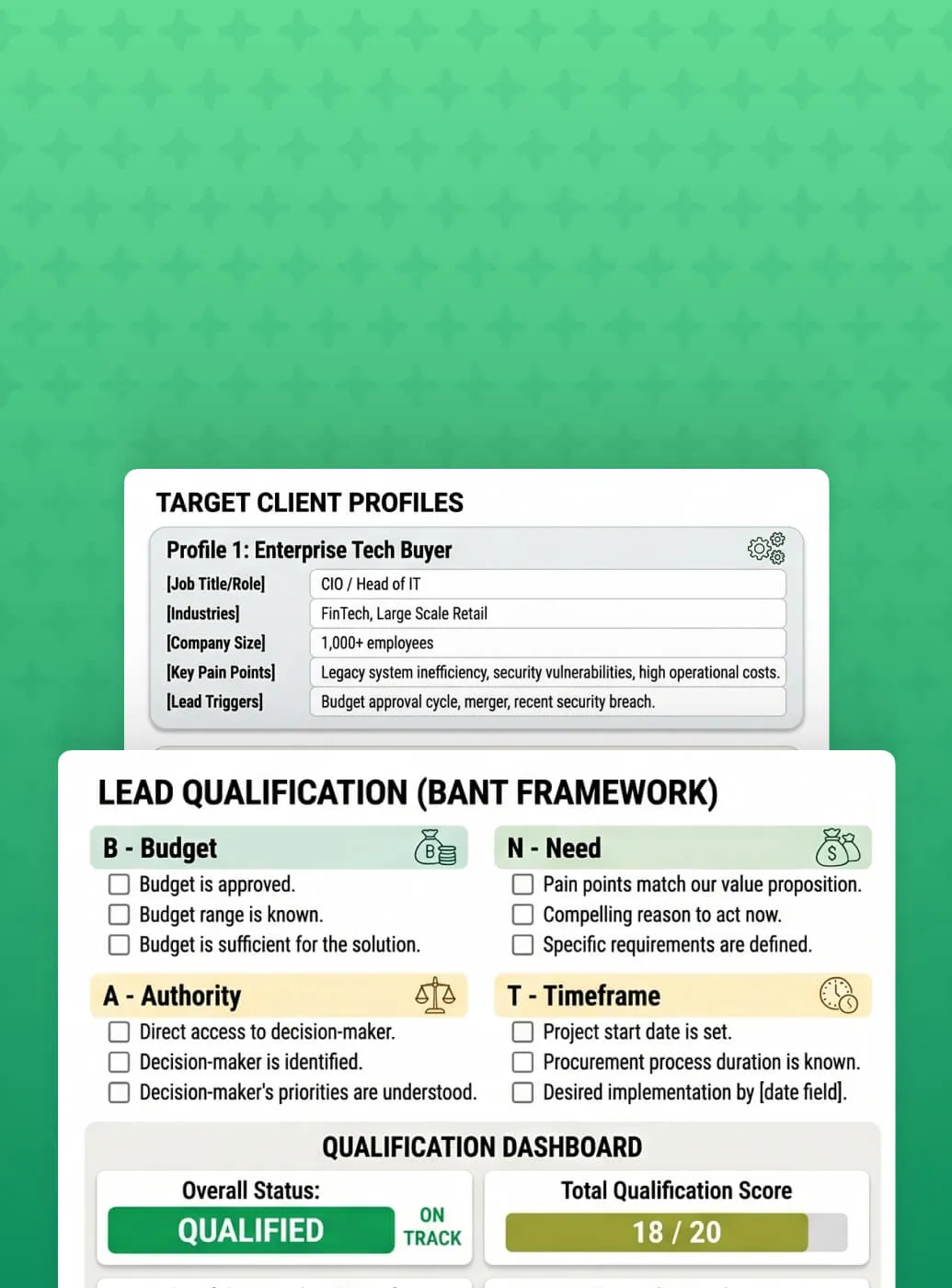
Define 3โ€“5 ideal client profiles to ensure your business development efforts stay focused on high-margin sectors.

Identify new revenue streams to capture more market share.

Formalize your referral partners and lead qualification criteria to ensure your pipeline remains healthy and billable.

Map out multi-year expansion plans and SEO focus areas to increase your firm's visibility in competitive regions.

Utilize the "Lead Qualification Criteria" section to identify high-value projects early, ensuring your studio only commits resources to viable, profitable leads.

Master the Art of the Pitch

All the latest insights from WorkflowMAX

Architecture Business Plan Template

June 19, 2026
โ€ข
5 min read

Heading 1

Heading 2

Heading 3

Heading 4

Heading 5
Heading 6

Lorem ipsum dolor sit amet, consectetur adipiscing elit, sed do eiusmod tempor incididunt ut labore et dolore magna aliqua. Ut enim ad minim veniam, quis nostrud exercitation ullamco laboris nisi ut aliquip ex ea commodo consequat. Duis aute irure dolor in reprehenderit in voluptate velit esse cillum dolore eu fugiat nulla pariatur.

Block quote

Ordered list

  1. Item 1
  2. Item 2
  3. Item 3

Unordered list

  • Item A
  • Item B
  • Item C

Text link

Bold text

Emphasis

Superscript

Subscript

Architecture Business Plan Template

June 19, 2026
โ€ข
5 min read

Heading 1

Heading 2

Heading 3

Heading 4

Heading 5
Heading 6

Lorem ipsum dolor sit amet, consectetur adipiscing elit, sed do eiusmod tempor incididunt ut labore et dolore magna aliqua. Ut enim ad minim veniam, quis nostrud exercitation ullamco laboris nisi ut aliquip ex ea commodo consequat. Duis aute irure dolor in reprehenderit in voluptate velit esse cillum dolore eu fugiat nulla pariatur.

Block quote

Ordered list

  1. Item 1
  2. Item 2
  3. Item 3

Unordered list

  • Item A
  • Item B
  • Item C

Text link

Bold text

Emphasis

Superscript

Subscript

Architecture Business Plan Template

June 19, 2026
โ€ข
5 min read

Heading 1

Heading 2

Heading 3

Heading 4

Heading 5
Heading 6

Lorem ipsum dolor sit amet, consectetur adipiscing elit, sed do eiusmod tempor incididunt ut labore et dolore magna aliqua. Ut enim ad minim veniam, quis nostrud exercitation ullamco laboris nisi ut aliquip ex ea commodo consequat. Duis aute irure dolor in reprehenderit in voluptate velit esse cillum dolore eu fugiat nulla pariatur.

Block quote

Ordered list

  1. Item 1
  2. Item 2
  3. Item 3

Unordered list

  • Item A
  • Item B
  • Item C

Text link

Bold text

Emphasis

Superscript

Subscript

Done with the Downloads? Switch to Active Growth.

Our free tools give you the blueprint, but WorkflowMAX provides the engine to automate it. Experience the full power of this proposal template integrated into a live lead-to-job workflow.

Frequently asked questions

No items found.

Education and training

Can I use this across multiple client accounts?

Yes. Firms managing multiple clients or entities can configure more than one WorkflowMAX account.

Does it work on mobile?

Yes - because it works through your AI assistant rather than the WorkflowMAX interface directly, you can use it wherever you have access to Claude, including on mobile.

What if the AI makes a mistake? Could it create the wrong invoice or update the wrong job?

The AI acts on your instructions, so it won't take action without a clear prompt from you. As with any tool, we recommend reviewing anything created or updated through MCP before sending it to a client. Your existing approval workflows in WorkflowMAX still apply.

Which AI assistants work with WorkflowMAX?

WorkflowMAX's MCP integration works with any AI assistant that supports the Model Context Protocol - including Claude, and other MCP-compatible tools. This means you can connect your WorkflowMAX account to whichever AI assistant fits your team's workflow and start taking action on your live project data straight away.

Can I use AI to manage my projects in WorkflowMAX?

Yes. Once connected, AI assistants like Claude can create and update jobs, draft quotes and invoices, check staff capacity, review financial summaries and more - all through conversation. It's designed for professional services firms that want to spend less time on admin and more time on billable work.

What is WorkflowMAX's AI integration and how does it work?

WorkflowMAX's AI integration uses MCP (Model Context Protocol) - a standard that lets AI assistants like Claude connect directly to your WorkflowMAX account. Rather than logging in to find information or manually updating records, you can manage your projects, jobs, invoices and team through natural conversation with your AI assistant, all against your live WorkflowMAX data.

What if I change a supplier's currency?

You can update supplier currency at any time. New purchase orders will use the updated currency. Existing POs remain in their original currency.

Can I use multi-currency for quotes/invoices/jobs?

Multi-currency for purchase orders and bills is just the beginning. We're actively building multi-currency support across jobs, quotes, and invoices โ€“ bringing end-to-end foreign currency handling to your entire project lifecycle.

Does this work with Xero integration?

Yes. If you're using Xero integration, your base currency matches your Xero account, and all foreign currency transactions sync seamlessly.

Can I manually adjust exchange rates?

Yes. While WorkflowMAX pulls current rates automatically, you can override them on any purchase order.

What currencies are supported?

WorkflowMAX supports all major global currencies. Exchange rates are pulled from live market data.

Can I include attachments with the quote?

Yes. Customers can view the quote documents and attached files as part of the eQuote experience.

Can customers choose optional items?

Yes. eQuote supports optional items so customers can select what they want included.

Can customers accept with comments?

Yes. Customers can add optional comments when they accept or decline.

Is this an e-signature replacement?

eQuote is designed for electronic quote acceptance within WorkflowMAX. If your process requires a formal signature workflow, you may still need an e-signature tool โ€” but many teams will be able to streamline acceptance without one.

Is Sales Pipeline available on all plans?

Sales Pipeline is an add on for legacy plans (Standard / Premium), and included for Pro and Advanced plans.

Do metrics update when I filter the board?

Yes. Metrics update based on the filters you apply, helping you focus on specific pipelines, owners, or lead segments.

Can we create our own stages?

Yes. You can create as many lead statuses as you need, and update them at any time.

How is this different from Job Manager Kanban?

Pipeline for Lead Manager is built specifically for sales opportunities (leads). Job Manager Kanban is for delivery work (jobs). You can use both, depending on where your team is in the lifecycle.

What bulk actions are available on WIP ledger entries?

You can apply bulk actions to ledger entries, including Invoice, Set as Billable / Nonโ€‘Billable, and Write off.

Can I export WIP details?

Yes. You can export the point-in-time WIP view (including the underlying ledger) to CSV.

Can I view WIP โ€œas atโ€ a past date?

Yes. Use the As at date selector to reconstruct WIP at a historical point in time, including the table view and CSV export.

What does Advanced WIP show on a job?

Advanced WIP shows a breakdown of Time/Costs Entered, WIP Invoiced, WIP Written Off, and the resulting Current WIP Balance, plus a ledger of the entries that make up that balance.

What is Work In Progress (WIP) in project-based businesses?

WIP (work in progress) is the value of time and costs that have been incurred on a job but not yet invoiced (or otherwise resolved), helping you understand profitability and revenue-in-progress.

Where do I find it?

Open any job and select the new WIP tab.

Which plans include Advanced WIP?

Advanced WIP is included on Advanced plans. Standard/Premium customers can trial it free for 14 days.

Does Advanced include dedicated account management and onboarding support?

Advanced includes access to a dedicated account manager, guided onboarding, and quarterly business reviews for annual subscribers with 25 or more users. If your team is below that threshold or on a monthly subscription, you'll still have access to priority support.

What happens when my team grows and I need to add more users?

Your subscription doesn't update automatically. To add users, you'll first need to update your subscription to the appropriate user band or user count, then add the new users to your account. Admins can manage this from within the billing settings.

Are there any setup fees or contracts?

No setup fees and no lock-in contracts. You can cancel at any time.

Is there a free trial?

Yes. All plans include a 14-day free trial with no credit card required. You get full access to the features on your chosen plan so you can test with real data before committing.

Which plan is right for my team?

Standard suits freelancers and small teams who need a solid end-to-end workflow without complexity. Premium suits growing teams who need multi-currency, deeper reporting, and workflow automation via Zapier. Advanced suits larger or more complex operations that need capacity planning, AI features, and a higher level of account support. If you're unsure, start a free trial โ€“ you can always upgrade.

How does Advanced pricing work?

Advanced is priced at a flat per-user rate โ€“ unlike Standard and Premium, there are no user bands. Because Advanced includes a higher level of account support, we size it through a short discovery call rather than a self-serve checkout. Book a call with our team and we'll confirm pricing for your organisation.

What's the difference between Standard, Premium, and Advanced?

Standard covers the core platform โ€“ quoting, job management, time tracking, invoicing, Xero integration, reporting, and document management. Premium adds productivity reporting, multi-currency support for POs and bills, Zapier integration, Kanban job board view, and the ability to import invoices from Xero. Advanced includes everything in Premium plus Lead Manager, Capacity Planning, Integrated Calendar, Quote Variations, Scheduled Reports, advanced percentage-based invoicing, a sandbox environment, extended API access, and priority support.

How does WorkflowMAX pricing work?

WorkflowMAX is priced per user per month. Standard and Premium are priced in user bands โ€“ 1โ€“3, 3โ€“5, 5โ€“10, 10โ€“20, 20โ€“50, 50โ€“100, and 100+ users โ€“ so the per-user rate decreases as your team grows. Advanced is a flat per-user rate regardless of team size. Pricing varies by currency depending on your region.

WorkflowMAX Premium sounds great, but does it cost extra?

Yes, WorkflowMAX Premium is an optional upgrade from your standard subscription plan. See our pricing here.

Will I be able to access WorkflowMAX when Iโ€™m not in the office?

Yes. You can manage jobs, track time, and access documents from anywhere via native iOS and Android apps, or through any web browser on iPad or desktop. Learn more about mobile access.

Will connecting SharePoint affect my existing WorkflowMAX documents?

Documents previously uploaded to WorkflowMAX will need to be migrated to SharePoint into the respective client and job folder structure. Once migrated, all future documents sync bi-directionally.

Will I lose access to AI features I currently use?

AI features remain available to any account with an active credit balance. Advanced plans include credits as part of the subscription, scaled to user count. Standard and Professional plans can access AI features by purchasing a credit pack add-on.

Will WorkflowMAX change my actual calendar events?

No. WorkflowMAX only reads your calendar it never modifies, deletes, or creates events in Google or Outlook. Your calendar remains the source of truth.

Can I edit or pause a scheduled report?

Yes. You can edit schedules, add or remove recipients, or disable any scheduled report at any time from the centralised management view.

Why would an accounting firm choose SuiteFiles for their WorkflowMAX DMS?

SuiteFiles is designed for accounting and professional services firms, with client portals, document signing, and structured filing built for practice management. If your firm already uses SuiteFiles, the WorkflowMAX integration keeps job documents within the same platform.

Why would a professional services firm use HubSpot alongside WorkflowMAX?

HubSpot excels at marketing automation, lead nurturing, and high-volume sales workflows. For firms with dedicated BD teams running multi-channel campaigns, HubSpot handles the top of the funnel while WorkflowMAX manages everything from job creation through to invoicing.

Why would a firm choose Dropbox as their WorkflowMAX DMS?

Dropbox is a good fit for firms that already use it for file sharing and collaboration. Job documents live alongside your other Dropbox files with the same sharing permissions you already manage. Dropbox's external sharing capabilities extend naturally to job documents.

Why should I connect WorkflowMAX to Zapier?

Zapier eliminates manual data transfer between WorkflowMAX and the other tools your business relies on. Automate job creation, contact syncing, notification routing, and reporting triggers saving time and reducing the risk of data falling between systems.

Why would a firm choose SharePoint over other document management options?

Firms already invested in Microsoft 365 benefit from having job documents live alongside existing SharePoint files, Teams channels, and OneDrive. The bi-directional sync means staff can access project documents from either platform, and IT teams maintain consistent security and governance policies.

Why is variation tracking important for architecture and engineering firms?

Architecture and engineering projects routinely encounter scope changes additional services, design revisions, consultant scope adjustments. Without formal tracking, these changes often go unbilled. Quote Variations ensure every change is documented against the original fee proposal.

Why is centralised document management important for professional services firms?

Professional services projects accumulate significant documentation contracts, correspondence, drawings, reports, approvals. When scattered across email, local drives, and cloud folders, finding the right version becomes a productivity drain. WorkflowMAX centralises documents at the job level, connected to the same record where you track time, costs, and invoices.

Why is centralised email capture important for professional services firms?

Professional services work generates high volumes of email scope discussions, approvals, change requests, client instructions that often form part of the project record. Losing or misfiling these creates risk in disputes, audits, and handovers. Collaboration Manager ensures every relevant email is attached to the job it relates to, creating an auditable trail without relying on individual staff to maintain folder structures.

Which web browsers does WorkflowMAX support?

WorkflowMAX supports modern versions of all major web browsers, including Google Chrome, Microsoft Edge, Mozilla Firefox and Safari. For the best experience - particularly with reporting and complex workflows - we recommend keeping your browser up to date.

Which tools can I migrate from?

WorkflowMAX accepts data imports from any system that can export to CSV or Excel - including spreadsheets, generic project management tools, and other job or practice management platforms. For data that needs more sophisticated mapping (for example, historical time entries linked to specific jobs and staff), a certified implementation partner can help structure and load the import.

Who is WorkflowMAX designed for?

WorkflowMAX is designed for service-based businesses that bill by the hour or by deliverable - typically teams of 1 to 200 people who need to track time, manage jobs, raise quotes and invoice clients accurately. It suits firms that have outgrown spreadsheets but don't want the complexity or cost of enterprise PSA platforms. Common users include architects, engineers, creative agencies, business consultants and building and construction firms.

Which document types does EzzyBills support?

EzzyBills processes supplier invoices, receipts, and bills in PDF, image, and email formats. The extraction technology handles different layouts without requiring pre-configured templates for each supplier.

Which WorkflowMAX plans support the SuiteFiles integration?

SuiteFiles integration is available across WorkflowMAX plans. You'll need a SuiteFiles subscription separately.

Why is Google Drive a good choice for WorkflowMAX document management?

For firms already using Google Workspace, the integration keeps job documents within the same ecosystem as Gmail, Sheets, and Docs. Files benefit from Google Drive's search, versioning, and sharing while remaining linked to the relevant job in WorkflowMAX.

Which countries is the Airwallex integration available in?

The Airwallex integration is available to WorkflowMAX customers in Australia, New Zealand, and the United Kingdom.

Why do purchase orders not flow from WorkflowMAX to QuickBooks?

Purchase orders are commitments, not financial transactions. When you receipt a PO in WorkflowMAX, the resulting cost entry flows to QuickBooks as an accounts payable item. This keeps your accounting ledger clean.

Why do accounting firms choose WorkflowMAX over other Xero-connected job management tools?

WorkflowMAX offers the tightest Xero integration available bi-directional sync, account code and tracking category mapping at granular levels, payroll export, and automatic payment tracking. Combined with purpose-built WIP management, write-on/off, and practice-level profitability reporting, it's designed for firms where Xero is the financial backbone.

Which devices does WorkflowMAX support?

WorkflowMAX is available on iOS and Android devices via the native mobile app.

Why is WIP management critical for professional services firms?

WIP is effectively unbilled revenue work delivered but not yet paid for. Without active management, WIP ages, gets forgotten, and eventually written off. WIP Manager makes that gap visible so you can close it systematically.

Which reports support AI Insights?

AI Reporting Insights currently supports table-view custom reports across jobs, quotes, leads, purchase orders, invoices, time, and WIP. Additional report types will be added as the feature matures.

Why are AI features moving to a credit-based model?

AI features require specialist processing for every request unlike traditional software where the cost is the same regardless of usage. A credit model lets WorkflowMAX offer AI capabilities at a sustainable, transparent cost that scales with your usage rather than applying a blanket price increase across all plans.

Which plans include Integrated Calendar?

Integrated Calendar is available on the Advanced plan.

Which document management systems does WorkflowMAX integrate with?

WorkflowMAX integrates with SharePoint, Google Drive, Dropbox, Box, and SuiteFiles. Once connected, documents uploaded against a job are stored in your chosen DMS and remain accessible from within WorkflowMAX. You can connect one DMS at a time, and switching is straightforward.

Why do professional services firms lose revenue through poor invoicing processes?

Revenue leakage typically happens when time goes unbilled, WIP ages without being invoiced, or manual processes introduce errors between tracking and billing. WorkflowMAX closes these gaps by connecting time tracking, job costing, and invoicing in one platform so every billable hour and cost flows directly into invoices without re-keying or reconciliation across separate tools.

Where are WorkflowMAX support teams located?

WorkflowMAX support teams are based across the United Kingdom, USA, Australia, New Zealand and Asia. This distribution provides 24/7 coverage across major business timezones and means customers typically reach a local support team during their working hours.

What support does WorkflowMAX include?

All WorkflowMAX customers have access to 24/7 in-product live chat support, email support at support@workflowmax.com, and the WorkflowMAX help centre. Advanced plan customers also receive priority support. Customers on the Advanced plan with 25 or more users on annual billing additionally receive a dedicated account manager and quarterly business reviews. There are no separate support fees on any plan.

Where is my WorkflowMAX data stored?

WorkflowMAX customer data is hosted on Amazon Web Services (AWS) in the Sydney, Australia region. AWS provides enterprise-grade physical and network security, including 24/7 facility monitoring, access controls and continuous infrastructure monitoring. For details on WorkflowMAX's data handling, security practices and the data processing addendum, see the security page and data processing addendum.

What's the difference between Standard, Premium and Advanced?

Standard covers the core quote-to-invoice workflow and is best for freelancers and small teams. Premium adds collaboration, reporting and integration features - multi-currency purchase orders and bills, productivity reporting, Zapier and a kanban job board - suiting growing teams. Advanced is the full platform, with the biggest differentiators being capacity planning, quote variations and approval workflows. It also adds lead manager, integrated calendar capture, scheduled custom reports, sandbox environments, extended API endpoints and priority support. See the pricing page for the full feature comparison.

What's the difference between Essentials, Pro, and Advanced?

Essentials covers the core job management workflow โ€“ quoting, time tracking, job costing, invoicing, and Xero integration. Pro adds features for growing teams, including multi-currency support, Kanban job boards, productivity reporting, and Zapier integration. Advanced is designed for firms that need full operational control โ€“ it includes lead management, integrated calendar time capture, scheduled reports, advanced invoicing, a sandbox environment, and priority support with a dedicated account manager. Most professional services firms with 10+ staff find Pro or Advanced gives them the depth they need.

Where does my data go?

Your WorkflowMax by BlueRock data is stored in its own dedicated data warehouse, hosted in our Microsoft Azure Sydney Data Center. If you'd like it stored somewhere else (even your own servers), just enquire about our BYOD (bring-your-own-database) option.

What reports does SyncHub offer?

SyncHub steps in where out-of-the-box reporting solutions fall over. We don't presume to know the questions you have of your data, and thus we don't provide any reports. What we do give you is raw data - as pure as possible - so you can build the reports that you need for your business. Of course, if you need help, you're sure to find a helpful professional in our Services Store.

What's the difference between scheduling and capacity planning in WorkflowMAX?

Scheduling focuses on when work happens โ€“ mapping tasks, milestones, and deadlines across a project timeline using the Gantt chart. Capacity planning focuses on who does the work โ€“ visualising each team member's workload, availability, and utilisation across all their jobs. WorkflowMAX offers both: scheduling to keep projects on track, and capacity planning to ensure you're not over-committing or under-utilising your team. Together, they connect your project plan directly to resource reality.

Which WorkflowMAX plans include the SharePoint integration?

SharePoint integration is available on Professional and Advanced plans.

What's the difference between WIP Manager and WIP reports?

WIP Manager is an operational view a live list of all jobs with uninvoiced work for day-to-day billing decisions. WIP reports (Aged WIP, WIP Control, Non-Invoiced Time) provide analytical views for management reporting. Together they cover both operational and strategic WIP management.

Which WorkflowMAX plan includes Capacity Planning?

Capacity Planning is available on the Advanced plan. You can start a 14-day free trial of Advanced to test it with your team before committing.

What standard reports does WorkflowMAX include?

WorkflowMAX includes over 20 standard reports covering key professional services metrics: aged WIP, aged debtors, job profitability, staff utilisation, productivity, billable time, write-on/off, and more. These are pre-built and ready to run. For anything beyond the standard set, the custom report builder lets you create exactly what you need.

What views does WorkflowMAX offer for managing jobs and tasks?

WorkflowMAX provides list, Kanban board, and Gantt-style schedule views for managing jobs and tasks. Kanban lets you visualise work by status and drag tasks between columns, while the schedule view shows task timelines and dependencies. Combined with filtering by job state, client, or assigned staff, you can tailor the view to how your team works.

What's the best way to get visibility over staff time across my firm?

Run a time report in the custom report builder to see submitted hours by staff, job, client, or date range filterable and exportable. Combine this with the KPI and Productivity dashboards for real-time utilisation metrics without building separate spreadsheets. Purpose-built time reporting means your data is always connected to job profitability and WIP unlike standalone time trackers that require manual reconciliation with your billing system.

What's the difference between a quote and an estimate in WorkflowMAX?

There's no functional difference both produce the same document and workflow. The distinction is primarily about terminology and how your industry frames pricing: a quote typically represents a fixed price commitment, while an estimate signals that final billing may vary based on actual time and costs. WorkflowMAX supports both approaches within the same quoting engine, so you choose the language that fits your client agreements.

What integrations does WorkflowMAX support?

WorkflowMAX integrates with leading accounting, productivity and document management platforms - including Xero, QuickBooks Online, HubSpot, Zapier, SuiteFiles, Dropbox, Google Drive, Airwallex and EzzyBills. Premium and Advanced plans also include Zapier, which connects WorkflowMAX to thousands of additional applications. See the full integrations directory for the current list.

What happens at the end of my trial?

At the end of your 14-day trial, you can convert to a paid subscription on Standard, Premium or Advanced - your data, settings and configuration are preserved. If you choose not to subscribe, your account is suspended and you can reactivate it later by completing the subscription. To convert, log into your account and complete the subscription form, or contact support@workflowmax.com for help.

What plans does WorkflowMAX offer?

WorkflowMAX offers three plans. Standard suits freelancers and small teams who need core quoting, time tracking, jobs, invoicing and Xero integration. Premium adds productivity reporting, multi-currency purchase orders and bills, Zapier integration, kanban job board view and client groups - ideal for growing teams. Advanced adds capacity planning, quote variations, approval workflows, lead manager, integrated calendar capture, advanced invoicing, scheduled custom reports, sandbox environments, extended API endpoints and priority support. See the full plan comparison.

What regions does WorkflowMAX serve?

WorkflowMAX serves customers around the world. Pricing is available in five currencies - AUD, NZD, GBP, USD and CAD - so the price you see depends on your region. Customer data is hosted on Amazon Web Services in the Sydney, Australia region. Team members are based across the UK, USA, Australia, New Zealand and Asia, providing 24/7 support coverage across major business timezones.

What industries use WorkflowMAX?

WorkflowMAX is used across professional services industries where billable time and project profitability matter. The most common industries are architecture, engineering and surveying, creative and digital agencies, business and management consulting, IT services, and building and construction. The platform is flexible enough to suit any service business that quotes work, tracks time against jobs, and invoices clients - including specialist consultancies, project-based contractors, and design firms.

What is WorkflowMAX?

WorkflowMAX is job and project management software built for professional services businesses. It brings quoting, time tracking, job management, invoicing and reporting into a single platform, with deep two-way integration to Xero and QuickBooks. WorkflowMAX supports thousands of architects, engineers, agencies, consultants and construction firms around the world.

What kind of support is available if my agency needs help?

WorkflowMAX provides 24/7 support, you can access our Help Centre with step-by-step guides, raise a support ticket, or join live and on-demand webinars. The free WorkflowMAX Academy offers online training, and our Certified Implementation Partners provide premium, hands-on support worldwide. Find a partner near you.

What is Zapier and how does it work with WorkflowMAX?

Zapier is an automation platform that connects WorkflowMAX to over 8,000 other apps without code. You create 'Zaps' automated workflows triggered by events in one app that perform actions in another. For example, a new deal won in your CRM can automatically create a job in WorkflowMAX.

What happens to my Xero contacts when I connect WorkflowMAX?

On initial setup, import your full Xero contact database into WorkflowMAX with a few clicks. Ongoing, contacts stay synchronised so updates in either platform are reflected in the other. For firms already running their practice through Xero, this means a zero-friction starting point.

What is the WIP Manager in WorkflowMAX?

WIP Manager gives you a real-time view of all work in progress every job's unbilled time and costs, quoted values, invoiced amounts, and remaining WIP. Jobs appear automatically regardless of state, so you always know what revenue is sitting uninvoiced.

What kind of insights will I see?

Depending on the report, you may see revenue concentration risks, utilisation trends, job profitability outliers, ageing WIP patterns, or conversion rate shifts. The AI adapts its analysis to the data type and surfaces what's most significant.

What is AI Reporting Insights in WorkflowMAX?

AI Reporting Insights analyses your custom reports and generates a plain-language summary of trends, anomalies, key drivers, and suggested next steps. Instead of interpreting rows of data manually, you get an actionable overview that highlights what matters. It reads your data it never changes it.

What if I don't want to use AI features?

That's fine. AI Credits only apply to AI-powered features. The core WorkflowMAX platform timesheets, quoting, invoicing, job management, reporting works exactly the same with or without AI enabled.

What happens when my credits run out?

Your admin controls the behaviour they can allow overages up to a ceiling they define, or stop AI access until credits refresh at the start of your next billing cycle. Full control over AI spending with no surprise charges.

What happens if I allocate too many hours to someone?

The system won't block you over-allocation is intentionally allowed so you can plan ahead and adjust. Over-allocated staff are highlighted clearly with colour coding, and capacity percentages update in real time so you can redistribute work before it becomes a problem.

How long are the download links valid?

For security purposes, download links expire after three days. Recipients should download their reports within this timeframe.

Is there an Android app for WorkflowMAX?

Yes. The WorkflowMAX Android app is available on the Google Play Store and supports time tracking, job and client lookup, viewing schedules, and document capture. The app is built for staff working in the field and complements the full WorkflowMAX web application. For details and download links, see the WorkflowMAX mobile page.

Is there an iOS app for WorkflowMAX?

Yes. The WorkflowMAX iOS app is available on the App Store and supports time tracking, job and client lookup, viewing schedules, and document capture. The app is designed for use in the field and works alongside the full WorkflowMAX web application. For details and download links, see the WorkflowMAX mobile page.

Is there a help centre or knowledge base?

Yes. The WorkflowMAX help centre contains hundreds of detailed setup guides, how-to articles, troubleshooting tips and video walkthroughs covering every area of the platform. The help centre is publicly accessible and is the fastest way to find answers to specific configuration questions.

Is there a free trial of WorkflowMAX?

Yes. WorkflowMAX offers a 14-day free trial of the full platform, with no credit card required to start. The trial includes access to all core features so you can properly evaluate the product against your business needs. Start your free trial directly from the WorkflowMAX website - setup takes a couple of minutes.

What currencies can I pay in?

WorkflowMAX bills in five currencies: Australian dollars (AUD), New Zealand dollars (NZD), British pounds (GBP), US dollars (USD) and Canadian dollars (CAD). The currency you're billed in is determined at signup based on your region. The platform itself supports multi-currency purchase orders and supplier bills on the Premium and Advanced plans for businesses that buy from suppliers across borders. Multi-currency client invoicing is not currently supported.