Manage quote changes without reissuing everything

Quote variations

Quote Variations lets you create and approve scope changes after a quote has been accepted, while keeping a clear record of what changed and how it impacts the job budget.

Why use Quote Variations?

Scope changes are common in construction, consulting, and other project-based work. But rebuilding an entire quote creates confusion and makes it harder to keep everyone aligned.

features-icon

Handle changes after acceptance

Add variations once the original quote is accepted, without duplicating the full quote.

features-icon

Make changes obvious

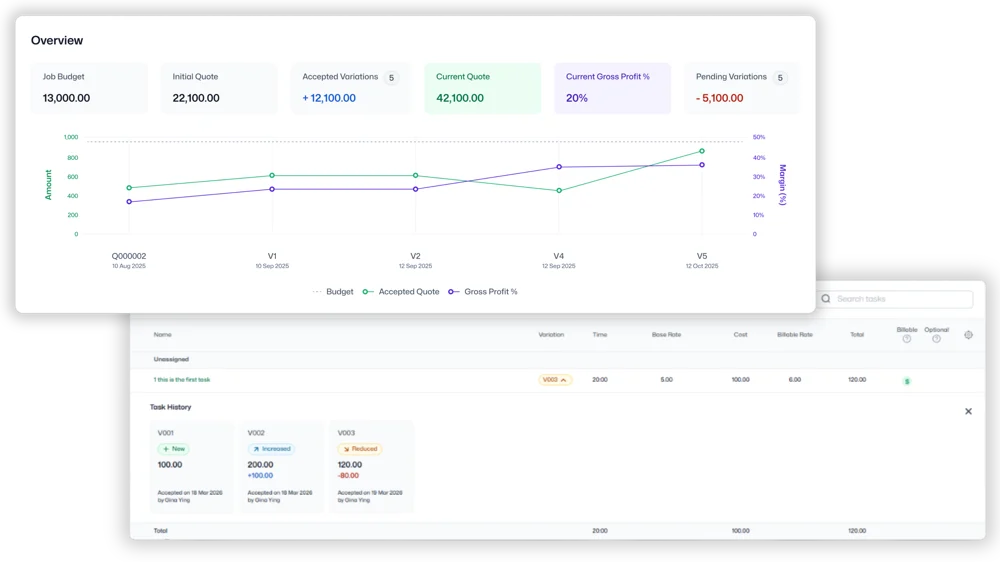
Clear visual indicators show whether items are increased, decreased, or new.

features-icon

See the impact instantly

An impact summary highlights the net change and the updated job budget before you send anything.

features-icon

Keep original vs current crystal clear

Separate views help you compare the current quote scope (including approved variations) with the original accepted quote.

Lead manager
listing-divider

How Quote Variations works

1

Create a variation

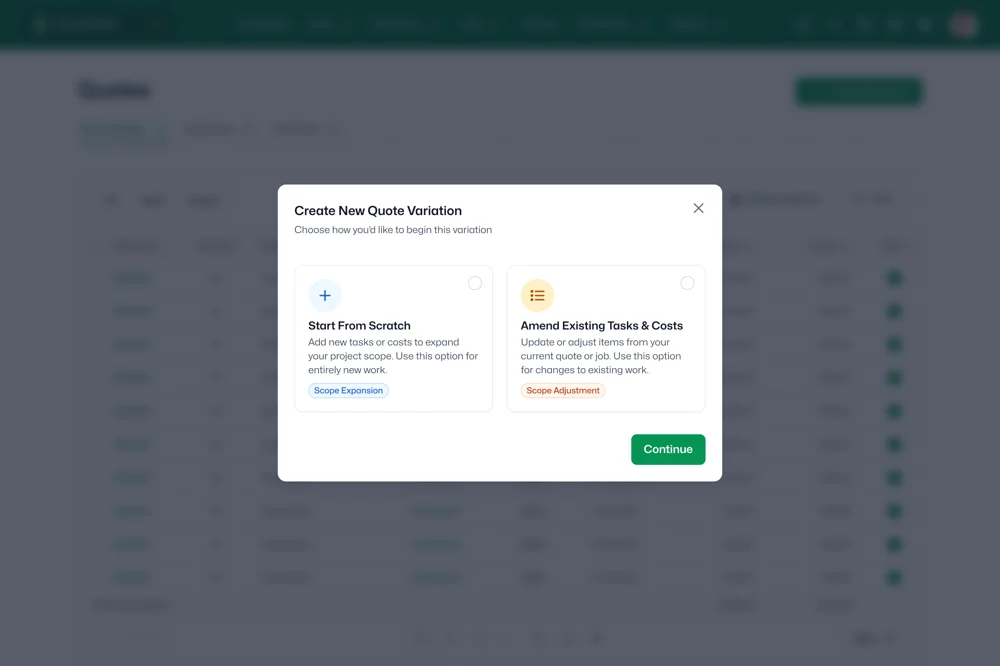
Create a variation from scratch or amend existing quote items.

2

Update items and pricing

Add new items, adjust quantities and pricing, or amend existing line items.

3

Review the impact

Check the impact summary to understand the net change and updated budget.

4

Share and confirm

Send the variation for approval so everyone is aligned on the updated scope.

Lead manager
listing-divider

Built for teams where scope changes are normal

Construction teams managing change requests

  • Capture site-driven scope changes and keep pricing and approvals clear.
  • Make it obvious what was added, removed, or adjusted before work continues.

Consulting teams updating deliverables mid-project

  • Document changes to deliverables, timelines, or effort as the project evolves.
  • Keep a clean record of what changed so handovers and invoicing stay straightforward.

Project-based businesses that need a clear audit trail of quote changes

  • Maintain a clear history of the original accepted quote versus the current scope.
  • Reduce disputes by showing the net impact of each variation on the overall job budget.
Lead manager

WorkflowMAX is essential for our business. It's intuitive, easy to use, and makes us much more efficient in charging projects correctly.

Andrew S.

Episode Two

We moved back and the team actually loves using it—billing is faster and we can see margins live.

Darlene Robertson

Principal, Surveying & Engineering Firm

It’s the same soul with better bones—job costing, timesheets, and invoicing finally work as one.

Floyd Miles

Implementation Partner

WorkflowMAX has made a huge difference to how we run our projects. A great system backed by great support. Highly recommended.

Rob P.

MAF Associates

Any questions?

Why is variation tracking important for architecture and engineering firms?

Architecture and engineering projects routinely encounter scope changes additional services, design revisions, consultant scope adjustments. Without formal tracking, these changes often go unbilled. Quote Variations ensure every change is documented against the original fee proposal.

What are Quote Variations in WorkflowMAX?

Quote Variations let you track scope and budget changes as a project evolves, with each variation linked to the original accepted quote. Instead of overwriting the original or creating a new standalone quote, variations create a clear change record showing what was added, removed, or adjusted.

How do Quote Variations help manage scope creep?

Scope creep erodes margins when changes aren't documented and priced. Quote Variations formalise every change what shifted, by how much, and the budget impact so clients and project managers have a shared record. This turns informal adjustments into auditable, billable changes.

Does a variation update the job budget automatically?

Yes. Quote Variations update budget visibility at the job level so you can see the impact of changes on the overall budget as they happen.

Can I still see the original accepted quote after creating a variation?

Yes. The original accepted quote stays unchanged. View it separately from the current scope for a baseline comparison.

Can I create a variation by editing existing quote items?

Yes. Variations can be created from scratch or by amending existing items. Visual indicators show increased, decreased, and new items so the changes are immediately clear.

Can I add more than one variation to the same quote?

Yes. Multiple variations can be created over time, so each scope change is tracked separately. This gives you a full audit trail of how a project's budget evolved.

addt-bg-left

Additional features

addt-bg-right
{"@context":"https://schema.org","@graph":[{"@type":"SoftwareApplication","name":"WorkflowMAX – Quote Variations","url":"https://www.workflowmax.com/job-management-software/quote-variations","applicationCategory":"BusinessApplication","operatingSystem":"Web, iOS, Android","brand":{"@id":"https://www.workflowmax.com/#organization"},"isPartOf":{"@id":"https://www.workflowmax.com/#software"},"description":"Track and bill scope changes with quote variations linked to the original quote and job.","featureList":"Quote Variations"},{"@type":"BreadcrumbList","itemListElement":[{"@type":"ListItem","position":1,"name":"Home","item":"https://www.workflowmax.com/"},{"@type":"ListItem","position":2,"name":"Features","item":"https://www.workflowmax.com/job-management-software/all-features"},{"@type":"ListItem","position":3,"name":"Variations","item":"https://www.workflowmax.com/job-management-software/quote-variations"}]}]}