{"@context":"https://schema.org","@graph":[{"@type":"SoftwareApplication","name":"WorkflowMAX – Capacity Planning","url":"https://www.workflowmax.com/job-management-software/capacity-planning","applicationCategory":"BusinessApplication","operatingSystem":"Web, iOS, Android","brand":{"@id":"https://www.workflowmax.com/#organization"},"isPartOf":{"@id":"https://www.workflowmax.com/#software"},"description":"Forecast team utilization and capacity to plan hires, balance workloads and protect margins.","featureList":"Capacity Planning"},{"@type":"BreadcrumbList","itemListElement":[{"@type":"ListItem","position":1,"name":"Home","item":"https://www.workflowmax.com/"},{"@type":"ListItem","position":2,"name":"Features","item":"https://www.workflowmax.com/job-management-software/all-features"},{"@type":"ListItem","position":3,"name":"Capacity Planning","item":"https://www.workflowmax.com/job-management-software/capacity-planning"}]}]}

Stop guessing. Start planning.

Capacity planning

Most teams are juggling capacity in a spreadsheet, time in one tool, quoting in another, and invoicing somewhere else. WorkflowMAX pulls it all into one place - a visual planner that shows you exactly who's available and when, on desktop and mobile.

This is v1 of Capacity Planning - the foundation we're building on, with more updates already on the way.

What changes for your team

features-icon

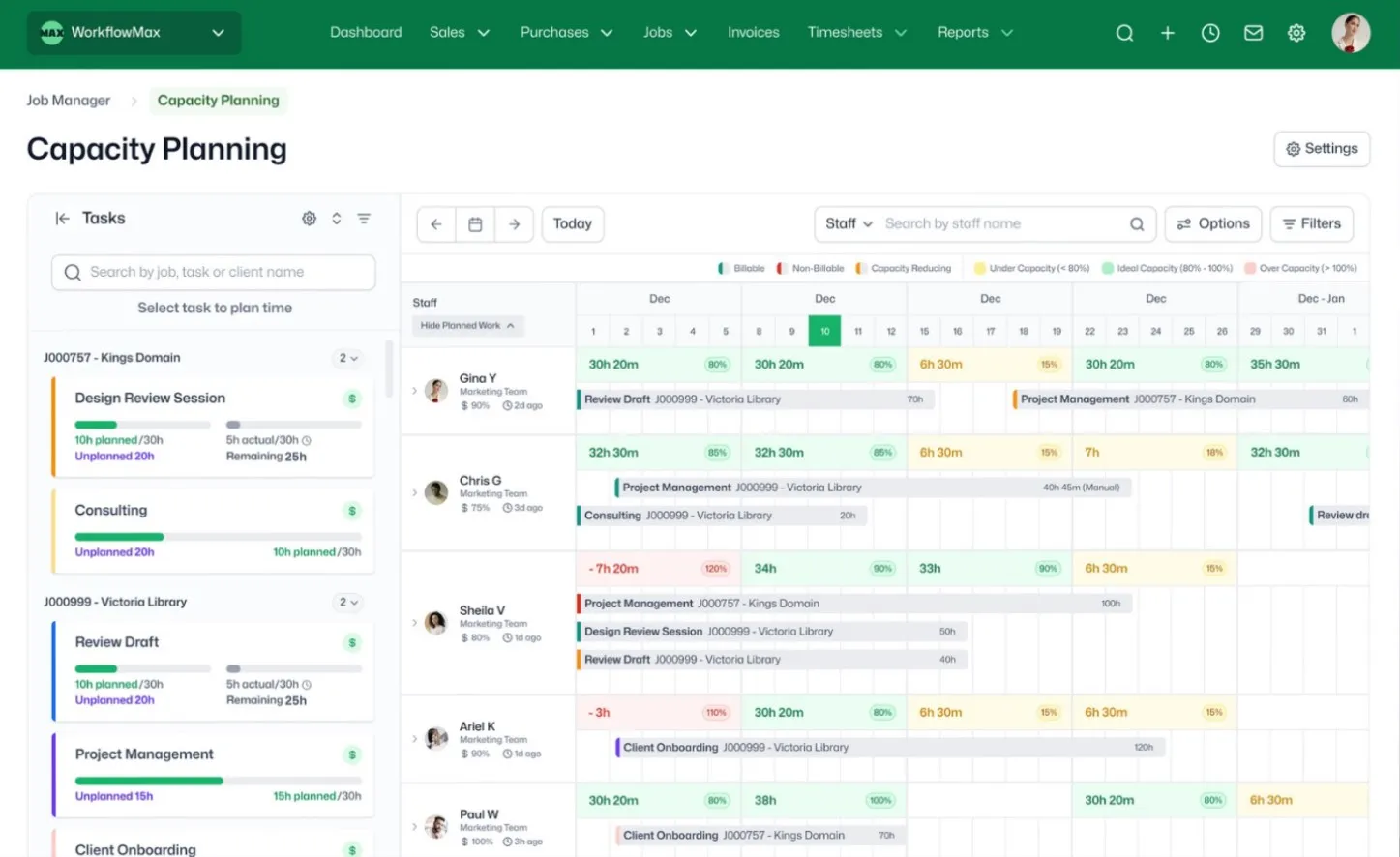
See your whole team's workload at a glance

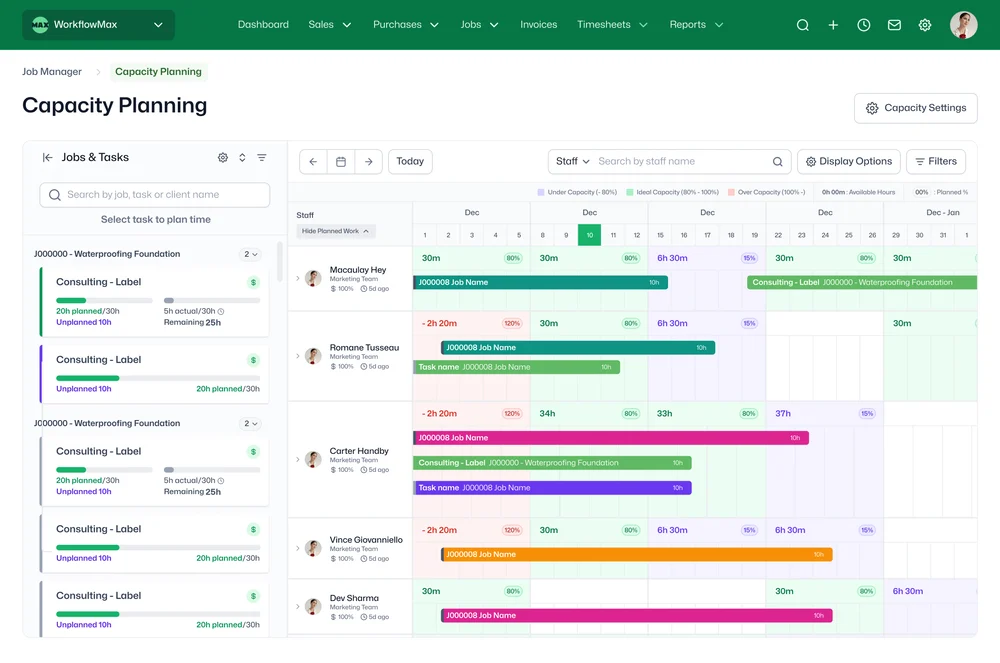
A colour-coded weekly timeline shows every staff member's capacity – yellow for under-utilised, green for ideal, red for overloaded. Spot problems before they happen.

features-icon

Drag and drop to assign work

Drag a task onto someone's schedule. Resize it, move it, reassign it – in seconds. No clicking through individual jobs one at a time.

features-icon

Know what's planned – and what isn't

Unassigned tasks surface automatically, so nothing slips through. If it's not on someone's schedule, you'll see it.

features-icon

Real-time capacity updates

Every change you make – dragging, resizing, reassigning – updates the capacity view instantly. See the impact before you commit.

features-icon

Flexible scheduling

Spread hours across a week or load them onto specific days. Start, pause, and restart – because real projects don't run in straight lines.

features-icon

Handle multiple jobs per person

When someone's across three jobs at once, you'll see all three – clearly separated, no overlap, no clutter.

Lead manager
listing-divider

What's calculated for you

WorkflowMAX handles the numbers automatically so you can focus on planning:

  • Remaining hours – estimated time minus planned time, so you always know what's left to assign
  • Capacity % – planned hours as a percentage of each person's configured working hours
  • Under- and over-allocation – flagged clearly so you can see at a glance who has room and who's stretched too thin
  • Actual time logged – see how much time has already been recorded against each job, so you can compare planned vs actual as work progresses

Capacity thresholds are configurable – set your own percentages for what counts as under, ideal, or over for your business.

‍

Lead manager
listing-divider

Built for professional services

Whether you're running a team of 10 or 50, v1 of Capacity Planning gives you the visibility to answer the question that matters most before taking on new work: do we actually have the capacity?

It's designed for firms where staff are spread across multiple jobs at once – and where one double-booking can throw off an entire client delivery.

And because our v1 of Capacity Planning lives inside the same system where you quote, track time, cost jobs, and invoice, every planning decision connects directly to profitability. No exporting. No reconciling across tools. One system from quote to cash – that's the WorkflowMAX Job Profitability OS.

Lead manager
listing-divider

Make it yours

features-icon

Customise your colour scheme

Choose your own colours for the capacity timeline, or let WorkflowMAX set them automatically based on billable status – so you can instantly tell billable work from non-billable at a glance.

features-icon

Filter by team or client

Narrow the view to a specific team or client to see exactly what's been planned. Whether you're checking one team's workload or reviewing everything scheduled for a key account, the right view is one click away.

features-icon

Account for leave and non-project time

Use capacity-reducing jobs to block out leave, training, or internal work. When someone's on annual leave, their available hours drop automatically – so you're never planning against time that isn't there.

features-icon

Configure normal working days and hours

Set each person's standard working days and hours to reflect how your team actually operates. Capacity calculations adjust automatically, whether someone works Monday to Friday or three days a week.

Lead manager
listing-divider

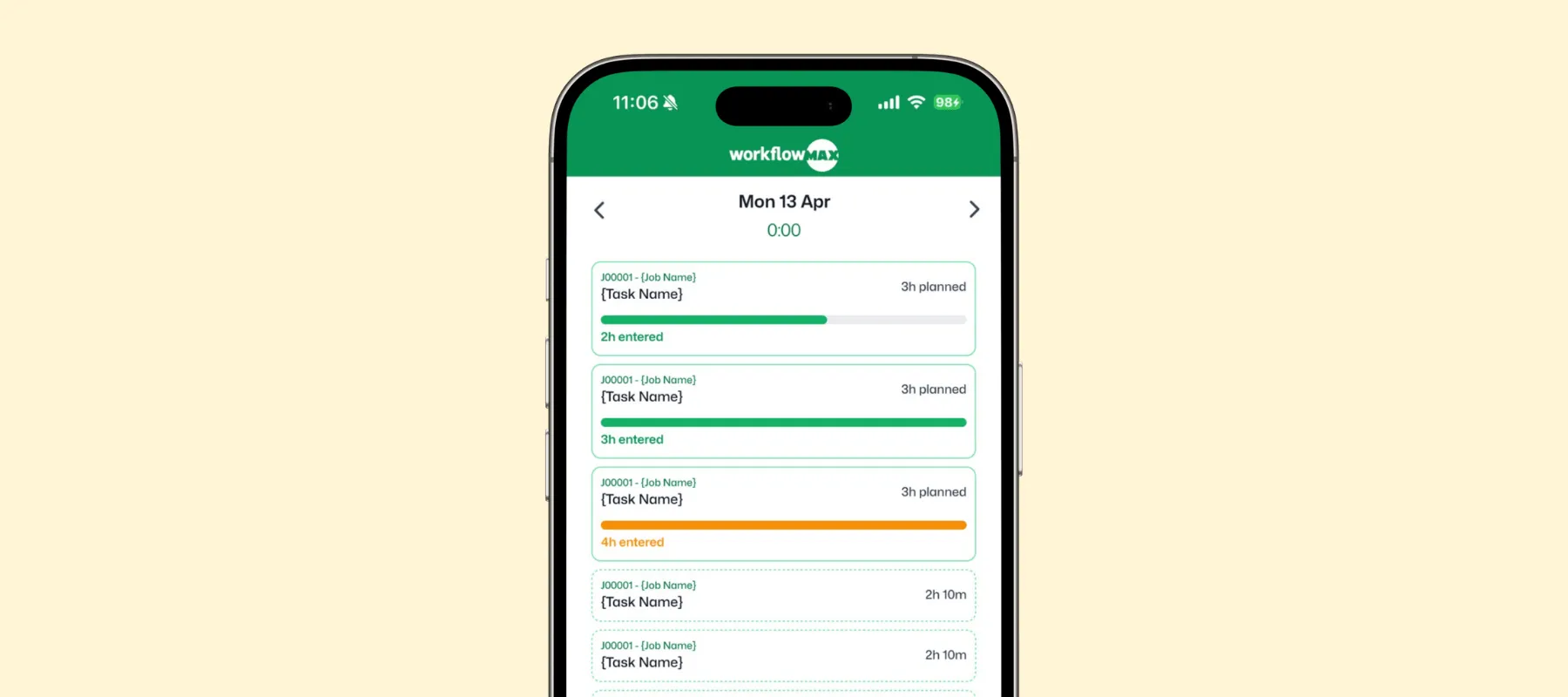
Your team's plan, in their pocket

Our v1 of Capacity Planning isn't just for the people running the schedule - it's for the whole team, wherever they are. The WorkflowMAX mobile app gives every team member a clear view of what's planned for their day, right from their phone.


Lead manager

WorkflowMAX is essential for our business. It's intuitive, easy to use, and makes us much more efficient in charging projects correctly.

Andrew S.

Episode Two

We moved back and the team actually loves using itβ€”billing is faster and we can see margins live.

Darlene Robertson

Principal, Surveying & Engineering Firm

It’s the same soul with better bonesβ€”job costing, timesheets, and invoicing finally work as one.

Floyd Miles

Implementation Partner

WorkflowMAX has made a huge difference to how we run our projects. A great system backed by great support. Highly recommended.

Rob P.

MAF Associates

Any questions?

Which WorkflowMAX plan includes Capacity Planning?

Capacity Planning is available on the Advanced plan. You can start a 14-day free trial of Advanced to test it with your team before committing.

What happens if I allocate too many hours to someone?

The system won't block you over-allocation is intentionally allowed so you can plan ahead and adjust. Over-allocated staff are highlighted clearly with colour coding, and capacity percentages update in real time so you can redistribute work before it becomes a problem.

How is Capacity Planning different from using a spreadsheet?

Spreadsheets can track allocations, but they don't update in real time, can't show remaining capacity as timesheets come in, and break the moment two people edit simultaneously. WorkflowMAX Capacity Planning connects directly to your jobs, tasks, and timesheets so every planning decision is informed by live data and feeds into the same system where you quote, track, and invoice.

How does WorkflowMAX Capacity Planning help me manage my team's workload?

Capacity Planning provides a visual, drag-and-drop timeline showing every staff member's planned work alongside their available hours. Colour-coded indicators flag under-utilised, ideally loaded, and over-allocated team members at a glance. Assign, reassign, and resize task allocations directly in the planner, and every change updates capacity metrics instantly.

Does planned time update automatically when timesheets are logged?

No planned time is kept separate from actual timesheet entries. This keeps your planning view stable so hours don't shift as staff log time. You can compare planned versus actual at any point, but the plan itself remains a deliberate, manager-driven allocation.

Can staff see their own allocations?

Yes. Team members can view their own schedule and see what they're expected to work on and when. Allocations also appear in the dashboard widget for a quick daily overview, and staff can check their schedule from the mobile app when they're away from their desk. Admins control view and edit permissions independently so team leads can plan for their group while individual staff see only their own workload.

Does Capacity Planning work for part-time staff?

Yes. Capacity is based on each person's configured working hours, so part-time team members are reflected accurately not assumed to be full-time.

Can I plan at the job level or does it need to be task-level?

Both. Allocate time to a whole job or to individual tasks within it, depending on how your team works. This flexibility means you can plan at a high level early in a project and get more granular as the work takes shape.

addt-bg-left

Additional features

addt-bg-right