AI insights from your WorkflowMAX reports

AI reporting insights

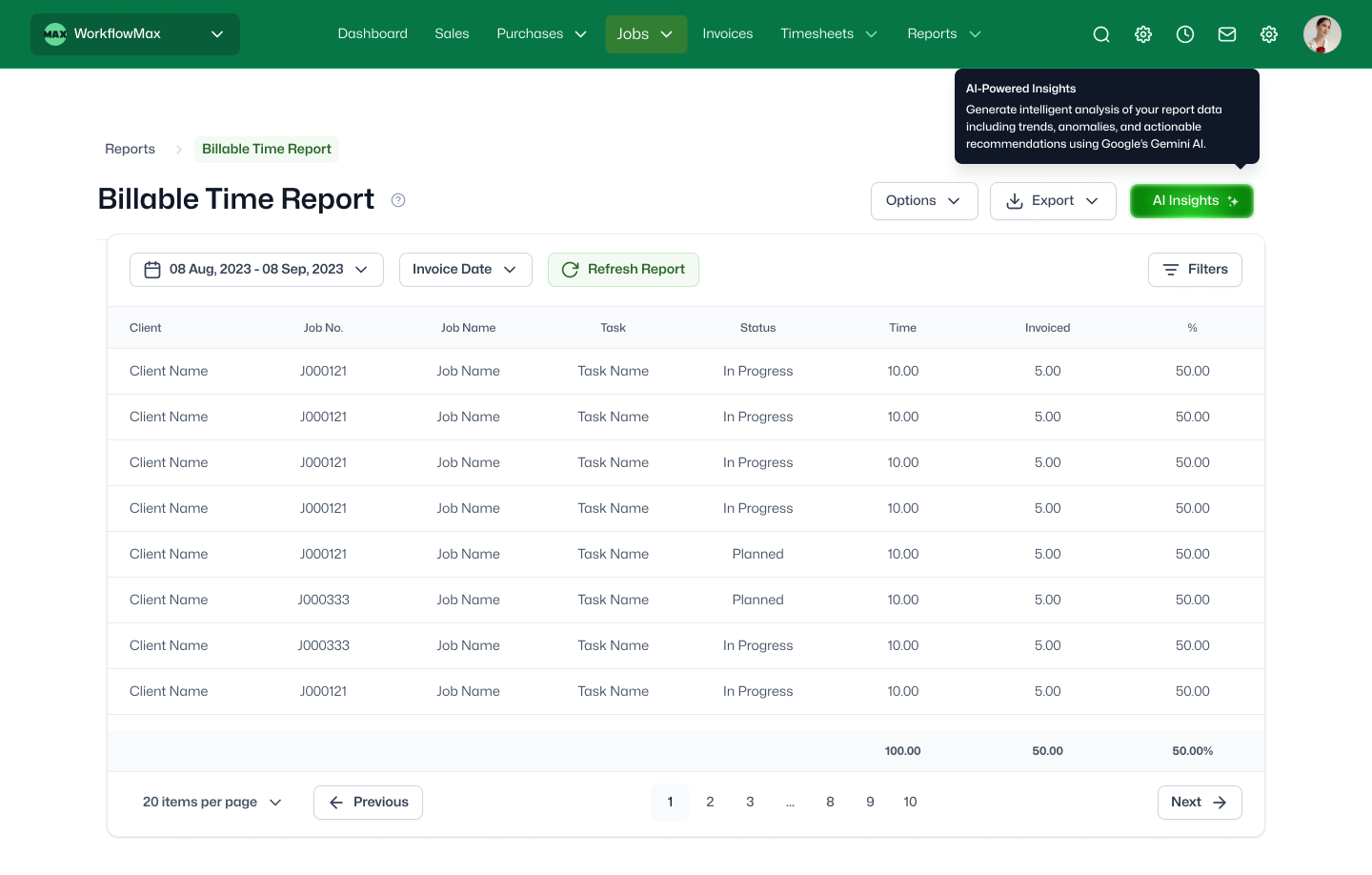
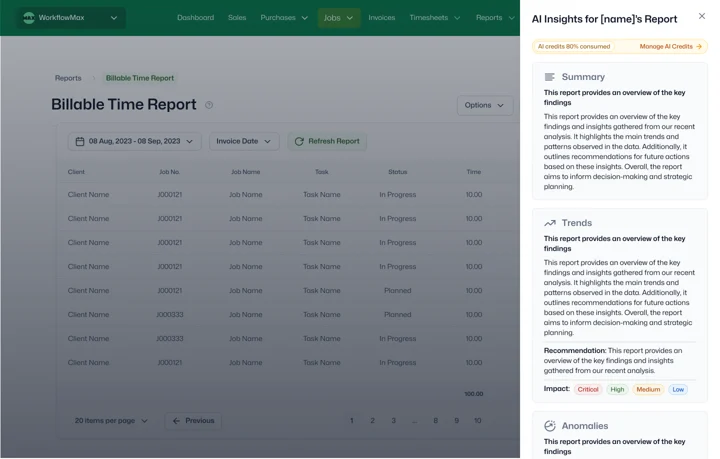
AI Reporting Insights is now available  in beta on WorkflowMAX. Now AI can read your job and invoice reports and get a clear summary of what happened, what changed, and what to do next — so you can make faster decisions without digging through rows of data.

Why use AI Reporting Insights?

Reports are essential, but they are often time-consuming to interpret. AI Reporting Insights helps you quickly spot the story behind the numbers so you can act with confidence.

features-icon

Understand performance at a glance

Get a plain-language summary of key outcomes from your report.

features-icon

Spot trends and unusual changes faster

See emerging patterns and anomalies without manually scanning for outliers.

features-icon

Get practical recommendations

Receive suggested next steps based on what the report data is showing.

features-icon

Share the story with your team

Use the summary to align stakeholders quickly, even if they do not live in reports.

Lead manager
listing-divider

How AI Reporting Insights works

1

Run your report

Start with a supported report type.

2

Generate insights

AI creates a structured summary and highlights what matters most.

3

 Review and share

Use the insights as a starting point for decisions, follow-ups, and team conversations.

Lead manager
listing-divider

What AI Reporting Insights Surfaces

Depending on the report type, AI Reporting Insights can surface:

  • A clear summary of results
  • Key trends over time
  • Anomalies and notable changes worth investigating
  • Useful insights and context on what may be driving the numbers
  • Recommendations for what to do next

AI Reporting Insights is currently available for beta on:

  • Job (table view)
  • Quote (table view)
  • Lead (table view)
  • Purchase Order (table view)
  • Invoice (table view)
  • WIP Ledgers (monthly summary view)
  • Time (monthly summary view)
Lead manager
No items found.

We moved back and the team actually loves using it—billing is faster and we can see margins live.

Darlene Robertson

Principal, Surveying & Engineering Firm

It’s the same soul with better bones—job costing, timesheets, and invoicing finally work as one.

Floyd Miles

Implementation Partner

No items found.

Any questions?

Which reports support AI Insights?

AI Reporting Insights currently supports table-view custom reports across jobs, quotes, leads, purchase orders, invoices, time, and WIP. Additional report types will be added as the feature matures.

What kind of insights will I see?

Depending on the report, you may see revenue concentration risks, utilisation trends, job profitability outliers, ageing WIP patterns, or conversion rate shifts. The AI adapts its analysis to the data type and surfaces what's most significant.

What is AI Reporting Insights in WorkflowMAX?

AI Reporting Insights analyses your custom reports and generates a plain-language summary of trends, anomalies, key drivers, and suggested next steps. Instead of interpreting rows of data manually, you get an actionable overview that highlights what matters. It reads your data it never changes it.

Is my report data sent externally when AI Insights runs?

AI processing occurs within WorkflowMAX's secure infrastructure. Your report data is used solely to generate insights for your organisation and is not shared with other accounts or used to train external models.

How can AI Insights help firm owners make better decisions?

By surfacing patterns you might miss in raw data such as a client becoming less profitable over time, or a team consistently over-running estimates AI Insights gives you an analytical starting point without manual number-crunching. It analyses the report you've just run and interprets what the data is telling you, so you can act on insights rather than spending time reading rows.

How does AI Reporting Insights differ from standard dashboards?

Dashboards show you numbers AI Insights interpret them. Rather than looking at a utilisation chart and working out what changed, the AI identifies the shift, explains the likely driver, and suggests what to investigate.

Can I share AI-generated insights with my team?

Yes. Insights are designed for easy sharing so stakeholders can quickly understand the key takeaways without running the report themselves.

addt-bg-left

Additional features

addt-bg-right
{"@context":"https://schema.org","@graph":[{"@type":"SoftwareApplication","name":"WorkflowMAX – AI Reporting Insights","url":"https://www.workflowmax.com/job-management-software/ai-reporting-insights","applicationCategory":"BusinessApplication","operatingSystem":"Web, iOS, Android","brand":{"@id":"https://www.workflowmax.com/#organization"},"isPartOf":{"@id":"https://www.workflowmax.com/#software"},"description":"AI-generated insights from your job, time and financial data to spot risks, opportunities and trends earlier.","featureList":"AI Reporting Insights"},{"@type":"BreadcrumbList","itemListElement":[{"@type":"ListItem","position":1,"name":"Home","item":"https://www.workflowmax.com/"},{"@type":"ListItem","position":2,"name":"Features","item":"https://www.workflowmax.com/job-management-software/all-features"},{"@type":"ListItem","position":3,"name":"AI Reporting Insights","item":"https://www.workflowmax.com/job-management-software/ai-reporting-insights"}]}]}